What's New In Raiser's Edge NXT The Week Of October 19





New feature
Send receipts for stock / property gifts (for those with gift receipting)
You can now send email or PDF receipts for stock / property gifts — gifts of stock or property that a donor gave instead of cash.
When you select a stock / property gift to receipt, the Transactions details merge field automatically displays the gift type of Stock/Property, and includes the Comment field with the value you entered on the gift record — typically a short description of the donation. Transactions details also displays the following fields if they exist on the gift record:
-
Issuer
-
Symbol
-
Number of units
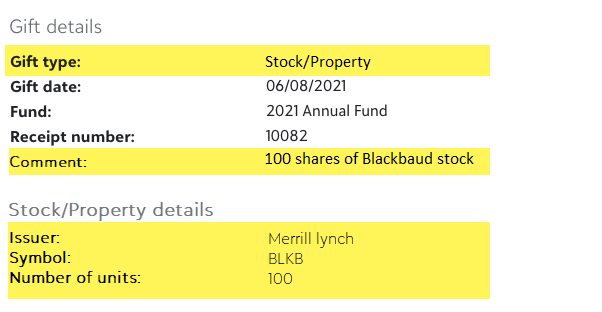
With stock / property gifts, you might not want to include a specific amount or value associated with the gift on the receipt. Therefore, the following fields are removed from the Transaction details merge field for stock/property gifts:
-
Gift amount / Value
-
Total benefit amount
-
Contribution amount
-
"Gift amount = Total benefit amount + Contribution amount" label
Tip: Depending on your organization's processes, you might want to mention the value of stock / property gifts on the receipt using specific contextual wording. To do this, create a separate receipt template for stock / property gifts, and include the Gift amount merge field in the body content.
For more information, see Receipt Templates Merge Fields.
Other changes
Email tasks tab removed from Gift receipting and Giving statements (for those with gift receipting)
When you email gift receipts or giving statements to your donors, you need to ensure that the email was successfully sent. Originally the Email tasks tab was the place to review email successes and failures. However, the Email tasks tab has been removed in favor of the more robust Failed gift receipts and Failed giving statements tabs.
From the Failed gift receipts and Failed giving statements tabs, not only can you see which emails failed, but also why it failed, as well as additional resolution options such as resending the email or generating a PDF receipt.
To further streamline the Gift receipting area, the PDF tasks tab has been renamed PDFs.
Use Blackbaud ID to open database view (for more of you)
Note: This change only applies to customers hosted in a data center. If you don’t see the update yet, don’t worry. You’ll receive it in a future wave.
As part of ongoing updates to security protocols, you no longer enter Citrix credentials when you access database view. This change streamlines the login experience, eliminating the requirement for users of both web view and database view to manage two sets of credentials: their BBID and Citrix logins. It also enables your organization to increase log in security, such as through Single Sign-On and Multi-Factor Authentication.
From Database  , Open database view, use the new Citrix access page to open your databases, Crystal Reports, hosted files, and regional settings. Previously, you entered a Citrix login and password before you could open these areas of the program.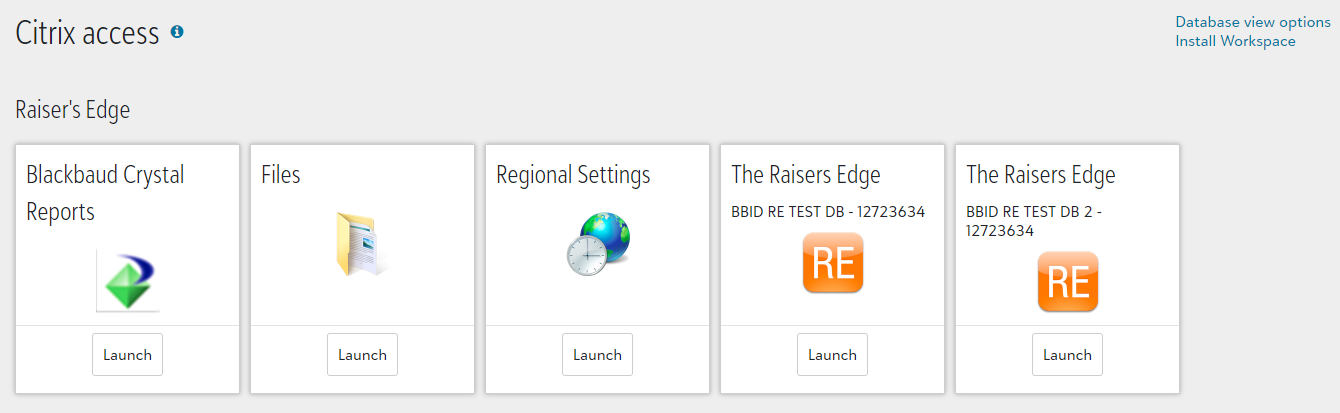
Although this update streamlines your experience, there are a few changes to be aware of.
-
Admins must now send invitations from Control panel, Security to each user so they can link their account to a Blackbaud ID. For example, users who previously navigated directly to the Citrix login page to open database view should now log in from web view and select Database
, Open database view. For more information, see Users.Tip: We recommend you configure and enable Windows authentication for each existing database view user before you send invitations. If you don’t, those users may notice color preferences, file locations, column selections, and other settings reset to default when they log in with their web view credentials for the first time. For information about how to set up Windows authentication, see this Knowledgebase article.
Note: Users with multiple accounts in the database view, such as for supervisor and regular access, must use separate Blackbaud IDs for each account.
-
To access hosted files — such as exports, media files, and Microsoft Word merges — shared in your secure file transfer protocol (FTP) location, you now use automatically generated login credentials instead of Citrix credentials. To view the details required to access the FTP location for each database, select Database view options from top right corner of the Citrix access page.
-
To view your database number, such as for third party integrations, select Database view options from the Citrix access page. Previously, you contacted Support for this information.
-
To download Citrix Workspace, such as before a user opens the database view the first time, select Install Workspace from the Citrix access page.
Comments
-
The switch to BBID login has gone much more smoothly than anticipated!
0


Categories
- All Categories
- New K-12 Community Home (TEST)
- New Higher Education Home Page (Test)
- New Impact Edge Community TEST
- New YourCause Community TEST
- New SKY Community TEST
- New Grantmaking TEST Community
- New Altru Test Community
- New bbcon Community - TEST
- 12 Blackbaud Agents for Good™
- New Raiser's Edge NXT Community
- 8 Blackbaud Community Help
- 222 bbcon®
- 1.4K Blackbaud Altru®
- 410 Blackbaud Award Management™ and Blackbaud Stewardship Management™
- 1.2K Blackbaud CRM™ and Blackbaud Internet Solutions™
- 16 donorCentrics®
- 361 Blackbaud eTapestry®
- 2.7K Blackbaud Financial Edge NXT®
- 687 Blackbaud Grantmaking™
- 604 Blackbaud Education Management Solutions for Higher Education
- 3.3K Blackbaud Education Management Solutions for K-12 Schools
- 954 Blackbaud Luminate Online® and Blackbaud TeamRaiser®
- 85 JustGiving® from Blackbaud®
- 7K Blackbaud Raiser's Edge NXT®
- 4K SKY Developer
- 258 ResearchPoint™
- 123 Blackbaud Tuition Management™
- 165 Organizational Best Practices
- 248 Member Lounge (Just for Fun)
- 40 Blackbaud Community Challenges
- 37 PowerUp Challenges
- 3 (Closed) PowerUp Challenge: Grid View Batch
- 3 (Closed) PowerUp Challenge: Chat for Blackbaud AI
- 3 (Closed) PowerUp Challenge: Data Health
- 3 (Closed) Raiser's Edge NXT PowerUp Challenge: Product Update Briefing
- 3 (Closed) Raiser's Edge NXT PowerUp Challenge: Standard Reports+
- 3 (Closed) Raiser's Edge NXT PowerUp Challenge: Email Marketing
- 3 (Closed) Raiser's Edge NXT PowerUp Challenge: Gift Management
- 4 (Closed) Raiser's Edge NXT PowerUp Challenge: Event Management
- 3 (Closed) Raiser's Edge NXT PowerUp Challenge: Home Page
- 4 (Closed) Raiser's Edge NXT PowerUp Challenge: Standard Reports
- 4 (Closed) Raiser's Edge NXT PowerUp Challenge: Query
- 829 Community News
- 3.1K Jobs Board
- 57 Blackbaud SKY® Reporting Announcements
- 47 Blackbaud CRM Higher Ed Product Advisory Group (HE PAG)
- 19 Blackbaud CRM Product Advisory Group (BBCRM PAG)