What's New In Blackbaud Raiser's Edge NXT® — November 14th





Here are the latest changes in Blackbaud Raiser's Edge NXT® for November 14th, 2023.
- Crop images in branding cards (for some of you)
- Manage Gift Aid declarations from the web view (for those in the UK)
- Review gifts received over time
To give you more flexibility, you can now crop a hero image when you add it to a branding card in Online Giving. From Online Giving, select Optimized branding cards under Related Links. Create a new branding card or edit an existing one. Select Crop under the hero image.
For more information, see Branding Cards Tutorial.
Manage Gift Aid declarations from the web view (for those in the UK)To improve how you manage Gift Aid declarations, you can view, add, edit, and delete them from constituent records. You can also add a declaration when enter a gift for a constituent. Previously, you could only manage declarations in the database view.
To add declarations from a constituent record, under Declarations, select Add declaration. To edit or delete a declaration, select Edit or Delete from its menu.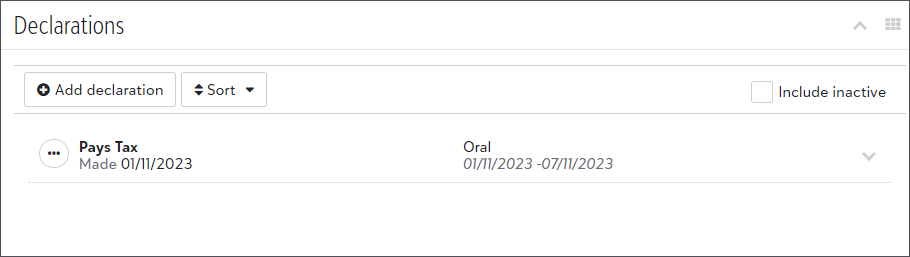
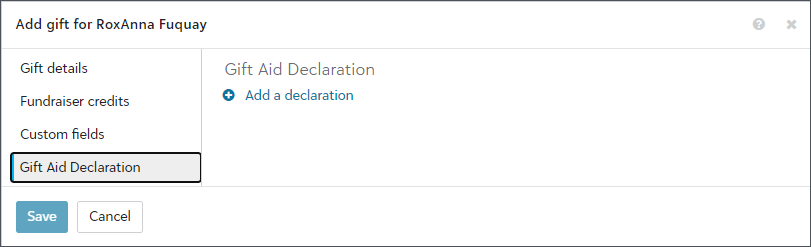
For more information, see Declarations.
Review gifts received over time
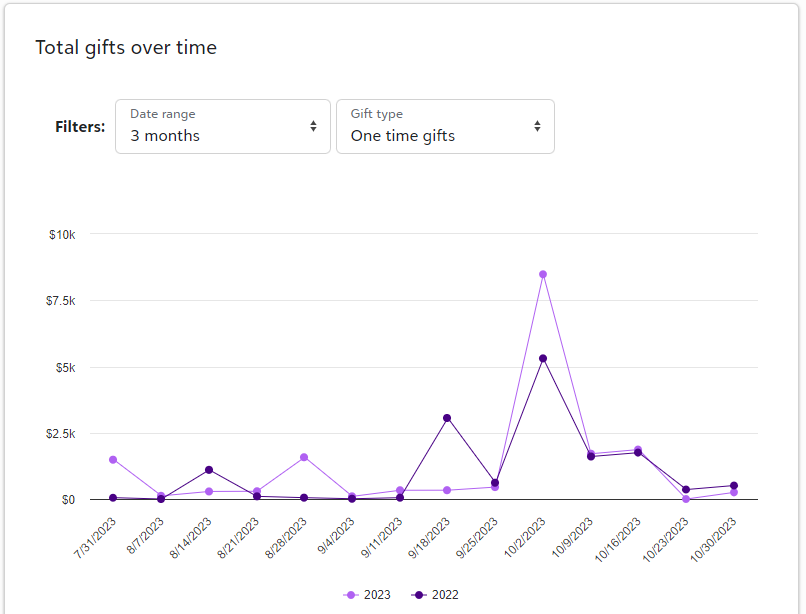
From Blackbaud Apps, Online Giving, under Total gifts over time, you can now see the total gifts received from all donation forms. You can filter by date range and gift type. For more information, see Donation Forms.
Categories
- All Categories
- New YourCause Community TEST
- New SKY Community TEST
- New Grantmaking TEST Community
- New Altru Test Community
- New bbcon Community - TEST
- 12 Blackbaud Agents for Good™
- New Raiser's Edge NXT Community
- 7 Blackbaud Community Help
- 218 bbcon®
- 1.4K Blackbaud Altru®
- 409 Blackbaud Award Management™ and Blackbaud Stewardship Management™
- 1.2K Blackbaud CRM™ and Blackbaud Internet Solutions™
- 16 donorCentrics®
- 361 Blackbaud eTapestry®
- 2.7K Blackbaud Financial Edge NXT®
- 680 Blackbaud Grantmaking™
- 598 Blackbaud Education Management Solutions for Higher Education
- 3.3K Blackbaud Education Management Solutions for K-12 Schools
- 952 Blackbaud Luminate Online® and Blackbaud TeamRaiser®
- 85 JustGiving® from Blackbaud®
- 7K Blackbaud Raiser's Edge NXT®
- 3.9K SKY Developer
- 257 ResearchPoint™
- 123 Blackbaud Tuition Management™
- 165 Organizational Best Practices
- 247 Member Lounge (Just for Fun)
- 40 Blackbaud Community Challenges
- 37 PowerUp Challenges
- 3 (Closed) PowerUp Challenge: Grid View Batch
- 3 (Closed) PowerUp Challenge: Chat for Blackbaud AI
- 3 (Closed) PowerUp Challenge: Data Health
- 3 (Closed) Raiser's Edge NXT PowerUp Challenge: Product Update Briefing
- 3 (Closed) Raiser's Edge NXT PowerUp Challenge: Standard Reports+
- 3 (Closed) Raiser's Edge NXT PowerUp Challenge: Email Marketing
- 3 (Closed) Raiser's Edge NXT PowerUp Challenge: Gift Management
- 4 (Closed) Raiser's Edge NXT PowerUp Challenge: Event Management
- 3 (Closed) Raiser's Edge NXT PowerUp Challenge: Home Page
- 4 (Closed) Raiser's Edge NXT PowerUp Challenge: Standard Reports
- 4 (Closed) Raiser's Edge NXT PowerUp Challenge: Query
- 822 Community News
- 3.1K Jobs Board
- 57 Blackbaud SKY® Reporting Announcements
- 47 Blackbaud CRM Higher Ed Product Advisory Group (HE PAG)
- 19 Blackbaud CRM Product Advisory Group (BBCRM PAG)