Registrar's Office: Scheduling 101 - Defining Restrictions for Rooms



Hi! Last time, I filled you in on the importance of defining scheduling restrictions for teachers. Today, let's talk about restrictions for rooms.
General Restrictions
On the General tab of a room record, it’s important to verify the maximum room capacity and target room capacity.
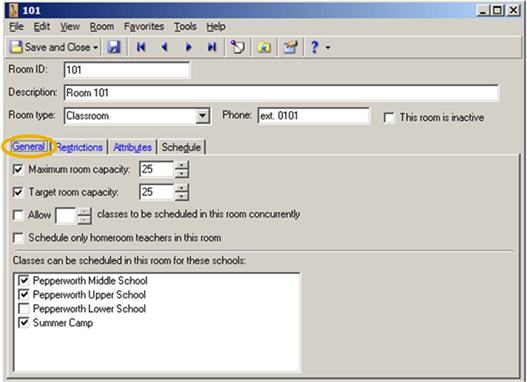
Additionally, be sure to:
Specific Restrictions
On the Restrictions tab of a room record, you can define scheduling restrictions that are specific to a school, academic year, and session. If you don’t define restrictions for a room, the program considers it available at all times.
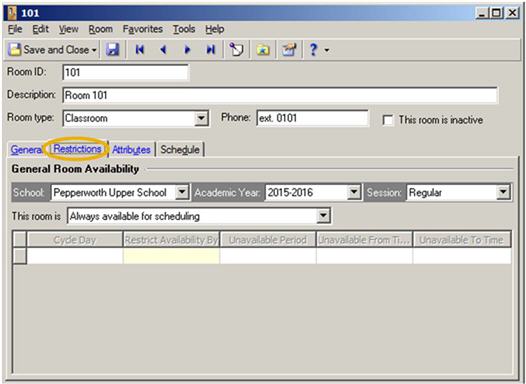
For more information about room records, review How to find or create a room.
Copying Restrictions
Don’t forget about these options:
General Restrictions
On the General tab of a room record, it’s important to verify the maximum room capacity and target room capacity.

Additionally, be sure to:
- Indicate whether more than one class can take place in the room at the same time. For example, maybe Mr. Smith teaches Latin I and Latin II at the same time in the same classroom.
- Select the relevant checkbox if you want the program to limit the room to homeroom teachers.
- Identify the schools that need access to the room.
Specific Restrictions
On the Restrictions tab of a room record, you can define scheduling restrictions that are specific to a school, academic year, and session. If you don’t define restrictions for a room, the program considers it available at all times.

For more information about room records, review How to find or create a room.
Copying Restrictions
Don’t forget about these options:
- You can copy restrictions for selected rooms using the Copy Room Restrictions feature on the Rooms page in Records.
- You can copy room restrictions for all rooms when you create a new academic year by copying an existing academic year.
1
Categories
- All Categories
- New K-12 Community Home (TEST)
- New Higher Education Home Page (Test)
- New Impact Edge Community TEST
- New YourCause Community TEST
- New SKY Community TEST
- New Grantmaking TEST Community
- New Altru Test Community
- New bbcon Community - TEST
- 12 Blackbaud Agents for Good™
- New Raiser's Edge NXT Community
- 8 Blackbaud Community Help
- 222 bbcon®
- 1.4K Blackbaud Altru®
- 410 Blackbaud Award Management™ and Blackbaud Stewardship Management™
- 1.2K Blackbaud CRM™ and Blackbaud Internet Solutions™
- 16 donorCentrics®
- 361 Blackbaud eTapestry®
- 2.7K Blackbaud Financial Edge NXT®
- 687 Blackbaud Grantmaking™
- 603 Blackbaud Education Management Solutions for Higher Education
- 3.3K Blackbaud Education Management Solutions for K-12 Schools
- 954 Blackbaud Luminate Online® and Blackbaud TeamRaiser®
- 85 JustGiving® from Blackbaud®
- 7K Blackbaud Raiser's Edge NXT®
- 4K SKY Developer
- 258 ResearchPoint™
- 123 Blackbaud Tuition Management™
- 165 Organizational Best Practices
- 248 Member Lounge (Just for Fun)
- 40 Blackbaud Community Challenges
- 37 PowerUp Challenges
- 3 (Closed) PowerUp Challenge: Grid View Batch
- 3 (Closed) PowerUp Challenge: Chat for Blackbaud AI
- 3 (Closed) PowerUp Challenge: Data Health
- 3 (Closed) Raiser's Edge NXT PowerUp Challenge: Product Update Briefing
- 3 (Closed) Raiser's Edge NXT PowerUp Challenge: Standard Reports+
- 3 (Closed) Raiser's Edge NXT PowerUp Challenge: Email Marketing
- 3 (Closed) Raiser's Edge NXT PowerUp Challenge: Gift Management
- 4 (Closed) Raiser's Edge NXT PowerUp Challenge: Event Management
- 3 (Closed) Raiser's Edge NXT PowerUp Challenge: Home Page
- 4 (Closed) Raiser's Edge NXT PowerUp Challenge: Standard Reports
- 4 (Closed) Raiser's Edge NXT PowerUp Challenge: Query
- 829 Community News
- 3.1K Jobs Board
- 57 Blackbaud SKY® Reporting Announcements
- 47 Blackbaud CRM Higher Ed Product Advisory Group (HE PAG)
- 19 Blackbaud CRM Product Advisory Group (BBCRM PAG)