Saving Time: Copy And Editing Schedule To The Next Year


If the upcoming school year schedule is staying the same, hopefully you’ve used the copy scheduling year function to copy everything over. In just a few clicks, the software will automatically copy everything over including class times and assigned teachers. If you’re unfamiliar with the wizard, I highly recommend it if things are more or less staying the same next year.
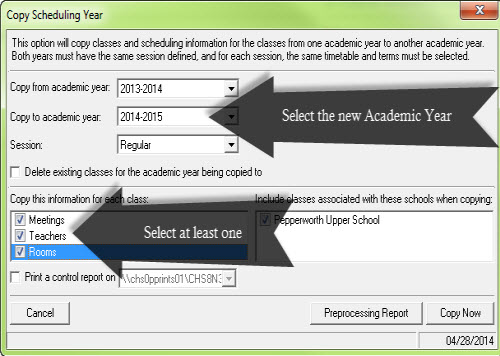
The wizard is located in Scheduling and then Copy Scheduling Year. We can select the Academic Year to copy from, the new Academic Year, and the session. Then, we have options to delete existing classes that may already have been scheduled. We can choose to copy meetings, teachers, and rooms or any combination of the 3.
While the wizard will make an exact replica of what exists today, we always anticipate some changes. Maybe the PE teacher is going to be different this year or 1st Period Algebra is moving to 2nd period? How do you make these changes?
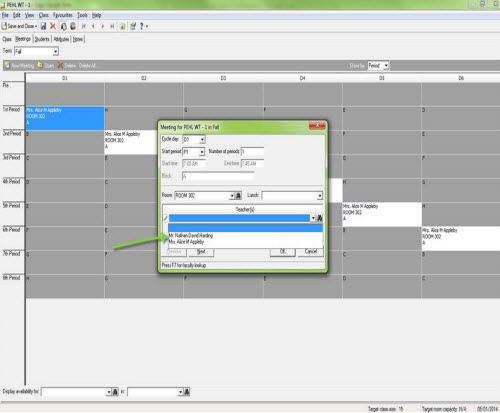
To change the teacher, open up the class and right-click on the meeting. We can select a different teacher and select to update all meetings in the pattern if it exists.
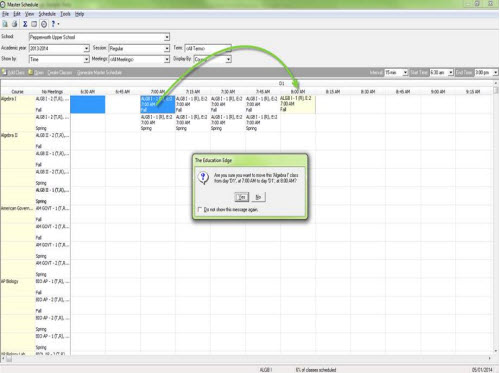
To move a class to a different period, we can do it directly in the class or in the master schedule. In the master schedule, it’s as easy and moving the period from one to another and selecting yes to the prompts.
Do you edit your master schedule in a different way? Let me know in the comments below.
The wizard is located in Scheduling and then Copy Scheduling Year. We can select the Academic Year to copy from, the new Academic Year, and the session. Then, we have options to delete existing classes that may already have been scheduled. We can choose to copy meetings, teachers, and rooms or any combination of the 3.

While the wizard will make an exact replica of what exists today, we always anticipate some changes. Maybe the PE teacher is going to be different this year or 1st Period Algebra is moving to 2nd period? How do you make these changes?
To change the teacher, open up the class and right-click on the meeting. We can select a different teacher and select to update all meetings in the pattern if it exists.

To move a class to a different period, we can do it directly in the class or in the master schedule. In the master schedule, it’s as easy and moving the period from one to another and selecting yes to the prompts.

Do you edit your master schedule in a different way? Let me know in the comments below.
NEED TRAINING OR A QUICK REFRESHER? LOOK NO MORE!
If you organization has a Learn subscription, you can access three video tutorial bundles about scheduling:
- Scheduling Part I – Annual Preparation Tasks
- Scheduling Part II – Creating the Master Schedule and Student Schedules
- Scheduling Part III – Drop, Withdraw, and Transfer
To access the video tutorial bundles, search Training Central with this keyword: eevtscheduling.
0
Categories
- All Categories
- New K-12 Community Home (TEST)
- New Higher Education Home Page (Test)
- New Impact Edge Community TEST
- New YourCause Community TEST
- New SKY Community TEST
- New Grantmaking TEST Community
- New Altru Test Community
- New bbcon Community - TEST
- 12 Blackbaud Agents for Good™
- New Raiser's Edge NXT Community
- 8 Blackbaud Community Help
- 222 bbcon®
- 1.4K Blackbaud Altru®
- 410 Blackbaud Award Management™ and Blackbaud Stewardship Management™
- 1.2K Blackbaud CRM™ and Blackbaud Internet Solutions™
- 16 donorCentrics®
- 361 Blackbaud eTapestry®
- 2.7K Blackbaud Financial Edge NXT®
- 687 Blackbaud Grantmaking™
- 603 Blackbaud Education Management Solutions for Higher Education
- 3.3K Blackbaud Education Management Solutions for K-12 Schools
- 954 Blackbaud Luminate Online® and Blackbaud TeamRaiser®
- 85 JustGiving® from Blackbaud®
- 7K Blackbaud Raiser's Edge NXT®
- 4K SKY Developer
- 258 ResearchPoint™
- 123 Blackbaud Tuition Management™
- 165 Organizational Best Practices
- 248 Member Lounge (Just for Fun)
- 40 Blackbaud Community Challenges
- 37 PowerUp Challenges
- 3 (Closed) PowerUp Challenge: Grid View Batch
- 3 (Closed) PowerUp Challenge: Chat for Blackbaud AI
- 3 (Closed) PowerUp Challenge: Data Health
- 3 (Closed) Raiser's Edge NXT PowerUp Challenge: Product Update Briefing
- 3 (Closed) Raiser's Edge NXT PowerUp Challenge: Standard Reports+
- 3 (Closed) Raiser's Edge NXT PowerUp Challenge: Email Marketing
- 3 (Closed) Raiser's Edge NXT PowerUp Challenge: Gift Management
- 4 (Closed) Raiser's Edge NXT PowerUp Challenge: Event Management
- 3 (Closed) Raiser's Edge NXT PowerUp Challenge: Home Page
- 4 (Closed) Raiser's Edge NXT PowerUp Challenge: Standard Reports
- 4 (Closed) Raiser's Edge NXT PowerUp Challenge: Query
- 829 Community News
- 3.1K Jobs Board
- 57 Blackbaud SKY® Reporting Announcements
- 47 Blackbaud CRM Higher Ed Product Advisory Group (HE PAG)
- 19 Blackbaud CRM Product Advisory Group (BBCRM PAG)