Checklists And Tracks: What Can We Do With These?


Have you ever been in charge of buying the supplies for a dinner with family and friends, spent hours at the grocery store buying all of the items, only to come home and realize that you forgot to buy a necessary ingredient? When there are a million other things going on (and there most certainly are, especially when you work in a school) sometimes important things can slip through the cracks. Although the Admissions Office in the Education Edge can’t help you with your grocery lists, it can serve as a checklist to help ensure that all forms are filled out, letters are sent, and appointments are made before an applicant can be enrolled in the school.
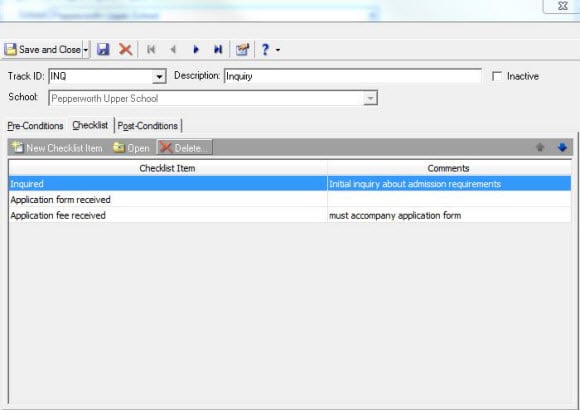
In Configuration in the Admissions Office, there is a section called Tracks. Essentially, tracks define groups of items and actions that can be automatically added to records to accelerate the admissions process. Checklist items are housed within these tracks. For example, this is what a Track and a Checklist might look like:
Track: Inquiry (Description: Student is interested in enrolling in the upper school)
Checklist: Inquired
Application Form received
Application Fee Received
Not entirely sure how to add checklist items to a track? Here is a comprehensive overview:
http://www.blackbaud.com/kb/index?page=content&id=BB128549
All tracks have sections called Pre-Conditions and Post-Conditions, as seen below:
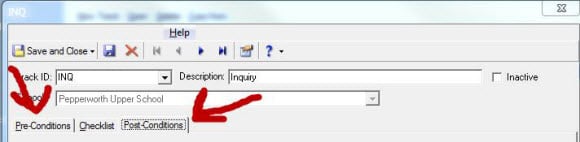
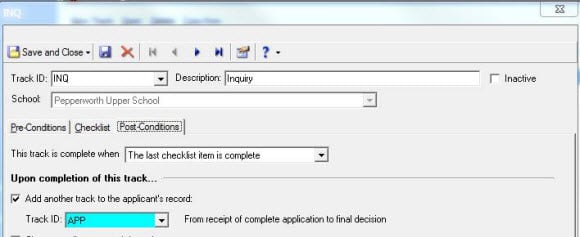
These come into play if you would like a completed checklist within one track to prompt a new track. For example, once someone has completed the Inquiry Track—they have expressed their interest, filled out the application form, and sent in the deposit fee---the school may decide to accept them. Once a student is accepted, however, in order to be truly enrolled, they must fill out a contract, send in medical forms, get immunizations, and pay a tuition deposit. This is an entirely new checklist that wouldn’t typically be included in an Inquiry track so we could create something called an Accepted track. Therefore, as a Post-Condition for the Inquiry Track, we could prompt a new status on the student record (e.g. Inquiry-Accepted). As a Pre-condition for the Accepted Track, we could say that a student must have the Inquiry-Accepted status to get the Accepted Track on the record.
More often than not, we deal with multiple students at once, and we may want to add tracks to multiple student records at a time. This can be done globally. The steps are listed in the link below:
http://www.blackbaud.com/kb/index?page=content&id=BB313431
Not sure which students have completed checklist items and those who have a few more things to do? The system can absolutely give you that list. Here’s a link that will walk you through the process:
http://www.blackbaud.com/kb/index?page=content&id=BB437859
Although we can’t help you with the grocery store trip, we can ensure that nothing is forgotten in the Application process for new students. Since there are obviously other things going on at your school that require your full attention, let the Education Edge assuage some of the stresses that come with a fast-paced environment. Checklists? No problem!
In Configuration in the Admissions Office, there is a section called Tracks. Essentially, tracks define groups of items and actions that can be automatically added to records to accelerate the admissions process. Checklist items are housed within these tracks. For example, this is what a Track and a Checklist might look like:
Track: Inquiry (Description: Student is interested in enrolling in the upper school)
Checklist: Inquired
Application Form received
Application Fee Received

Not entirely sure how to add checklist items to a track? Here is a comprehensive overview:
http://www.blackbaud.com/kb/index?page=content&id=BB128549
All tracks have sections called Pre-Conditions and Post-Conditions, as seen below:

These come into play if you would like a completed checklist within one track to prompt a new track. For example, once someone has completed the Inquiry Track—they have expressed their interest, filled out the application form, and sent in the deposit fee---the school may decide to accept them. Once a student is accepted, however, in order to be truly enrolled, they must fill out a contract, send in medical forms, get immunizations, and pay a tuition deposit. This is an entirely new checklist that wouldn’t typically be included in an Inquiry track so we could create something called an Accepted track. Therefore, as a Post-Condition for the Inquiry Track, we could prompt a new status on the student record (e.g. Inquiry-Accepted). As a Pre-condition for the Accepted Track, we could say that a student must have the Inquiry-Accepted status to get the Accepted Track on the record.

More often than not, we deal with multiple students at once, and we may want to add tracks to multiple student records at a time. This can be done globally. The steps are listed in the link below:
http://www.blackbaud.com/kb/index?page=content&id=BB313431
Not sure which students have completed checklist items and those who have a few more things to do? The system can absolutely give you that list. Here’s a link that will walk you through the process:
http://www.blackbaud.com/kb/index?page=content&id=BB437859
Although we can’t help you with the grocery store trip, we can ensure that nothing is forgotten in the Application process for new students. Since there are obviously other things going on at your school that require your full attention, let the Education Edge assuage some of the stresses that come with a fast-paced environment. Checklists? No problem!
0
Categories
- All Categories
- New K-12 Community Home (TEST)
- New Higher Education Home Page (Test)
- New Impact Edge Community TEST
- New YourCause Community TEST
- New SKY Community TEST
- New Grantmaking TEST Community
- New Altru Test Community
- New bbcon Community - TEST
- 12 Blackbaud Agents for Good™
- New Raiser's Edge NXT Community
- 8 Blackbaud Community Help
- 222 bbcon®
- 1.4K Blackbaud Altru®
- 411 Blackbaud Award Management™ and Blackbaud Stewardship Management™
- 1.2K Blackbaud CRM™ and Blackbaud Internet Solutions™
- 16 donorCentrics®
- 361 Blackbaud eTapestry®
- 2.7K Blackbaud Financial Edge NXT®
- 688 Blackbaud Grantmaking™
- 604 Blackbaud Education Management Solutions for Higher Education
- 3.3K Blackbaud Education Management Solutions for K-12 Schools
- 954 Blackbaud Luminate Online® and Blackbaud TeamRaiser®
- 85 JustGiving® from Blackbaud®
- 7.1K Blackbaud Raiser's Edge NXT®
- 4K SKY Developer
- 258 ResearchPoint™
- 123 Blackbaud Tuition Management™
- 165 Organizational Best Practices
- 249 Member Lounge (Just for Fun)
- 40 Blackbaud Community Challenges
- 37 PowerUp Challenges
- 3 (Closed) PowerUp Challenge: Grid View Batch
- 3 (Closed) PowerUp Challenge: Chat for Blackbaud AI
- 3 (Closed) PowerUp Challenge: Data Health
- 3 (Closed) Raiser's Edge NXT PowerUp Challenge: Product Update Briefing
- 3 (Closed) Raiser's Edge NXT PowerUp Challenge: Standard Reports+
- 3 (Closed) Raiser's Edge NXT PowerUp Challenge: Email Marketing
- 3 (Closed) Raiser's Edge NXT PowerUp Challenge: Gift Management
- 4 (Closed) Raiser's Edge NXT PowerUp Challenge: Event Management
- 3 (Closed) Raiser's Edge NXT PowerUp Challenge: Home Page
- 4 (Closed) Raiser's Edge NXT PowerUp Challenge: Standard Reports
- 4 (Closed) Raiser's Edge NXT PowerUp Challenge: Query
- 829 Community News
- 3.1K Jobs Board
- 57 Blackbaud SKY® Reporting Announcements
- 47 Blackbaud CRM Higher Ed Product Advisory Group (HE PAG)
- 19 Blackbaud CRM Product Advisory Group (BBCRM PAG)