Working With (Website) Cookies

Derek Nichols
Blackbaud Employee




As much as I’d love to spend today’s blog post discussing things like Oreos or chocolate chip cookies, we’re actually going to be spending time on the other types of cookies out there. You know, the less tasty, but equally important website versions.
Internet cookies are small pieces of data that are sent from a website to be stored in the user’s computer through the browser. Essentially, they’re a way that websites can remember more about you such as your browsing activity or terms you’ve previously entered into search bars, fields, and shopping carts.
Considering that we live in a constantly evolving world that focused more and more on website security and privacy, knowing what sites are doing with your data is an important issue to many users.
To help with this issue, we’ve updated the School Website product to enable a cookie consent feature. Essentially, this is a banner that notifies users about the cookies being used by the site. This newly implemented feature is disabled by default but schools can turn it on and customize the message that users will see when visiting their website.
Turning It On
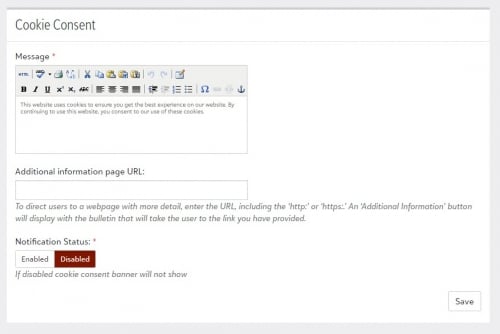
Cookie Consent can be found under School Website and then Site Settings. Once enabled, you can customize the message displayed in the banner. Optionally, you can add in a URL redirect that adds a new button to the banner to take the user to a different page with more information regarding site cookies and whatever else you wish to disclose.
The banner appears at the bottom of the page so it won’t interfere with any potential emergency bulletins that pop up.
Customize Your Message
Just adding text isn’t all you can do with this feature however. From website Styles, select Cookie Consent to be taken to the design view where the banner can be customized further. The process itself is exactly the same as what we’ve implemented in the past for Emergency Bulletin, so users who have previously worked in there should be very familiar with this process already. Personalization options for the banner include: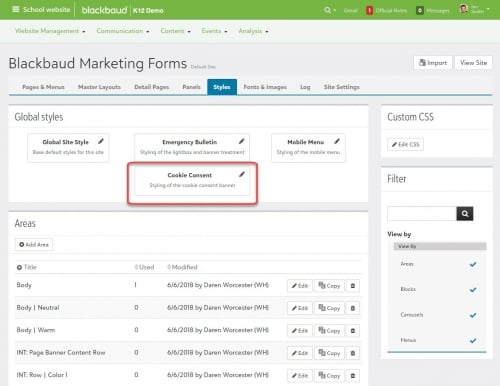
With the Thanksgiving holiday rapidly approaching for our US schools, I’d like to take a moment on behalf of my K-12 colleagues here to wish all of you a happy holiday season. I’m personally thankful that you all take the time out of your day to continue to stop by and keep in touch with us through this community channel.
Enjoy the week and I’ll see you right back here next week for more K-12 content.
Internet cookies are small pieces of data that are sent from a website to be stored in the user’s computer through the browser. Essentially, they’re a way that websites can remember more about you such as your browsing activity or terms you’ve previously entered into search bars, fields, and shopping carts.
Considering that we live in a constantly evolving world that focused more and more on website security and privacy, knowing what sites are doing with your data is an important issue to many users.
To help with this issue, we’ve updated the School Website product to enable a cookie consent feature. Essentially, this is a banner that notifies users about the cookies being used by the site. This newly implemented feature is disabled by default but schools can turn it on and customize the message that users will see when visiting their website.

Turning It On
Cookie Consent can be found under School Website and then Site Settings. Once enabled, you can customize the message displayed in the banner. Optionally, you can add in a URL redirect that adds a new button to the banner to take the user to a different page with more information regarding site cookies and whatever else you wish to disclose.
The banner appears at the bottom of the page so it won’t interfere with any potential emergency bulletins that pop up.
Customize Your Message
Just adding text isn’t all you can do with this feature however. From website Styles, select Cookie Consent to be taken to the design view where the banner can be customized further. The process itself is exactly the same as what we’ve implemented in the past for Emergency Bulletin, so users who have previously worked in there should be very familiar with this process already. Personalization options for the banner include:
- Adding an Alert Icon.
- Display an Additional Information Button.
- Add an icon to close the banner.
- Ability to display the full message instead of a link to be taken to a page with the message.
- Users can also add CSS styling to the message as well and the changes are immediately reflected.

With the Thanksgiving holiday rapidly approaching for our US schools, I’d like to take a moment on behalf of my K-12 colleagues here to wish all of you a happy holiday season. I’m personally thankful that you all take the time out of your day to continue to stop by and keep in touch with us through this community channel.
Enjoy the week and I’ll see you right back here next week for more K-12 content.
0
Categories
- All Categories
- New K-12 Community Home (TEST)
- New Higher Education Home Page (Test)
- New Impact Edge Community TEST
- New YourCause Community TEST
- New SKY Community TEST
- New Grantmaking TEST Community
- New Altru Test Community
- New bbcon Community - TEST
- 12 Blackbaud Agents for Good™
- New Raiser's Edge NXT Community
- 8 Blackbaud Community Help
- 222 bbcon®
- 1.4K Blackbaud Altru®
- 410 Blackbaud Award Management™ and Blackbaud Stewardship Management™
- 1.2K Blackbaud CRM™ and Blackbaud Internet Solutions™
- 16 donorCentrics®
- 361 Blackbaud eTapestry®
- 2.7K Blackbaud Financial Edge NXT®
- 687 Blackbaud Grantmaking™
- 603 Blackbaud Education Management Solutions for Higher Education
- 3.3K Blackbaud Education Management Solutions for K-12 Schools
- 954 Blackbaud Luminate Online® and Blackbaud TeamRaiser®
- 85 JustGiving® from Blackbaud®
- 7K Blackbaud Raiser's Edge NXT®
- 4K SKY Developer
- 258 ResearchPoint™
- 123 Blackbaud Tuition Management™
- 165 Organizational Best Practices
- 248 Member Lounge (Just for Fun)
- 40 Blackbaud Community Challenges
- 37 PowerUp Challenges
- 3 (Closed) PowerUp Challenge: Grid View Batch
- 3 (Closed) PowerUp Challenge: Chat for Blackbaud AI
- 3 (Closed) PowerUp Challenge: Data Health
- 3 (Closed) Raiser's Edge NXT PowerUp Challenge: Product Update Briefing
- 3 (Closed) Raiser's Edge NXT PowerUp Challenge: Standard Reports+
- 3 (Closed) Raiser's Edge NXT PowerUp Challenge: Email Marketing
- 3 (Closed) Raiser's Edge NXT PowerUp Challenge: Gift Management
- 4 (Closed) Raiser's Edge NXT PowerUp Challenge: Event Management
- 3 (Closed) Raiser's Edge NXT PowerUp Challenge: Home Page
- 4 (Closed) Raiser's Edge NXT PowerUp Challenge: Standard Reports
- 4 (Closed) Raiser's Edge NXT PowerUp Challenge: Query
- 829 Community News
- 3.1K Jobs Board
- 57 Blackbaud SKY® Reporting Announcements
- 47 Blackbaud CRM Higher Ed Product Advisory Group (HE PAG)
- 19 Blackbaud CRM Product Advisory Group (BBCRM PAG)