Let’s Talk: Even More About School Forms And Candidate Checklists

Derek Nichols
Blackbaud Employee




As you may have seen in the May 1 release, we’ve made some highly requested updates to Candidate Checklists inside of the Enrollment management product. Since this is a feature that many schools have been requesting, we wanted to go over some of the finer details on this update and provide even more details.
In case you missed it in the May 1 release, we’ve added the ability for admissions managers to associate a school form with a candidate checklist. Basically, when adding or editing a checklist step, School Form can be selected under the Type field. Not only that, admissions managers can see if the form has been started or completed from the candidate profile. If a resubmit is allowed, the checklist step will be automatically set back to awaiting.
So why is this totally awesome?
Well, this addition enables schools to have a seamless data collection process right from the checklist. Families no longer need to go back out to their files and forms to see what needs to be filled out.
This is also intended to be a time saver for the admissions office thanks to the automatic marking of the checklist step being completed. This makes manual comparison of what has been completed and what is still awaiting no longer necessary. Additionally, the form is assigned when the parent clicks on the school form link.
Finally, with the checklist step association, admissions managers can now use the candidate list to see whether or not a school form step has been completed.
Sounds great and all but how do I do this?
The adventure begins by going to Enrollment management, Admissions, Admissions setup, and then Checklists.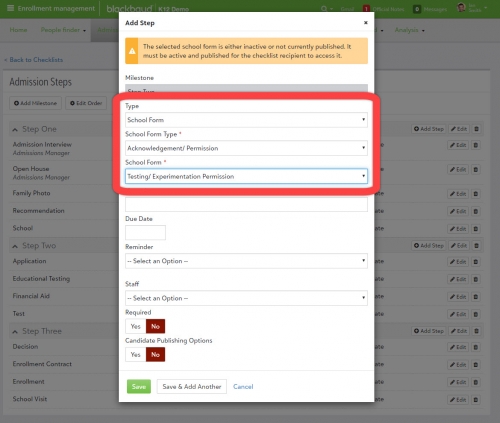
One last thing to keep in mind. Checklists steps can always be edited, so switching out your forms from year to year will be a breeze.
So we hope this post clears up some of the confusion, answers the questions you may have, or helps temper the excitement that this feature has caused. If you do have any questions or comments, please feel free to reach out in the comments below.
In case you missed it in the May 1 release, we’ve added the ability for admissions managers to associate a school form with a candidate checklist. Basically, when adding or editing a checklist step, School Form can be selected under the Type field. Not only that, admissions managers can see if the form has been started or completed from the candidate profile. If a resubmit is allowed, the checklist step will be automatically set back to awaiting.
 https://www.youtube.com/watch?v=LorlEMSnlWg
So why is this totally awesome?
Well, this addition enables schools to have a seamless data collection process right from the checklist. Families no longer need to go back out to their files and forms to see what needs to be filled out.
This is also intended to be a time saver for the admissions office thanks to the automatic marking of the checklist step being completed. This makes manual comparison of what has been completed and what is still awaiting no longer necessary. Additionally, the form is assigned when the parent clicks on the school form link.
Finally, with the checklist step association, admissions managers can now use the candidate list to see whether or not a school form step has been completed.
Sounds great and all but how do I do this?
The adventure begins by going to Enrollment management, Admissions, Admissions setup, and then Checklists.
- Find the checklist to edit or create a new one from scratch followed by a milestone or two.
- Select Add Step to open a new modal opens with a ton of fields to configure.
- In this case, select the dropdown for Type and select School Form.
- Two new fields appear once School Form is selected:
- School Form Type – Select the type of form this is going to be. Some options may include Acknowledgement/Permission, Profile Updates, Emergency Contacts, etc.
- School Form – Based on the type selected, the matching school forms can be selected here.

One last thing to keep in mind. Checklists steps can always be edited, so switching out your forms from year to year will be a breeze.
So we hope this post clears up some of the confusion, answers the questions you may have, or helps temper the excitement that this feature has caused. If you do have any questions or comments, please feel free to reach out in the comments below.
3
Comments
-
Great ....... BUT this requires that the forms "live" in admissions or Enrollment Management. Our biggest need is to have the medical / condition form added as soon as possible when a contract gets accepted and returned. This is especially true the closer we get to school starting. If you can only add those forms that are tied to the Enrollment Module then, this is only a very small victory......0



Categories
- All Categories
- New K-12 Community Home (TEST)
- New Higher Education Home Page (Test)
- New Impact Edge Community TEST
- New YourCause Community TEST
- New SKY Community TEST
- New Grantmaking TEST Community
- New Altru Test Community
- New bbcon Community - TEST
- 12 Blackbaud Agents for Good™
- New Raiser's Edge NXT Community
- 8 Blackbaud Community Help
- 222 bbcon®
- 1.4K Blackbaud Altru®
- 410 Blackbaud Award Management™ and Blackbaud Stewardship Management™
- 1.2K Blackbaud CRM™ and Blackbaud Internet Solutions™
- 16 donorCentrics®
- 361 Blackbaud eTapestry®
- 2.7K Blackbaud Financial Edge NXT®
- 687 Blackbaud Grantmaking™
- 604 Blackbaud Education Management Solutions for Higher Education
- 3.3K Blackbaud Education Management Solutions for K-12 Schools
- 954 Blackbaud Luminate Online® and Blackbaud TeamRaiser®
- 85 JustGiving® from Blackbaud®
- 7K Blackbaud Raiser's Edge NXT®
- 4K SKY Developer
- 258 ResearchPoint™
- 123 Blackbaud Tuition Management™
- 165 Organizational Best Practices
- 248 Member Lounge (Just for Fun)
- 40 Blackbaud Community Challenges
- 37 PowerUp Challenges
- 3 (Closed) PowerUp Challenge: Grid View Batch
- 3 (Closed) PowerUp Challenge: Chat for Blackbaud AI
- 3 (Closed) PowerUp Challenge: Data Health
- 3 (Closed) Raiser's Edge NXT PowerUp Challenge: Product Update Briefing
- 3 (Closed) Raiser's Edge NXT PowerUp Challenge: Standard Reports+
- 3 (Closed) Raiser's Edge NXT PowerUp Challenge: Email Marketing
- 3 (Closed) Raiser's Edge NXT PowerUp Challenge: Gift Management
- 4 (Closed) Raiser's Edge NXT PowerUp Challenge: Event Management
- 3 (Closed) Raiser's Edge NXT PowerUp Challenge: Home Page
- 4 (Closed) Raiser's Edge NXT PowerUp Challenge: Standard Reports
- 4 (Closed) Raiser's Edge NXT PowerUp Challenge: Query
- 829 Community News
- 3.1K Jobs Board
- 57 Blackbaud SKY® Reporting Announcements
- 47 Blackbaud CRM Higher Ed Product Advisory Group (HE PAG)
- 19 Blackbaud CRM Product Advisory Group (BBCRM PAG)