What’s New: Education Management Updates for January 8, 2020

Derek Nichols
Blackbaud Employee




Welcome to 2020 everyone! I hope you had a wonderful holiday season! We’re wasting no time kicking the new year off with a bang here on Blackbaud’s Education management solutions.
Starting tomorrow, the latest update is jam packed with new additions and features as well as plenty of quality of life updates. Here’s a quick look at only a handful of the features coming inside of the January 8 product release.
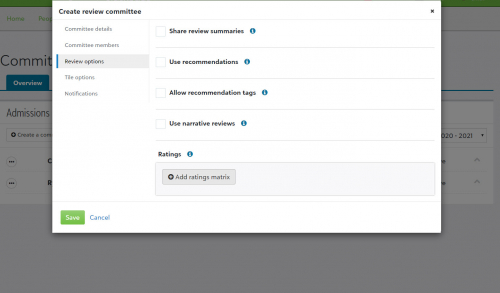
Enrollment management: Committee review enhanced! For this release, the EMS team focused on enhancing the Committee Review feature for 2020. We’ve added a ton of new quality of life updates for this feature so make sure to check out the release notes for every single detail.
However, some of the bigger additions this month include the ability to add a ratings matrix when creating a new review committee as well as selecting specific tiles like Applications and Inquires to appear for reviewers. Reviewers now have a new Share option which will make review narratives visible to other reviewers even when it hasn’t been submitted yet.
Core: Security changes for Academic Profiles! Any user who has the Academic Profile task now have more granular tasks enabled by default. Platform managers can disable these tasks based on roles (or clones) to help restrict what users can do with test scores. Under Core, select Security and then Roles to either enable or disable the new tasks for roles who already have the Academic Profile task.
Academics: Edit Student Enrollment! A new Save and next button is available for administrators to help them make quick enrollment changes. Under Scheduling, select Requests and schedules to find the Student enrollment tab. Select Edit from the context menu next to the student. Selecting Save and next will move to the next student in the list without having to close out or change screens.
For those of you still waiting on the 2019 recap for School website, make sure to check back next week as we do a deep dive into all of the cool stuff the team added into that product. In the coming weeks, I’ll also be tackling the important changes the EMS team has made to contracts over the past month or so and I have some exciting news to share regarding videos and release letters.
For now, thank you for stopping by to check out my content, as always. There’s plenty more on the way as 2020 gets started so make sure to subscribe to the blog to stay up to date on all the latest education related content. See you next week!
Starting tomorrow, the latest update is jam packed with new additions and features as well as plenty of quality of life updates. Here’s a quick look at only a handful of the features coming inside of the January 8 product release.
Enrollment management: Committee review enhanced! For this release, the EMS team focused on enhancing the Committee Review feature for 2020. We’ve added a ton of new quality of life updates for this feature so make sure to check out the release notes for every single detail.
However, some of the bigger additions this month include the ability to add a ratings matrix when creating a new review committee as well as selecting specific tiles like Applications and Inquires to appear for reviewers. Reviewers now have a new Share option which will make review narratives visible to other reviewers even when it hasn’t been submitted yet.

Core: Security changes for Academic Profiles! Any user who has the Academic Profile task now have more granular tasks enabled by default. Platform managers can disable these tasks based on roles (or clones) to help restrict what users can do with test scores. Under Core, select Security and then Roles to either enable or disable the new tasks for roles who already have the Academic Profile task.
Academics: Edit Student Enrollment! A new Save and next button is available for administrators to help them make quick enrollment changes. Under Scheduling, select Requests and schedules to find the Student enrollment tab. Select Edit from the context menu next to the student. Selecting Save and next will move to the next student in the list without having to close out or change screens.
For those of you still waiting on the 2019 recap for School website, make sure to check back next week as we do a deep dive into all of the cool stuff the team added into that product. In the coming weeks, I’ll also be tackling the important changes the EMS team has made to contracts over the past month or so and I have some exciting news to share regarding videos and release letters.
For now, thank you for stopping by to check out my content, as always. There’s plenty more on the way as 2020 gets started so make sure to subscribe to the blog to stay up to date on all the latest education related content. See you next week!
3
Comments
-
I think "to check out the release notes for every single detail." brings us to an old link.
please update [and poss. re-email]0 -
Hi john ronan! I just checked the link and it is bringing me to the Jan 8 notes.
Here's the direct link to it just in case: https://www.blackbaud.com/files/support/helpfiles/education/k12/panel/content/bb-k12-new.html0 -
I just tried out the student enrollment tab as outlined, however, I don't get any students to appear in the list/page.0
-
Hi Martha Erskine! Very strange! I just tested this on my end and I was able to see a list of students appear.
So in this case, make sure that the drop down on the right side says "Academics" and not either of the other options Activities or Advisories. Also, I was informed of a bug related to this list which basically caused a blank screen to appear. A fix went out for it today, so I don't know if that's the issue here but if you haven't yet, log out and then back in to see if a potential update fixes the problem.
If none of that works for you, my advice would be to contact support and have them take a look. Something isn't working as intended. Good luck!0




Categories
- All Categories
- New K-12 Community Home (TEST)
- New Higher Education Home Page (Test)
- New Impact Edge Community TEST
- New YourCause Community TEST
- New SKY Community TEST
- New Grantmaking TEST Community
- New Altru Test Community
- New bbcon Community - TEST
- 12 Blackbaud Agents for Good™
- New Raiser's Edge NXT Community
- 8 Blackbaud Community Help
- 222 bbcon®
- 1.4K Blackbaud Altru®
- 410 Blackbaud Award Management™ and Blackbaud Stewardship Management™
- 1.2K Blackbaud CRM™ and Blackbaud Internet Solutions™
- 16 donorCentrics®
- 361 Blackbaud eTapestry®
- 2.7K Blackbaud Financial Edge NXT®
- 687 Blackbaud Grantmaking™
- 603 Blackbaud Education Management Solutions for Higher Education
- 3.3K Blackbaud Education Management Solutions for K-12 Schools
- 954 Blackbaud Luminate Online® and Blackbaud TeamRaiser®
- 85 JustGiving® from Blackbaud®
- 7K Blackbaud Raiser's Edge NXT®
- 4K SKY Developer
- 258 ResearchPoint™
- 123 Blackbaud Tuition Management™
- 165 Organizational Best Practices
- 248 Member Lounge (Just for Fun)
- 40 Blackbaud Community Challenges
- 37 PowerUp Challenges
- 3 (Closed) PowerUp Challenge: Grid View Batch
- 3 (Closed) PowerUp Challenge: Chat for Blackbaud AI
- 3 (Closed) PowerUp Challenge: Data Health
- 3 (Closed) Raiser's Edge NXT PowerUp Challenge: Product Update Briefing
- 3 (Closed) Raiser's Edge NXT PowerUp Challenge: Standard Reports+
- 3 (Closed) Raiser's Edge NXT PowerUp Challenge: Email Marketing
- 3 (Closed) Raiser's Edge NXT PowerUp Challenge: Gift Management
- 4 (Closed) Raiser's Edge NXT PowerUp Challenge: Event Management
- 3 (Closed) Raiser's Edge NXT PowerUp Challenge: Home Page
- 4 (Closed) Raiser's Edge NXT PowerUp Challenge: Standard Reports
- 4 (Closed) Raiser's Edge NXT PowerUp Challenge: Query
- 829 Community News
- 3.1K Jobs Board
- 57 Blackbaud SKY® Reporting Announcements
- 47 Blackbaud CRM Higher Ed Product Advisory Group (HE PAG)
- 19 Blackbaud CRM Product Advisory Group (BBCRM PAG)