Copy previous invoice

Justin Ward
Blackbaud Employee




When you are adding invoices for existing vendors in Financial Edge NXT, we recommend you take advantage of the Copy a previous invoice functionally to save time during data entry. This feature is really helpful when you enter a lot of similar invoices for vendors.
When you add an invoice for an existing vendor, the last three invoices you created for that vendor appear on the right.
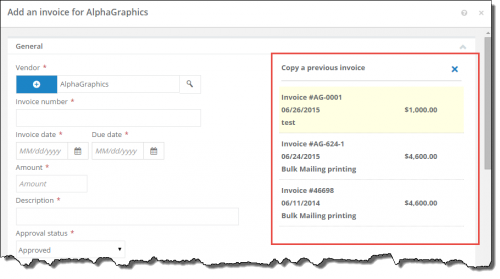
When you select one of those previous invoices, it populates the Amount, Description, Approval status, Payment method, Paid from account, and distribution information from that invoice. You can of course edit this information as needed. You can also add any additional information like 1099s, discounts or custom fields. The only fields you have to enter (that are not copied over) are the Invoice date and Due date, and Invoice number.
Here is a short video showing how the Copy a previous invoice feature works.
Data entry tips
And just another quick tip regarding data entry, you can save time with keyboard shortcuts as you add invoice. For example, when you enter the day of the month, the month and year fill in automatically. Also, when you access a drop down-down menu, if you enter the first letter of the option you want, the field populates with that option. And, of course, you can use Tab on your keyboard to quickly move from field to field.
When you add an invoice for an existing vendor, the last three invoices you created for that vendor appear on the right.

When you select one of those previous invoices, it populates the Amount, Description, Approval status, Payment method, Paid from account, and distribution information from that invoice. You can of course edit this information as needed. You can also add any additional information like 1099s, discounts or custom fields. The only fields you have to enter (that are not copied over) are the Invoice date and Due date, and Invoice number.
Here is a short video showing how the Copy a previous invoice feature works.
Data entry tips
And just another quick tip regarding data entry, you can save time with keyboard shortcuts as you add invoice. For example, when you enter the day of the month, the month and year fill in automatically. Also, when you access a drop down-down menu, if you enter the first letter of the option you want, the field populates with that option. And, of course, you can use Tab on your keyboard to quickly move from field to field.
0
Categories
- All Categories
- New K-12 Community Home (TEST)
- New Higher Education Home Page (Test)
- New Impact Edge Community TEST
- New YourCause Community TEST
- New SKY Community TEST
- New Grantmaking TEST Community
- New Altru Test Community
- New bbcon Community - TEST
- 12 Blackbaud Agents for Good™
- New Raiser's Edge NXT Community
- 8 Blackbaud Community Help
- 222 bbcon®
- 1.4K Blackbaud Altru®
- 410 Blackbaud Award Management™ and Blackbaud Stewardship Management™
- 1.2K Blackbaud CRM™ and Blackbaud Internet Solutions™
- 16 donorCentrics®
- 361 Blackbaud eTapestry®
- 2.7K Blackbaud Financial Edge NXT®
- 687 Blackbaud Grantmaking™
- 603 Blackbaud Education Management Solutions for Higher Education
- 3.3K Blackbaud Education Management Solutions for K-12 Schools
- 954 Blackbaud Luminate Online® and Blackbaud TeamRaiser®
- 85 JustGiving® from Blackbaud®
- 7K Blackbaud Raiser's Edge NXT®
- 4K SKY Developer
- 258 ResearchPoint™
- 123 Blackbaud Tuition Management™
- 165 Organizational Best Practices
- 248 Member Lounge (Just for Fun)
- 40 Blackbaud Community Challenges
- 37 PowerUp Challenges
- 3 (Closed) PowerUp Challenge: Grid View Batch
- 3 (Closed) PowerUp Challenge: Chat for Blackbaud AI
- 3 (Closed) PowerUp Challenge: Data Health
- 3 (Closed) Raiser's Edge NXT PowerUp Challenge: Product Update Briefing
- 3 (Closed) Raiser's Edge NXT PowerUp Challenge: Standard Reports+
- 3 (Closed) Raiser's Edge NXT PowerUp Challenge: Email Marketing
- 3 (Closed) Raiser's Edge NXT PowerUp Challenge: Gift Management
- 4 (Closed) Raiser's Edge NXT PowerUp Challenge: Event Management
- 3 (Closed) Raiser's Edge NXT PowerUp Challenge: Home Page
- 4 (Closed) Raiser's Edge NXT PowerUp Challenge: Standard Reports
- 4 (Closed) Raiser's Edge NXT PowerUp Challenge: Query
- 829 Community News
- 3.1K Jobs Board
- 57 Blackbaud SKY® Reporting Announcements
- 47 Blackbaud CRM Higher Ed Product Advisory Group (HE PAG)
- 19 Blackbaud CRM Product Advisory Group (BBCRM PAG)