What’s New In Financial Edge NXT

Justin Ward
Blackbaud Employee




The September 4 release of Financial Edge NXT includes the following features and enhancements:
Supported browsers
We added support for an additional browser. In addition to Chrome, Financial Edge NXT now supports Internet Explorer 11. Additional browsers will be supported in upcoming releases.
Adjustment categories
Adjustment transactions are used to record bank account transactions such as interest earned, service charges, balance adjustments, and transfers between bank accounts. You can now create adjustment categories on the Bank account record for the adjustment transactions you create regularly. The Adjustment categories tile on the bank account displays all saved adjustment categories. You can open a saved category to make changes, delete an adjustment category, or copy an existing category to create a new one based on its settings.
Invoice and vendor tile enhancements
You can now drag and drop the information tiles on vendor and invoice records. This is helpful when you want to rearrange where the information displays on the page. We will add this same functionality to other record pages in upcoming releases. You can move the tiles using the anchor in the top right corner.
Account, project and deposit tile enhancements
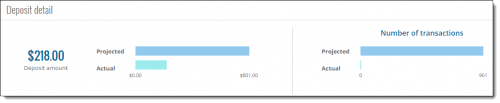
We added graphs to the deposit, account, and project record pages to provide a visual representation of your data. You can view these graphs on the Deposit detail tile on the Deposit page, and the Activity and Budget tiles on the Account and Projects pages. When you hover your mouse over the graphs, more detailed information appears.
Journal entry enhancements
We made several enhancements to the look and feel of Journal entry.
Supported browsers
We added support for an additional browser. In addition to Chrome, Financial Edge NXT now supports Internet Explorer 11. Additional browsers will be supported in upcoming releases.
Adjustment categories
Adjustment transactions are used to record bank account transactions such as interest earned, service charges, balance adjustments, and transfers between bank accounts. You can now create adjustment categories on the Bank account record for the adjustment transactions you create regularly. The Adjustment categories tile on the bank account displays all saved adjustment categories. You can open a saved category to make changes, delete an adjustment category, or copy an existing category to create a new one based on its settings.
Invoice and vendor tile enhancements
You can now drag and drop the information tiles on vendor and invoice records. This is helpful when you want to rearrange where the information displays on the page. We will add this same functionality to other record pages in upcoming releases. You can move the tiles using the anchor in the top right corner.
Account, project and deposit tile enhancements
We added graphs to the deposit, account, and project record pages to provide a visual representation of your data. You can view these graphs on the Deposit detail tile on the Deposit page, and the Activity and Budget tiles on the Account and Projects pages. When you hover your mouse over the graphs, more detailed information appears.

Journal entry enhancements
We made several enhancements to the look and feel of Journal entry.
- You can now access the batch post and validate functionality from the toolbar of an open batch. Prior to this release, you accessed the post and validate functionality from the More actions menu.
- We added checkboxes next to each journal entry transaction to make adding duplicate rows, or deleting multiple rows, easier.
- To open and edit a journal entry transaction row, simply click the transaction. You cannot open the row if the checkbox is marked.
- We no longer display the Batch defaults column if no defaults exist.
- We updated the icon in the journal entry grid used to access the Distribution breakdown screen.
- If you encounter an error when adding rows to the batch, the error message now appears just beneath the grid.
0
Categories
- All Categories
- New K-12 Community Home (TEST)
- New Higher Education Home Page (Test)
- New Impact Edge Community TEST
- New YourCause Community TEST
- New SKY Community TEST
- New Grantmaking TEST Community
- New Altru Test Community
- New bbcon Community - TEST
- 12 Blackbaud Agents for Good™
- New Raiser's Edge NXT Community
- 8 Blackbaud Community Help
- 222 bbcon®
- 1.4K Blackbaud Altru®
- 411 Blackbaud Award Management™ and Blackbaud Stewardship Management™
- 1.2K Blackbaud CRM™ and Blackbaud Internet Solutions™
- 16 donorCentrics®
- 361 Blackbaud eTapestry®
- 2.7K Blackbaud Financial Edge NXT®
- 688 Blackbaud Grantmaking™
- 604 Blackbaud Education Management Solutions for Higher Education
- 3.3K Blackbaud Education Management Solutions for K-12 Schools
- 954 Blackbaud Luminate Online® and Blackbaud TeamRaiser®
- 85 JustGiving® from Blackbaud®
- 7.1K Blackbaud Raiser's Edge NXT®
- 4K SKY Developer
- 258 ResearchPoint™
- 123 Blackbaud Tuition Management™
- 165 Organizational Best Practices
- 249 Member Lounge (Just for Fun)
- 40 Blackbaud Community Challenges
- 37 PowerUp Challenges
- 3 (Closed) PowerUp Challenge: Grid View Batch
- 3 (Closed) PowerUp Challenge: Chat for Blackbaud AI
- 3 (Closed) PowerUp Challenge: Data Health
- 3 (Closed) Raiser's Edge NXT PowerUp Challenge: Product Update Briefing
- 3 (Closed) Raiser's Edge NXT PowerUp Challenge: Standard Reports+
- 3 (Closed) Raiser's Edge NXT PowerUp Challenge: Email Marketing
- 3 (Closed) Raiser's Edge NXT PowerUp Challenge: Gift Management
- 4 (Closed) Raiser's Edge NXT PowerUp Challenge: Event Management
- 3 (Closed) Raiser's Edge NXT PowerUp Challenge: Home Page
- 4 (Closed) Raiser's Edge NXT PowerUp Challenge: Standard Reports
- 4 (Closed) Raiser's Edge NXT PowerUp Challenge: Query
- 829 Community News
- 3.1K Jobs Board
- 57 Blackbaud SKY® Reporting Announcements
- 47 Blackbaud CRM Higher Ed Product Advisory Group (HE PAG)
- 19 Blackbaud CRM Product Advisory Group (BBCRM PAG)