What’s New (June 2, 2017)

Justin Ward
Blackbaud Employee




This release of Financial Edge NXT includes the Journal Entry Excel Add-in. The Journal Entry Excel Add-In is an application built by Blackbaud and available in Microsoft's Office Store.
With the application, you enter transactions in a Microsoft Excel spreadsheet which you can then submit as a new journal entry batch to Financial Edge NXT. This integration enables flexible data entry (in bulk) and saves time, especially when entering similar data.
Note: The Journal Entry Excel Add-in only works with Microsoft Office 2016 or higher. You can choose to use the Excel add-in from Microsoft Office 365 or from your desktop version.
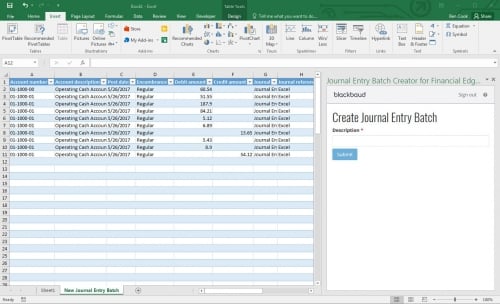
To use the application, it must be approved by a tenant administrator. Administrators provide approval for applications, including the Journal Entry Excel Add-In, by activating the application within the Applications area of Financial Edge NXT. You can then the add-in from Microsoft's Office Store.
For more information about enabling and downloading the Jounral Entry Excel Add-in, see our Financial Edge NXT Journal Entry Excel Add-In help topic.
Early Adopter Programs (EAP)
Note: Credit card management, SKY Reporting – Customizable dashboards, and Post subledgers are features available only in our Early Adopters Program (EAP). Throughout the EAP, we will continue to enhance and improve these areas in preparation for general availability in an upcoming release.
We with this release, we made big enhancements to Credit card management functionality. If you created credit card accounts in the database view, you need to link them to your Financial Edge NXT credit cards to ensure accurate tracking of credit card activity.
To link credit card accounts, go to the Credit card account page in Treasury. If you have any credit card accounts that need to be linked, we will display an alert at the top of the page.
Once you link your credit card accounts, you can automatically download transactions from your online credit card accounts to Financial Edge NXT. For more information, see our Link Credit Card Account help topic.
We also made enhancement to Sky Reporting – Customizable dashboards and Post subledgers, which are only available in our EAP.
To catch up on what we’ve recently released, check out our What’s Recent help topic.
With the application, you enter transactions in a Microsoft Excel spreadsheet which you can then submit as a new journal entry batch to Financial Edge NXT. This integration enables flexible data entry (in bulk) and saves time, especially when entering similar data.
Note: The Journal Entry Excel Add-in only works with Microsoft Office 2016 or higher. You can choose to use the Excel add-in from Microsoft Office 365 or from your desktop version.

To use the application, it must be approved by a tenant administrator. Administrators provide approval for applications, including the Journal Entry Excel Add-In, by activating the application within the Applications area of Financial Edge NXT. You can then the add-in from Microsoft's Office Store.
For more information about enabling and downloading the Jounral Entry Excel Add-in, see our Financial Edge NXT Journal Entry Excel Add-In help topic.
Early Adopter Programs (EAP)
Note: Credit card management, SKY Reporting – Customizable dashboards, and Post subledgers are features available only in our Early Adopters Program (EAP). Throughout the EAP, we will continue to enhance and improve these areas in preparation for general availability in an upcoming release.
We with this release, we made big enhancements to Credit card management functionality. If you created credit card accounts in the database view, you need to link them to your Financial Edge NXT credit cards to ensure accurate tracking of credit card activity.
To link credit card accounts, go to the Credit card account page in Treasury. If you have any credit card accounts that need to be linked, we will display an alert at the top of the page.
Once you link your credit card accounts, you can automatically download transactions from your online credit card accounts to Financial Edge NXT. For more information, see our Link Credit Card Account help topic.
We also made enhancement to Sky Reporting – Customizable dashboards and Post subledgers, which are only available in our EAP.
To catch up on what we’ve recently released, check out our What’s Recent help topic.
0
Comments
-
The steps in the "Enable the Financial Edge NXT Journal Entry Excel Add-In" section of help topic linked above (https://www.blackbaud.com/files/support/helpfiles/fe/content/fe-journal-entry-excel-add-in.html) don't work. I get an "Unknow error" when adding that application ID per the instructions. I've submitted a case via tech support (#13510747) if that help you. I think the Application ID is incorrect.0




Categories
- All Categories
- New YourCause Community TEST
- New SKY Community TEST
- New Grantmaking TEST Community
- New Altru Test Community
- New bbcon Community - TEST
- 12 Blackbaud Agents for Good™
- New Raiser's Edge NXT Community
- 7 Blackbaud Community Help
- 219 bbcon®
- 1.4K Blackbaud Altru®
- 409 Blackbaud Award Management™ and Blackbaud Stewardship Management™
- 1.2K Blackbaud CRM™ and Blackbaud Internet Solutions™
- 16 donorCentrics®
- 361 Blackbaud eTapestry®
- 2.7K Blackbaud Financial Edge NXT®
- 682 Blackbaud Grantmaking™
- 599 Blackbaud Education Management Solutions for Higher Education
- 3.3K Blackbaud Education Management Solutions for K-12 Schools
- 952 Blackbaud Luminate Online® and Blackbaud TeamRaiser®
- 85 JustGiving® from Blackbaud®
- 7K Blackbaud Raiser's Edge NXT®
- 3.9K SKY Developer
- 257 ResearchPoint™
- 123 Blackbaud Tuition Management™
- 165 Organizational Best Practices
- 247 Member Lounge (Just for Fun)
- 40 Blackbaud Community Challenges
- 37 PowerUp Challenges
- 3 (Closed) PowerUp Challenge: Grid View Batch
- 3 (Closed) PowerUp Challenge: Chat for Blackbaud AI
- 3 (Closed) PowerUp Challenge: Data Health
- 3 (Closed) Raiser's Edge NXT PowerUp Challenge: Product Update Briefing
- 3 (Closed) Raiser's Edge NXT PowerUp Challenge: Standard Reports+
- 3 (Closed) Raiser's Edge NXT PowerUp Challenge: Email Marketing
- 3 (Closed) Raiser's Edge NXT PowerUp Challenge: Gift Management
- 4 (Closed) Raiser's Edge NXT PowerUp Challenge: Event Management
- 3 (Closed) Raiser's Edge NXT PowerUp Challenge: Home Page
- 4 (Closed) Raiser's Edge NXT PowerUp Challenge: Standard Reports
- 4 (Closed) Raiser's Edge NXT PowerUp Challenge: Query
- 822 Community News
- 3.1K Jobs Board
- 57 Blackbaud SKY® Reporting Announcements
- 47 Blackbaud CRM Higher Ed Product Advisory Group (HE PAG)
- 19 Blackbaud CRM Product Advisory Group (BBCRM PAG)