What’s New (Feb 7, 2019)

Justin Ward
Blackbaud Employee




This release of Financial Edge NXT includes several new features and enhancements. Let’s start with Fixed assets.
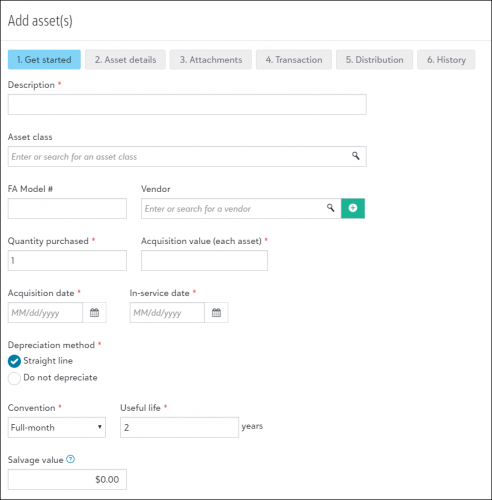
You can now add and edit assets in the web view! To add a new asset, access the Assets list page. From there, you can add all the necessary asset information you want to track and manage. For detailed information about adding assets, see Add Asset.
You can also add a transaction to an asset from the Transactions tile of an open asset record. You can add the following types of transactions:
Cash receipts
Based on your feedback, we made a couple small changes to the Deposit report. The report now includes the payment details for each payment method.
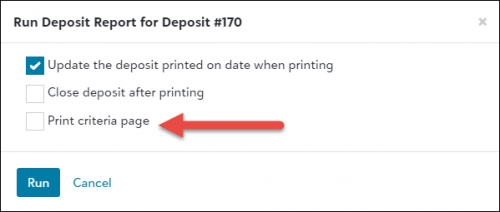
Also, when running a deposit report from a deposit record, you can select whether or not to include the criteria page. If you want to print the criteria with the report, mark the Print criteria page checkbox.
When adding a new deposit, the Post date will now default to the transaction date automatically. We recommend you match the post date to the transaction date to eliminate timing differences.
To catch up on what we’ve recently released, check out What’s Recent.
You can now add and edit assets in the web view! To add a new asset, access the Assets list page. From there, you can add all the necessary asset information you want to track and manage. For detailed information about adding assets, see Add Asset.

You can also add a transaction to an asset from the Transactions tile of an open asset record. You can add the following types of transactions:
- Acquisition transaction
- Accumulated depreciation transaction
- Year-to-date deprecation transaction
- Annual depreciation transaction
- Period depreciation transaction
- Improvement transaction
- Disposal transaction
Cash receipts
Based on your feedback, we made a couple small changes to the Deposit report. The report now includes the payment details for each payment method.
Also, when running a deposit report from a deposit record, you can select whether or not to include the criteria page. If you want to print the criteria with the report, mark the Print criteria page checkbox.

When adding a new deposit, the Post date will now default to the transaction date automatically. We recommend you match the post date to the transaction date to eliminate timing differences.
To catch up on what we’ve recently released, check out What’s Recent.
2
Categories
- All Categories
- New eTapestry Home Community
- New K-12 Community Home (TEST)
- New Higher Education Home Page (Test)
- New Impact Edge Community TEST
- New YourCause Community TEST
- New SKY Community TEST
- New Grantmaking TEST Community
- New Altru Test Community
- New bbcon Community - TEST
- 12 Blackbaud Agents for Good™
- New Raiser's Edge NXT Community
- 8 Blackbaud Community Help
- 223 bbcon®
- 1.4K Blackbaud Altru®
- 411 Blackbaud Award Management™ and Blackbaud Stewardship Management™
- 1.2K Blackbaud CRM™ and Blackbaud Internet Solutions™
- 16 donorCentrics®
- 361 Blackbaud eTapestry®
- 2.7K Blackbaud Financial Edge NXT®
- 688 Blackbaud Grantmaking™
- 604 Blackbaud Education Management Solutions for Higher Education
- 3.3K Blackbaud Education Management Solutions for K-12 Schools
- 954 Blackbaud Luminate Online® and Blackbaud TeamRaiser®
- 85 JustGiving® from Blackbaud®
- 7.1K Blackbaud Raiser's Edge NXT®
- 4K SKY Developer
- 258 ResearchPoint™
- 124 Blackbaud Tuition Management™
- 165 Organizational Best Practices
- 249 Member Lounge (Just for Fun)
- 40 Blackbaud Community Challenges
- 37 PowerUp Challenges
- 3 (Closed) PowerUp Challenge: Grid View Batch
- 3 (Closed) PowerUp Challenge: Chat for Blackbaud AI
- 3 (Closed) PowerUp Challenge: Data Health
- 3 (Closed) Raiser's Edge NXT PowerUp Challenge: Product Update Briefing
- 3 (Closed) Raiser's Edge NXT PowerUp Challenge: Standard Reports+
- 3 (Closed) Raiser's Edge NXT PowerUp Challenge: Email Marketing
- 3 (Closed) Raiser's Edge NXT PowerUp Challenge: Gift Management
- 4 (Closed) Raiser's Edge NXT PowerUp Challenge: Event Management
- 3 (Closed) Raiser's Edge NXT PowerUp Challenge: Home Page
- 4 (Closed) Raiser's Edge NXT PowerUp Challenge: Standard Reports
- 4 (Closed) Raiser's Edge NXT PowerUp Challenge: Query
- 829 Community News
- 3.1K Jobs Board
- 57 Blackbaud SKY® Reporting Announcements
- 47 Blackbaud CRM Higher Ed Product Advisory Group (HE PAG)
- 19 Blackbaud CRM Product Advisory Group (BBCRM PAG)