What's New (June 7, 2021)

Justin Ward
Blackbaud Employee




To modernize and stay current with the latest software standards and technology, we are updating the look and feel of Financial Edge NXT. These updates should not disrupt your current processes, but you will likely notice slight changes in navigation, or how information is presented on a record. For example, here are the updates we made to Fields and tables last month.
This week, Financial Edge NXT released updates to General ledger settings, Chart organizer and Post subledgers. These updates (detailed below) are being released in waved roll outs.
Why waved rollouts? Releasing in waves enables us to:
General Ledger Settings
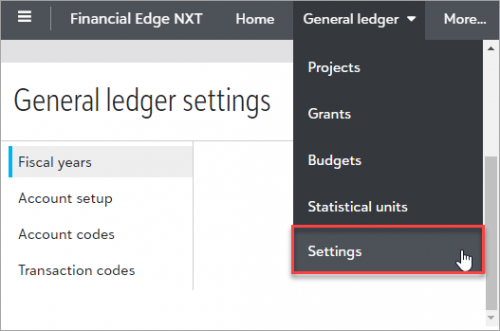
You can now work with fiscal year and general ledger settings from General ledger, Settings. Previously, these were located under Control panel, Settings.
On the General ledger settings page, look for the following enhancements: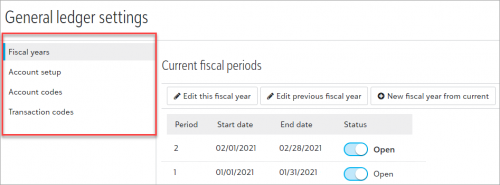
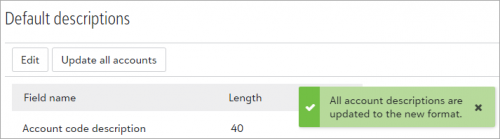
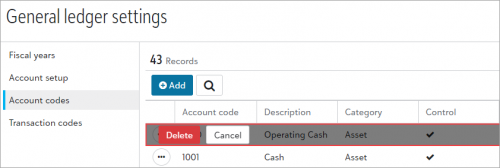
Chart Organizer
We updated General ledger, Chart organizer to include slight changes in the way information is presented.
We updated General ledger, Post subledgers with minimal changes to the way information is presented. For example, validation reports now display an updated toolbar at the bottom of the page.
To preview upcoming waves and changes, check out our What’s Next.
This week, Financial Edge NXT released updates to General ledger settings, Chart organizer and Post subledgers. These updates (detailed below) are being released in waved roll outs.
Why waved rollouts? Releasing in waves enables us to:
- Better gauge impact on the larger user base based on feedback and analytics
- Make adjustments to the feature in real-time as any issues arise, without affecting all organizations
- Continue to release to organizations in additional waves as confidence in the feature builds
General Ledger Settings
You can now work with fiscal year and general ledger settings from General ledger, Settings. Previously, these were located under Control panel, Settings.

On the General ledger settings page, look for the following enhancements:
- Left navigation has changed.

- For Account codes, the placement of the All categories filter has shifted to be more prominent. Previously, this displayed after you selected Filters.
- Notification messages for processes such as save and delete no longer display on the bottom right side of a page. However, notifications continue to display for processes such as updating the description for all accounts.

- When deleting items from a row, a confirmation now displays above a row instead of on a separate screen.

Chart Organizer
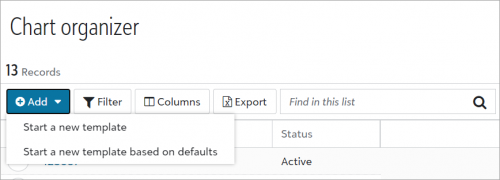
We updated General ledger, Chart organizer to include slight changes in the way information is presented.
- Toolbar actions are now easier to identify with new labels.
- Actions changed to Add.
- Add, Start a new template changed to Add template.
- Add, Start a new template based on defaults changed to Add template based on defaults.
- Add, Export to Excel displays as Export directly on the toolbar.

- When choosing columns, use the Show only selected columns checkbox.
- When you work with validation and financial statement reports, note the following:
- You can still choose to add or edit a validation report, or edit a financial statement report. However, you'll notice slight differences as you move through these processes.
- When running a report, the Select button changed to Run.
- An updated toolbar now displays at the bottom of report pages.
We updated General ledger, Post subledgers with minimal changes to the way information is presented. For example, validation reports now display an updated toolbar at the bottom of the page.
To preview upcoming waves and changes, check out our What’s Next.
1
Categories
- All Categories
- New K-12 Community Home (TEST)
- New Higher Education Home Page (Test)
- New Impact Edge Community TEST
- New YourCause Community TEST
- New SKY Community TEST
- New Grantmaking TEST Community
- New Altru Test Community
- New bbcon Community - TEST
- 12 Blackbaud Agents for Good™
- New Raiser's Edge NXT Community
- 8 Blackbaud Community Help
- 222 bbcon®
- 1.4K Blackbaud Altru®
- 411 Blackbaud Award Management™ and Blackbaud Stewardship Management™
- 1.2K Blackbaud CRM™ and Blackbaud Internet Solutions™
- 16 donorCentrics®
- 361 Blackbaud eTapestry®
- 2.7K Blackbaud Financial Edge NXT®
- 688 Blackbaud Grantmaking™
- 604 Blackbaud Education Management Solutions for Higher Education
- 3.3K Blackbaud Education Management Solutions for K-12 Schools
- 954 Blackbaud Luminate Online® and Blackbaud TeamRaiser®
- 85 JustGiving® from Blackbaud®
- 7.1K Blackbaud Raiser's Edge NXT®
- 4K SKY Developer
- 258 ResearchPoint™
- 123 Blackbaud Tuition Management™
- 165 Organizational Best Practices
- 249 Member Lounge (Just for Fun)
- 40 Blackbaud Community Challenges
- 37 PowerUp Challenges
- 3 (Closed) PowerUp Challenge: Grid View Batch
- 3 (Closed) PowerUp Challenge: Chat for Blackbaud AI
- 3 (Closed) PowerUp Challenge: Data Health
- 3 (Closed) Raiser's Edge NXT PowerUp Challenge: Product Update Briefing
- 3 (Closed) Raiser's Edge NXT PowerUp Challenge: Standard Reports+
- 3 (Closed) Raiser's Edge NXT PowerUp Challenge: Email Marketing
- 3 (Closed) Raiser's Edge NXT PowerUp Challenge: Gift Management
- 4 (Closed) Raiser's Edge NXT PowerUp Challenge: Event Management
- 3 (Closed) Raiser's Edge NXT PowerUp Challenge: Home Page
- 4 (Closed) Raiser's Edge NXT PowerUp Challenge: Standard Reports
- 4 (Closed) Raiser's Edge NXT PowerUp Challenge: Query
- 829 Community News
- 3.1K Jobs Board
- 57 Blackbaud SKY® Reporting Announcements
- 47 Blackbaud CRM Higher Ed Product Advisory Group (HE PAG)
- 19 Blackbaud CRM Product Advisory Group (BBCRM PAG)