Get Started With Key Performance Indicators





With insights, you pair measures with attributes to analyze your records across different criteria. To instead simply summarize a measure's total or amount, such as invoice amounts in Financial Edge NXT or the recently released past due pledges in Raiser's Edge NXT, add it as a key performance indicator (KPI) on a dashboard. With KPIs, you can quickly stay current with a measure and compare it to previous performance!
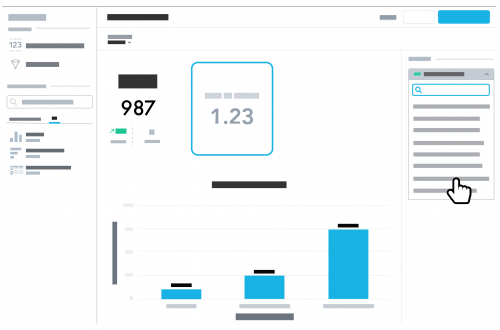 Choose what to measure. Measures are the totals and amounts to analyze with an insight or KPI. To add a KPI to a dashboard, select Edit, move Key Performance Indicator from under New item to the dashboard, and choose which measure to track.
Customize for optimal analysis. To best meet your needs, you can adjust the KPI as necessary.
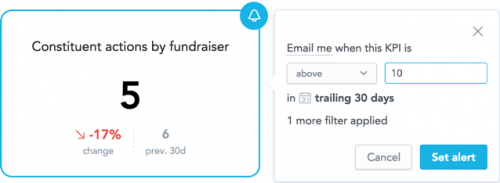 Set alerts to stay current. To help track a KPI, you can set an alert to be notified — at the email address you use to sign in — when it exceeds or falls below a specific amount. To set an alert for a KPI, select Edit on the dashboard and choose the time period to track in the Date range filter (as well as any other filters to consider). Then, select Alert (the bell) for the KPI, enter the threshold amount to be notified of, and select Set alert.
 Choose what to measure. Measures are the totals and amounts to analyze with an insight or KPI. To add a KPI to a dashboard, select Edit, move Key Performance Indicator from under New item to the dashboard, and choose which measure to track.
Customize for optimal analysis. To best meet your needs, you can adjust the KPI as necessary.
- Under Filter by, choose which of the dashboard's filters apply to the KPI. To use the Date range filter, select Date and choose which date to use.
- Under Comparison, choose whether to compare the measure with an earlier time period, based on either the Date range filter or the previous fiscal year. If you compare with another time period, choose whether to display an increase as green (good) or red (not so good!).
 Set alerts to stay current. To help track a KPI, you can set an alert to be notified — at the email address you use to sign in — when it exceeds or falls below a specific amount. To set an alert for a KPI, select Edit on the dashboard and choose the time period to track in the Date range filter (as well as any other filters to consider). Then, select Alert (the bell) for the KPI, enter the threshold amount to be notified of, and select Set alert.
 0
Comments
-
I don't understand the differnece bewtween a measure and a KPI - you seem to be confusing the two and it is not clear to me - would you please better define WITH better context? Thank you0
-
Hey Michelle, sure thing! In SKY Reporting, "measures" are the totals, averages, etc. you want to analyze. You can pair them with attributes or other measures to design charts or tables as insights, and you can also use them by themselves to quickly analyze their number-crunching as "KPIs". In short, measures are WHAT you want to analyze, while KPIs are HOW you can present them for analysis. I hope that helps. Thanks!0
-
To help clarify any confusion around the SKY Reporting-ese, check out this blog post, inspired by this thread: https://community.blackbaud.com/blogs/80/3684 Thanks!0



Categories
- All Categories
- New K-12 Community Home (TEST)
- New Higher Education Home Page (Test)
- New Impact Edge Community TEST
- New YourCause Community TEST
- New SKY Community TEST
- New Grantmaking TEST Community
- New Altru Test Community
- New bbcon Community - TEST
- 12 Blackbaud Agents for Good™
- New Raiser's Edge NXT Community
- 8 Blackbaud Community Help
- 222 bbcon®
- 1.4K Blackbaud Altru®
- 411 Blackbaud Award Management™ and Blackbaud Stewardship Management™
- 1.2K Blackbaud CRM™ and Blackbaud Internet Solutions™
- 16 donorCentrics®
- 361 Blackbaud eTapestry®
- 2.7K Blackbaud Financial Edge NXT®
- 688 Blackbaud Grantmaking™
- 604 Blackbaud Education Management Solutions for Higher Education
- 3.3K Blackbaud Education Management Solutions for K-12 Schools
- 954 Blackbaud Luminate Online® and Blackbaud TeamRaiser®
- 85 JustGiving® from Blackbaud®
- 7.1K Blackbaud Raiser's Edge NXT®
- 4K SKY Developer
- 258 ResearchPoint™
- 123 Blackbaud Tuition Management™
- 165 Organizational Best Practices
- 249 Member Lounge (Just for Fun)
- 40 Blackbaud Community Challenges
- 37 PowerUp Challenges
- 3 (Closed) PowerUp Challenge: Grid View Batch
- 3 (Closed) PowerUp Challenge: Chat for Blackbaud AI
- 3 (Closed) PowerUp Challenge: Data Health
- 3 (Closed) Raiser's Edge NXT PowerUp Challenge: Product Update Briefing
- 3 (Closed) Raiser's Edge NXT PowerUp Challenge: Standard Reports+
- 3 (Closed) Raiser's Edge NXT PowerUp Challenge: Email Marketing
- 3 (Closed) Raiser's Edge NXT PowerUp Challenge: Gift Management
- 4 (Closed) Raiser's Edge NXT PowerUp Challenge: Event Management
- 3 (Closed) Raiser's Edge NXT PowerUp Challenge: Home Page
- 4 (Closed) Raiser's Edge NXT PowerUp Challenge: Standard Reports
- 4 (Closed) Raiser's Edge NXT PowerUp Challenge: Query
- 829 Community News
- 3.1K Jobs Board
- 57 Blackbaud SKY® Reporting Announcements
- 47 Blackbaud CRM Higher Ed Product Advisory Group (HE PAG)
- 19 Blackbaud CRM Product Advisory Group (BBCRM PAG)