Get Started With Dashboard Attribute Filters





As you build your personalized dashboard of insights and key performance indicators (KPIs) to help gauge performance, you can fine-tune your analysis with attribute filters. When you add filters to your dashboard, you can focus on only records that meet specific characteristics.
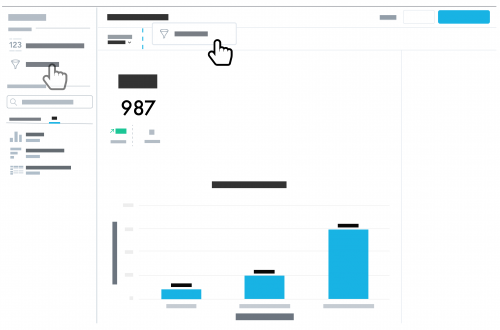 To use an attribute filter, select Edit, move Attribute Filter from under New item to the dashboard, choose the attribute and criteria of the records to include, and then select Apply.
By default, your dashboard includes the Date range filter. With this filter, you can analyze records in context of a specific time period, such as Last 7 days or This quarter. When you edit your dashboard, you can choose its default date range in the Date range filter.
Since you can analyze different types of records on your dashboard, an attribute filter may not apply to all KPIs and insights. To have analysis on the dashboard ignore a filter, select the KPI or insight and deselect the filter under Filter by.
After you set up your dashboard with the filters and their default options, don't forget to select Save & Publish to finalize your edits.
 To use an attribute filter, select Edit, move Attribute Filter from under New item to the dashboard, choose the attribute and criteria of the records to include, and then select Apply.
By default, your dashboard includes the Date range filter. With this filter, you can analyze records in context of a specific time period, such as Last 7 days or This quarter. When you edit your dashboard, you can choose its default date range in the Date range filter.
Since you can analyze different types of records on your dashboard, an attribute filter may not apply to all KPIs and insights. To have analysis on the dashboard ignore a filter, select the KPI or insight and deselect the filter under Filter by.
After you set up your dashboard with the filters and their default options, don't forget to select Save & Publish to finalize your edits.
0
Categories
- All Categories
- New K-12 Community Home (TEST)
- New Higher Education Home Page (Test)
- New Impact Edge Community TEST
- New YourCause Community TEST
- New SKY Community TEST
- New Grantmaking TEST Community
- New Altru Test Community
- New bbcon Community - TEST
- 12 Blackbaud Agents for Good™
- New Raiser's Edge NXT Community
- 8 Blackbaud Community Help
- 222 bbcon®
- 1.4K Blackbaud Altru®
- 410 Blackbaud Award Management™ and Blackbaud Stewardship Management™
- 1.2K Blackbaud CRM™ and Blackbaud Internet Solutions™
- 16 donorCentrics®
- 361 Blackbaud eTapestry®
- 2.7K Blackbaud Financial Edge NXT®
- 687 Blackbaud Grantmaking™
- 604 Blackbaud Education Management Solutions for Higher Education
- 3.3K Blackbaud Education Management Solutions for K-12 Schools
- 954 Blackbaud Luminate Online® and Blackbaud TeamRaiser®
- 85 JustGiving® from Blackbaud®
- 7K Blackbaud Raiser's Edge NXT®
- 4K SKY Developer
- 258 ResearchPoint™
- 123 Blackbaud Tuition Management™
- 165 Organizational Best Practices
- 248 Member Lounge (Just for Fun)
- 40 Blackbaud Community Challenges
- 37 PowerUp Challenges
- 3 (Closed) PowerUp Challenge: Grid View Batch
- 3 (Closed) PowerUp Challenge: Chat for Blackbaud AI
- 3 (Closed) PowerUp Challenge: Data Health
- 3 (Closed) Raiser's Edge NXT PowerUp Challenge: Product Update Briefing
- 3 (Closed) Raiser's Edge NXT PowerUp Challenge: Standard Reports+
- 3 (Closed) Raiser's Edge NXT PowerUp Challenge: Email Marketing
- 3 (Closed) Raiser's Edge NXT PowerUp Challenge: Gift Management
- 4 (Closed) Raiser's Edge NXT PowerUp Challenge: Event Management
- 3 (Closed) Raiser's Edge NXT PowerUp Challenge: Home Page
- 4 (Closed) Raiser's Edge NXT PowerUp Challenge: Standard Reports
- 4 (Closed) Raiser's Edge NXT PowerUp Challenge: Query
- 829 Community News
- 3.1K Jobs Board
- 57 Blackbaud SKY® Reporting Announcements
- 47 Blackbaud CRM Higher Ed Product Advisory Group (HE PAG)
- 19 Blackbaud CRM Product Advisory Group (BBCRM PAG)