Get Started With Insights





While both Raiser's Edge NXT and Financial Edge NXT provide useful analysis out-of-the-box, you can design your own as insights. With this custom analysis, you can analyze measures in context of various characteristics — or attributes — to best meet your specialized needs and drive action.
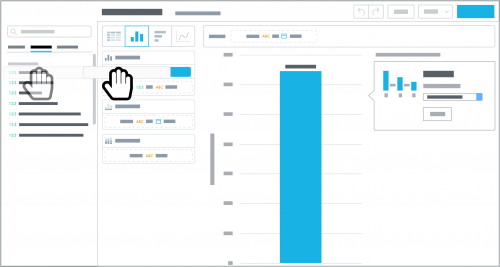 To visualize your data, you can build insights as tables or charts. Regardless of the format, it's all about pairing measures and attributes to uncover the analysis you want.
Choose what you want to measure. These are your numbers — your totals, amounts, averages, and so on — like gift or budget amounts.
To narrow the focus of a measure used with an insight, select it and then select Add attribute filter to choose the characteristic and criteria of the records to include.
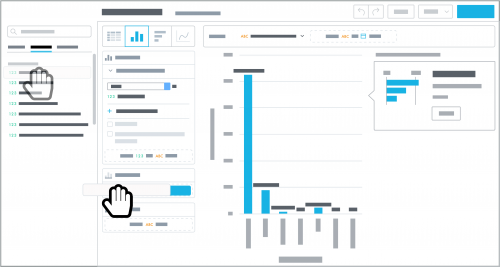 Choose the attribute to analyze with the measure. These are the characteristics of the records to break the measure down by, such as gift types for giving totals in Raiser's Edge NXT, or account categories for budget amounts in Financial Edge NXT.
To analyze the measure based on a date like when a gift or account was added, apply the Date attribute and choose which date to track and at which interval, like day, year, or quarter. (For year-over-year analysis, apply the Date attribute and then select the measure and compare to the same period in previous year.)
When you add an attribute to an insight, it divides the measure into the total number of records across the attribute's different criteria. To instead show the percentage of records across the criteria, select the measure and then show in %.
Fine-tune your analysis. As you design your table or chart, tweak the insight to hone in on the numbers you really want to analyze!
 To visualize your data, you can build insights as tables or charts. Regardless of the format, it's all about pairing measures and attributes to uncover the analysis you want.
Choose what you want to measure. These are your numbers — your totals, amounts, averages, and so on — like gift or budget amounts.
To narrow the focus of a measure used with an insight, select it and then select Add attribute filter to choose the characteristic and criteria of the records to include.
 Choose the attribute to analyze with the measure. These are the characteristics of the records to break the measure down by, such as gift types for giving totals in Raiser's Edge NXT, or account categories for budget amounts in Financial Edge NXT.
To analyze the measure based on a date like when a gift or account was added, apply the Date attribute and choose which date to track and at which interval, like day, year, or quarter. (For year-over-year analysis, apply the Date attribute and then select the measure and compare to the same period in previous year.)
When you add an attribute to an insight, it divides the measure into the total number of records across the attribute's different criteria. To instead show the percentage of records across the criteria, select the measure and then show in %.
Fine-tune your analysis. As you design your table or chart, tweak the insight to hone in on the numbers you really want to analyze!
- To further define the characteristics of the records to include, add or adjust filters.
- To futher break down a bar, column, or line chart, apply another attribute to stack or segment its measure by.
0
Categories
- All Categories
- New K-12 Community Home (TEST)
- New Higher Education Home Page (Test)
- New Impact Edge Community TEST
- New YourCause Community TEST
- New SKY Community TEST
- New Grantmaking TEST Community
- New Altru Test Community
- New bbcon Community - TEST
- 12 Blackbaud Agents for Good™
- New Raiser's Edge NXT Community
- 8 Blackbaud Community Help
- 222 bbcon®
- 1.4K Blackbaud Altru®
- 411 Blackbaud Award Management™ and Blackbaud Stewardship Management™
- 1.2K Blackbaud CRM™ and Blackbaud Internet Solutions™
- 16 donorCentrics®
- 361 Blackbaud eTapestry®
- 2.7K Blackbaud Financial Edge NXT®
- 688 Blackbaud Grantmaking™
- 604 Blackbaud Education Management Solutions for Higher Education
- 3.3K Blackbaud Education Management Solutions for K-12 Schools
- 954 Blackbaud Luminate Online® and Blackbaud TeamRaiser®
- 85 JustGiving® from Blackbaud®
- 7.1K Blackbaud Raiser's Edge NXT®
- 4K SKY Developer
- 258 ResearchPoint™
- 123 Blackbaud Tuition Management™
- 165 Organizational Best Practices
- 249 Member Lounge (Just for Fun)
- 40 Blackbaud Community Challenges
- 37 PowerUp Challenges
- 3 (Closed) PowerUp Challenge: Grid View Batch
- 3 (Closed) PowerUp Challenge: Chat for Blackbaud AI
- 3 (Closed) PowerUp Challenge: Data Health
- 3 (Closed) Raiser's Edge NXT PowerUp Challenge: Product Update Briefing
- 3 (Closed) Raiser's Edge NXT PowerUp Challenge: Standard Reports+
- 3 (Closed) Raiser's Edge NXT PowerUp Challenge: Email Marketing
- 3 (Closed) Raiser's Edge NXT PowerUp Challenge: Gift Management
- 4 (Closed) Raiser's Edge NXT PowerUp Challenge: Event Management
- 3 (Closed) Raiser's Edge NXT PowerUp Challenge: Home Page
- 4 (Closed) Raiser's Edge NXT PowerUp Challenge: Standard Reports
- 4 (Closed) Raiser's Edge NXT PowerUp Challenge: Query
- 829 Community News
- 3.1K Jobs Board
- 57 Blackbaud SKY® Reporting Announcements
- 47 Blackbaud CRM Higher Ed Product Advisory Group (HE PAG)
- 19 Blackbaud CRM Product Advisory Group (BBCRM PAG)