Have Questions? Answers Are At Your Fingertips!





As you work with SKY Reporting, you may have questions, ranging from how to get started to how to create specific analysis, or the number-crunching behind specific measures. When questions arise, you have easy access to answers at your fingertips!
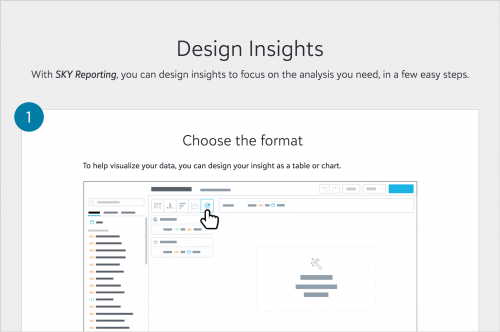 Quick start. Whether you're a SKY Reporting novice or just need a refresher, you can find a quick overview with the new SKY Reporting Quick Start. With this page, learn how to pair measures with attributes to design insights, complete with animations to preview each of the five easy steps!
Recipes. While the Quick Start provides an overview of how to create insights in general, you may have questions around how to design specific analysis. For the steps and ingredients — the measures and attributes — to design specific insights, you can use recipes for commonly used analysis — for both Raiser's Edge NXT and Financial Edge NXT!
Community discussions. Want to reach out to other EAP participants and Blackbaud gurus directly? Browse the Discussions in this EAP Community, or start your own thread to ask a question or share your experience (good or bad!). And don't forget this very blog for the latest updates, best practices, and helpful information.
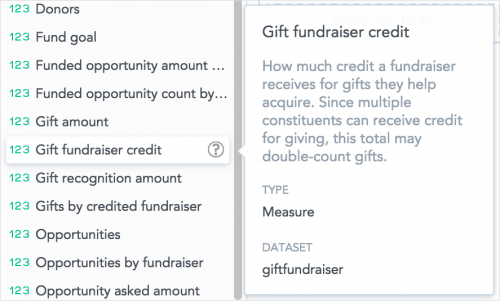 Measure and attribute descriptions. As you design an insight, select the ? for a measure or attribute to view a detailed description. For a measure, this description includes its dataset or how it's calculated; for an attribute, a list of its available values.
Help file. Just like with other features, you can always select the green ? in the upper right of your screen for contextual information. Ranging from general overviews to detailed deep-dives, it's a click away and in-application, enabling you to continue to work as you learn, side-by-side.
Where do you find yourself looking for answers? Sound off below!
 Quick start. Whether you're a SKY Reporting novice or just need a refresher, you can find a quick overview with the new SKY Reporting Quick Start. With this page, learn how to pair measures with attributes to design insights, complete with animations to preview each of the five easy steps!
Recipes. While the Quick Start provides an overview of how to create insights in general, you may have questions around how to design specific analysis. For the steps and ingredients — the measures and attributes — to design specific insights, you can use recipes for commonly used analysis — for both Raiser's Edge NXT and Financial Edge NXT!
Community discussions. Want to reach out to other EAP participants and Blackbaud gurus directly? Browse the Discussions in this EAP Community, or start your own thread to ask a question or share your experience (good or bad!). And don't forget this very blog for the latest updates, best practices, and helpful information.
 Measure and attribute descriptions. As you design an insight, select the ? for a measure or attribute to view a detailed description. For a measure, this description includes its dataset or how it's calculated; for an attribute, a list of its available values.
Help file. Just like with other features, you can always select the green ? in the upper right of your screen for contextual information. Ranging from general overviews to detailed deep-dives, it's a click away and in-application, enabling you to continue to work as you learn, side-by-side.
Where do you find yourself looking for answers? Sound off below!
0
Categories
- All Categories
- New YourCause Community TEST
- New SKY Community TEST
- New Grantmaking TEST Community
- New Altru Test Community
- New bbcon Community - TEST
- 12 Blackbaud Agents for Good™
- New Raiser's Edge NXT Community
- 7 Blackbaud Community Help
- 218 bbcon®
- 1.4K Blackbaud Altru®
- 409 Blackbaud Award Management™ and Blackbaud Stewardship Management™
- 1.2K Blackbaud CRM™ and Blackbaud Internet Solutions™
- 16 donorCentrics®
- 361 Blackbaud eTapestry®
- 2.7K Blackbaud Financial Edge NXT®
- 680 Blackbaud Grantmaking™
- 598 Blackbaud Education Management Solutions for Higher Education
- 3.3K Blackbaud Education Management Solutions for K-12 Schools
- 952 Blackbaud Luminate Online® and Blackbaud TeamRaiser®
- 85 JustGiving® from Blackbaud®
- 7K Blackbaud Raiser's Edge NXT®
- 3.9K SKY Developer
- 257 ResearchPoint™
- 123 Blackbaud Tuition Management™
- 165 Organizational Best Practices
- 247 Member Lounge (Just for Fun)
- 40 Blackbaud Community Challenges
- 37 PowerUp Challenges
- 3 (Closed) PowerUp Challenge: Grid View Batch
- 3 (Closed) PowerUp Challenge: Chat for Blackbaud AI
- 3 (Closed) PowerUp Challenge: Data Health
- 3 (Closed) Raiser's Edge NXT PowerUp Challenge: Product Update Briefing
- 3 (Closed) Raiser's Edge NXT PowerUp Challenge: Standard Reports+
- 3 (Closed) Raiser's Edge NXT PowerUp Challenge: Email Marketing
- 3 (Closed) Raiser's Edge NXT PowerUp Challenge: Gift Management
- 4 (Closed) Raiser's Edge NXT PowerUp Challenge: Event Management
- 3 (Closed) Raiser's Edge NXT PowerUp Challenge: Home Page
- 4 (Closed) Raiser's Edge NXT PowerUp Challenge: Standard Reports
- 4 (Closed) Raiser's Edge NXT PowerUp Challenge: Query
- 822 Community News
- 3.1K Jobs Board
- 57 Blackbaud SKY® Reporting Announcements
- 47 Blackbaud CRM Higher Ed Product Advisory Group (HE PAG)
- 19 Blackbaud CRM Product Advisory Group (BBCRM PAG)