What's New In Raiser's Edge NXT EAP: Default Insights!





To help ease common analysis, Raiser's Edge NXT now provides new insights out-of-the-box in Analysis!
To get started, try these new default insights:
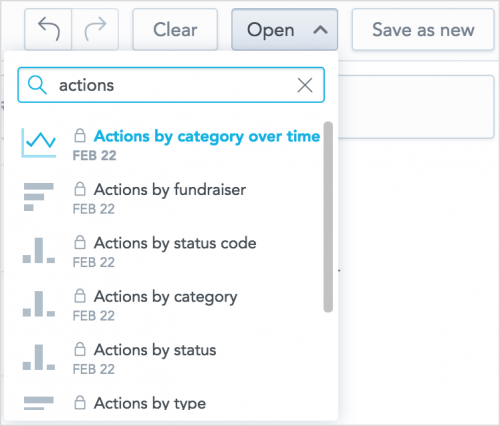 To view a default insight in Insights, select Open, and search by its name or select it under all.
- To add a default insight to a dashboard, search by its name under Saved insights and move it to the dashboard.

To get started, try these new default insights:
- Actions by category — Compares how many actions of each category you have in total
- Actions by category over time — Tracks trends in use of each action category. (By default, this is a line chart. Under Trend by, use the Date filter to choose which date (such as when the action was scheduled to occur or when it was completed) and interval (Quarter, Month, etc.) to analyze.)
- Actions by fundraiser — Compare how many actions of each category each fundraiser manages.
- Actions by status — Compare how many actions are open, marked as complete, or past their due dates.
- Actions by status code — Compare where actions are in your organization's workflow, based on the status codes configured by your admin
- Actions by type — Compare how many actions of each type you have in total
- Appeal performance — Compare and analyze your solicitations. For each appeal, you can view how much it raised (both net and gross), compared to its set goal amount.
- Gifts by age group — Helps identify which generations of donors your mission attracts most
- Gifts by gender — Helps determine which genders of donors your mission attracts most
0
Categories
- All Categories
- New K-12 Community Home (TEST)
- New Higher Education Home Page (Test)
- New Impact Edge Community TEST
- New YourCause Community TEST
- New SKY Community TEST
- New Grantmaking TEST Community
- New Altru Test Community
- New bbcon Community - TEST
- 12 Blackbaud Agents for Good™
- New Raiser's Edge NXT Community
- 8 Blackbaud Community Help
- 222 bbcon®
- 1.4K Blackbaud Altru®
- 410 Blackbaud Award Management™ and Blackbaud Stewardship Management™
- 1.2K Blackbaud CRM™ and Blackbaud Internet Solutions™
- 16 donorCentrics®
- 361 Blackbaud eTapestry®
- 2.7K Blackbaud Financial Edge NXT®
- 687 Blackbaud Grantmaking™
- 603 Blackbaud Education Management Solutions for Higher Education
- 3.3K Blackbaud Education Management Solutions for K-12 Schools
- 954 Blackbaud Luminate Online® and Blackbaud TeamRaiser®
- 85 JustGiving® from Blackbaud®
- 7K Blackbaud Raiser's Edge NXT®
- 4K SKY Developer
- 258 ResearchPoint™
- 123 Blackbaud Tuition Management™
- 165 Organizational Best Practices
- 248 Member Lounge (Just for Fun)
- 40 Blackbaud Community Challenges
- 37 PowerUp Challenges
- 3 (Closed) PowerUp Challenge: Grid View Batch
- 3 (Closed) PowerUp Challenge: Chat for Blackbaud AI
- 3 (Closed) PowerUp Challenge: Data Health
- 3 (Closed) Raiser's Edge NXT PowerUp Challenge: Product Update Briefing
- 3 (Closed) Raiser's Edge NXT PowerUp Challenge: Standard Reports+
- 3 (Closed) Raiser's Edge NXT PowerUp Challenge: Email Marketing
- 3 (Closed) Raiser's Edge NXT PowerUp Challenge: Gift Management
- 4 (Closed) Raiser's Edge NXT PowerUp Challenge: Event Management
- 3 (Closed) Raiser's Edge NXT PowerUp Challenge: Home Page
- 4 (Closed) Raiser's Edge NXT PowerUp Challenge: Standard Reports
- 4 (Closed) Raiser's Edge NXT PowerUp Challenge: Query
- 829 Community News
- 3.1K Jobs Board
- 57 Blackbaud SKY® Reporting Announcements
- 47 Blackbaud CRM Higher Ed Product Advisory Group (HE PAG)
- 19 Blackbaud CRM Product Advisory Group (BBCRM PAG)