Aggregate a gift query in a report Only by FY showing 2 columns: total $'s and total # of Gifts

Hi all, I’m looking for help creating a very basic and simple aggregation report based on a gift query (Report needs to be able to use a gift query as I am needing the criteria to use a fund attribute/custom field). It should display 2 columns only: 1. total $ giving and 2. total number of gifts by Only the 2 fiscal years I enter in the report config. Is this possible in any Report that uses a Gift Query. Thanks in advance!


Answers

  • Carlene Johnson
    Carlene Johnson Community All-Star
    Tenth Anniversary Kudos 5 Raiser's Edge NXT Fall 2025 Product Update Briefing Badge First Reply
    edited August 7

    Does this need to be an actual report printed out of Unified View? Or can this be exported to Excel and formatted nicely there for presentation?

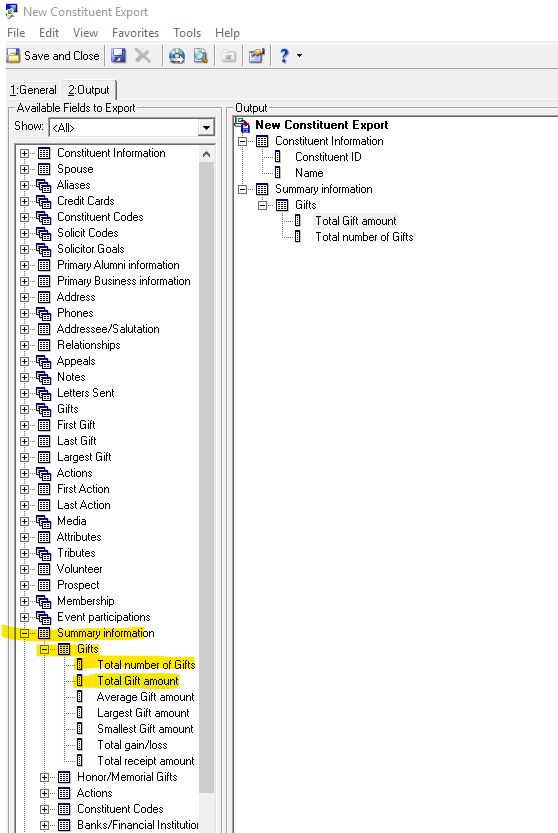
    I'd suggest creating a Constituent Export (which is currently only in database view) and then exporting:
    *Cons ID
    *Name
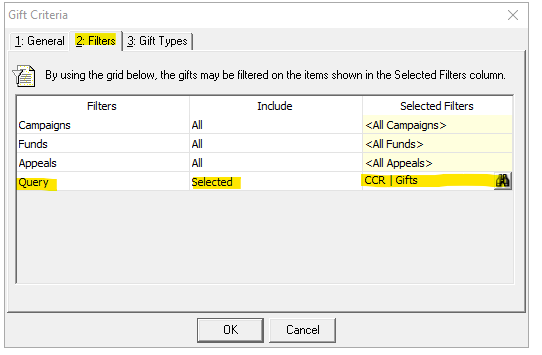
    *Total Amount of Giving and filter by your gift query on the filter tab of total giving
    *Total # of Gifts and filter by your gift query on the filter tab of total # of gifts.

    You will find this KB helpful in using a gift query on the filter tab. KB # 38785

    Here is a screenshot of how to use a query on the filter tab:

    image.png


    Here is an image of what your export should look like:

    image.png
  • Thanks, Carlene! This is helpful. I ran a fund query, pulled total giving and number of gifts into the Output using the right fund attribute and “New Business” gift types, exported, de-duped, and totaled. For us, that’s a much shorter list than pulling every constituent for this dataset. Looks like RE DBV and WBV can’t give me an aggregate-only rows by fiscal year. I’d use NXT dashboards but fund custom fields don’t show up as filters for me. Appreciate the nudge in the right direction.

  • Amy Dana
    Amy Dana Community All-Star
    Tenth Anniversary Kudos 5 Raiser's Edge NXT Fall 2025 Product Update Briefing Badge Name Dropper

    Hopefully the export function will be up and running soon in webview, because that way you can replicate the exact data in your query but not have all the duplicates. (and yes, I feel your pain about not having the filters you need on dashboards)

  • Alex Wong
    Alex Wong Community All-Star
    Ninth Anniversary Kudos 5 Facilitator 3 Raiser's Edge NXT Fall 2025 Product Update Briefing Badge

    You can use Fund Query like you mentioned, and in the Total Number of Gift and Total Amount of Gift, you can create mutiple output columns each filtering by gift date to give you columns by fiscal year. if you need "rows" by fiscal year, then some excel work.

  • @Alex Wong Thanks, that’s essentially what I did. I used the Fund Query as you suggested, then brought the results into Power Pivot to aggregate by fiscal year and maintain Fund-level detail. Power Query can made it easy to generate a fiscal year dimension, keep a clean star schema, and drill from Fund aggregates to transaction-level data.