Question About Online Donation Receipts in Raiser's Edge NXT


- Right now in our system, when someone makes an online donation, they don’t receive a receipt right away. The receipt is only sent after the gift batch is approved.
Can you please confirm if this is how Raiser's Edge NXT normally works? If so, what’s the reason for doing it this way?
2. Also, is there any way to change the setup so donors receive their receipt immediately after donating?
Thanks in advance.
Best Answer
-
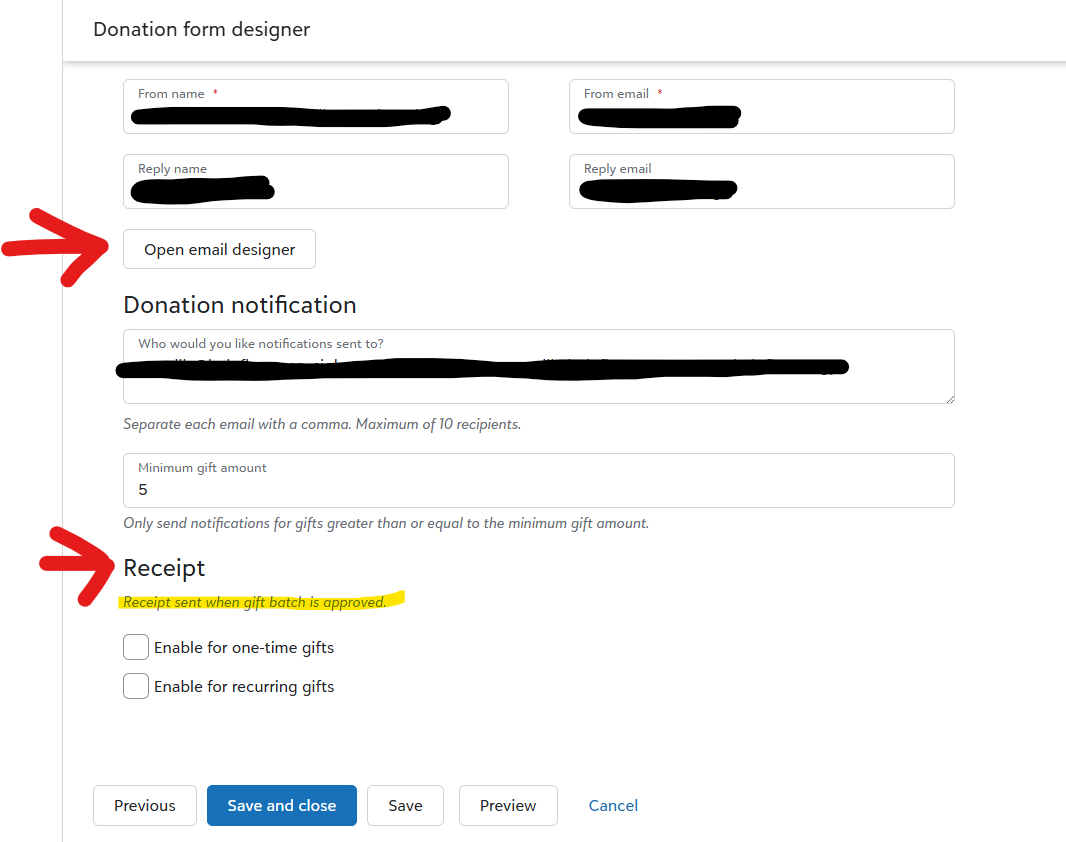
When you’re using Raiser’s Edge NXT Online Giving Donation Forms, there are actually two separate emails involved, and they serve different purposes. In the screenshot I’m including, you’ll see both the auto‑responder and the receipt‑on‑batch‑approval options.
1. Immediate email = Transaction Confirmation (not a tax‑receipt)
As soon as a donor completes an online gift, the system sends an auto‑responder. You can customize this under Donation Form Designer → Tab 4: Confirmations → Open email designer (shown in my screenshot).
This confirmation email is intentionally not a tax‑receipt. It typically avoids tax‑deductibility language because some online gifts are not 100% deductible (events, memberships, benefits, split gifts, etc.). So this message functions as a “thank you / we received your gift” notice.
2. Tax‑receipt = Sent only after the batch is approved/committed
The official tax‑receipt is generated only after you approve/commit the gift batch in RE NXT. This ensures the gift is fully processed and coded correctly before issuing anything that could be interpreted as a tax document.
Here’s the relevant Blackbaud documentation language for context:
Send receipts
If you use Raiser's Edge NXT receipt management, you can enable emailed receipts. After approving donations in a gift batch in Raiser's Edge NXT, receipts automatically send to donors.Under Receipt, select which gift types you want to enable receipts for.
Select an email receipt template for each gift type.
Select a receipt series for the receipts.And here is the full product documentation page that walks through this workflow in more detail:
Q: Can donors receive their tax‑receipt immediately after donating?A: Not with the native RE NXT workflow. The system is designed so that:
- Immediate email = confirmation only
- Post‑batch email = official tax‑receipt
There isn’t a setting to convert the confirmation into a tax‑receipt or to send the tax‑receipt before the batch is committed.
Optional workaround some organizations use
If you know that every gift on a specific form is 100% tax‑deductible, some organizations choose to:
- Add tax‑receipt language directly into the auto‑responder, and
- Disable the receipt‑on‑batch‑approval option for that form
In that scenario, the confirmation email functions as the donor’s tax‑receipt, and no second email is needed.
This only works when the form is used exclusively for fully deductible gifts.
There’s a helpful thread that dives into the differences between thank‑yous, receipts, and acknowledgements in RE NXT, which may give additional context:
Just to clarify: everything I’ve described here applies specifically to Online Giving Forms in Raiser’s Edge NXT. Online Express uses a completely different email/receipt workflow, so this explanation doesn’t apply there.
Hope this helps! Let me know if you have any other questions!6






Answers
-
Thank you for your reply, Carlene Johnson. I really appreciate your support!
1 -
Carlene is amazing! Just to share this method that Carlene spelled out so beautifully is exactly how we set up our system to handle gifts. We don't offer goods or services with our donations so it works. We also don't have records for spouses in our couples (particularly parent couples - we are a school) so this allows the person who fills out the form to be on the receiving end of our confirmation/acknowledgement/receipt - all in one process. If someone give a gift over 1K online they get specialized outreach that might be an email or a call - of the non-official nature - depending on their preferences on their records.
1 -
This is a great explanation and makes the process much clearer. Thank you Carlene!
2 -
FYI - We are still using OLX for online donations because of this issue. We need to issue a receipt as a pdf instantly. My understanding from our Customer Success Mgr is that this automatic instant receipting functionality will be implemented this year so that we transition over to the NXT forms.
1








Categories
- All Categories
- 6 Blackbaud Community Help
- 211 bbcon®
- 1.4K Blackbaud Altru®
- 403 Blackbaud Award Management™ and Blackbaud Stewardship Management™
- 1.2K Blackbaud CRM™ and Blackbaud Internet Solutions™
- 15 donorCentrics®
- 360 Blackbaud eTapestry®
- 2.6K Blackbaud Financial Edge NXT®
- 659 Blackbaud Grantmaking™
- 579 Blackbaud Education Management Solutions for Higher Education
- 3.2K Blackbaud Education Management Solutions for K-12 Schools
- 943 Blackbaud Luminate Online® and Blackbaud TeamRaiser®
- 84 JustGiving® from Blackbaud®
- 6.7K Blackbaud Raiser's Edge NXT®
- 3.8K SKY Developer
- 250 ResearchPoint™
- 120 Blackbaud Tuition Management™
- 165 Organizational Best Practices
- 241 Member Lounge (Just for Fun)
- 36 Blackbaud Community Challenges
- 37 PowerUp Challenges
- 3 (Open) PowerUp Challenge: Grid View Batch
- 3 (Closed) PowerUp Challenge: Chat for Blackbaud AI
- 3 (Closed) PowerUp Challenge: Data Health
- 3 (Closed) Raiser's Edge NXT PowerUp Challenge: Product Update Briefing
- 3 (Closed) Raiser's Edge NXT PowerUp Challenge: Standard Reports+
- 3 (Closed) Raiser's Edge NXT PowerUp Challenge: Email Marketing
- 3 (Closed) Raiser's Edge NXT PowerUp Challenge: Gift Management
- 4 (Closed) Raiser's Edge NXT PowerUp Challenge: Event Management
- 3 (Closed) Raiser's Edge NXT PowerUp Challenge: Home Page
- 4 (Closed) Raiser's Edge NXT PowerUp Challenge: Standard Reports
- 4 (Closed) Raiser's Edge NXT PowerUp Challenge: Query
- 798 Community News
- 3K Jobs Board
- 56 Blackbaud SKY® Reporting Announcements
- 47 Blackbaud CRM Higher Ed Product Advisory Group (HE PAG)
- 19 Blackbaud CRM Product Advisory Group (BBCRM PAG)