As browsers prioritize secure connections, fundraising links and pages may face challenges, especially if older HTTP links remain. This shift could affect supporter engagement. Blackbaud is committed to guiding Blackbaud Luminate Online™ and Blackbaud TeamRaiser® customers by offering intuitive tools and insights to ensure seamless transitions to the HTTPS protocol without the hassle.
A Brief Recap
- On September 22nd, 2026, Google Chrome will start displaying warnings on non-secure pages using HTTP. This impacts all HTTP links. Switching all your HTTP hyperlinks to HTTPS will ensure that these security warnings don’t get shown to your supporters.
- Learn how Link Manager helps detect and transform HTTP links to HTTPS.
- Register for this important webinar:
How security shifts are affecting supporter engagement
Warnings about page security can sow doubt, reducing confidence in even trusted organizations. Such friction undermines conversions and impacts donor engagement. Blackbaud is proactively addressing these security shifts to protect your supporters’ trust and deliver a seamless experience for your fundraising goals.
Reliable fundraising: trust without the guesswork
Modern browser standards drive Blackbaud’s migration to full HTTPS for its fundraising platforms, reinforcing security and trust. This proactive approach minimizes supporter disruptions and ensures compliance. Paired with detailed guidance, customers gain confidence to take effective, informed actions with ease.
Stronger browser rules and complete HTTPS adoption explained
Google has announced stricter “HTTPS by Default” policies for Chrome 154. Chrome will start defaulting to “Always Use Secure Connections” and will alert users before visiting non-secure sites.
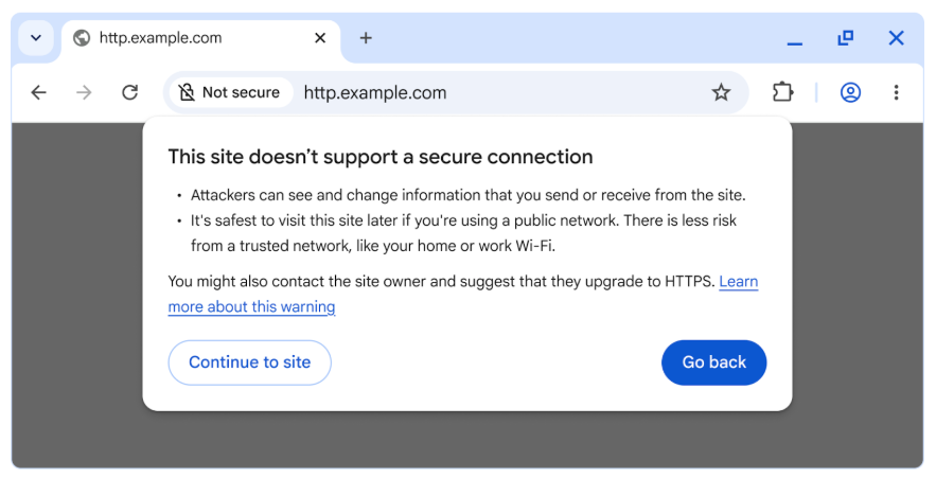
For further information, check Google’s official statement.
You don’t need advanced security knowledge to prepare.
Introducing Link Manager
Blackbaud’s Link Manager, part of the 26.1 Release, simplifies the process for admins to locate and upgrade links to secure HTTPS formats.
Link Manager is designed to help you with:
- Organizing links within your Luminate Online system for efficient tracking
- Identifying where links are placed to target critical upgrades
- Identifying HTTP links to help you move them to HTTPS with greater confidence
- Ensure consistent link health for improved resource performance
Reference Articles:
Updating fundraising links to HTTPS using Link Manager
Configuring HTTPS for multi-domain setups
On the horizon: 26.2.2 introduces bulk updates
Overwhelmed with too many links? Accumulating outdated HTTP links is a common issue for organizations. For customers with many links, manually updating them one by one can quickly become an overwhelming task.
Blackbaud will be introducing a bulk update feature in release 26.2.2, which will help users transition from non-secure links to secure HTTPS links more efficiently. This tool will position customers for success ahead of September 22nd, 2026, when Chrome will start issuing warnings to visitors trying to access public sites without HTTPS, ensuring a smoother and more secure browsing experience for all.
Evaluate and secure your online presence today
Think of security improvements as a catalyst for tidying up your digital space. Websites often host outdated links or pages that no longer serve a purpose. A thorough audit can help prioritize important elements while clearing out unnecessary clutter. This approach reduces the workload of maintaining legacy content, while simultaneously creating a smoother, more engaging journey for your audience.
FAQs
Do I need to update every link at once?
No. Start by focusing on active, high-traffic pages, and wait for the bulk updater. Version 26.2.2 will offer bulk update capabilities to simplify the process and improve efficiency when managing larger sets of links.
How can I identify links that matter most?
Use Link Manager to prioritize and identify active HTTP links across your web presence. While all links should eventually be updated, active links are the highest priority.
Preparing together for what’s next
As browser security standards change, Blackbaud helps customers stay proactive. Audit your links to prepare for the upcoming bulk updater release to keep your fundraising secure and accessible.