Power Automate Compose Action





I have a compose action where I am trying to join constituent code descriptions. The way my expression is currently set up it is creating separate rows in my add a row to table for each constituent code description. I want it to join them by a comma.
This is my compose action expression:
join(createArray(items('For_each_-_Tributee_Constituent_Code_Self_Acknowledgee')?['description']), ',')
What am I doing wrong?
Best Answer
-
not completely sure what your flow looks like, but I'm going to make some assumptions.
You have a "get constituent codes" action on a constituent record id, that gives you a list (array) of objects of constituent code, which you want to have these code "join" as a one string separated by comma.
this is what you need:
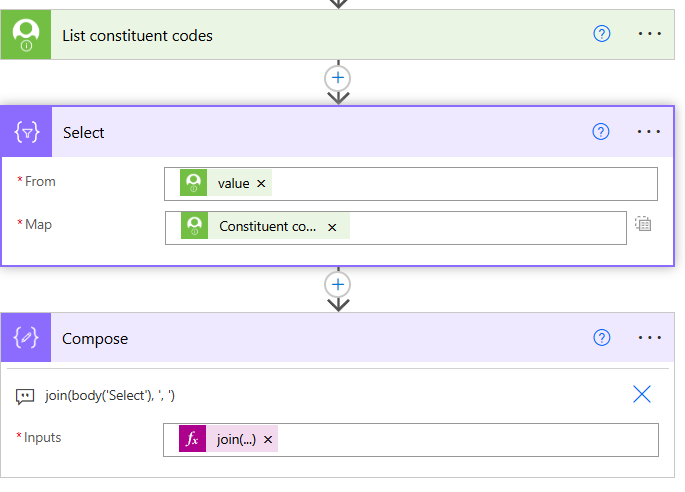
Note:
- Select action's From field should be the "value" dynamic content from the List constituent codes action
- Select actoin's Map field, you need to first click on the icon on the far right side, so it becomes ONE field, not TWO, then select the Constituent code dynamic content from the List constituent codes action, THERE IS NO FOR EACH LOOP needed here.
4






Answers
-
The array is whatever feeds the For_each_-_Tributee_Constituent_Code_Self_Acknowledgee loop. I think createArray(items('...')?['description']) creates single element array each loop. Joining array of one item. Without seeing your whole follow, there's probably two ways you can do it.
Option 1: Select + Join using three actions.
- Select action place outside/after the For_each loop
- From: the same that feeds Tributee_Constituent_Code_Self_Acknowledgee
- Open your For_each, copy whatever is in "Select an output from previous steps"
- for example:
body('Get_Tributee_Constituent_Codes')
- Map:
item()?['description'] - This should give you an output like:
["Code A", "Code B", "Code C"]
- From: the same that feeds Tributee_Constituent_Code_Self_Acknowledgee
- Compose action (after the Select)
- Inputs:
join(body('Select'), ', ') - Output:
"Code A, Code B, Code C"
- Inputs:
- Add Row to Table
- Reference:
outputs('Compose')
- Reference:
Option 2: One-liner
- Use directly in Add Row to Table
- Expression:
join(xpath(xml(json(concat('{"r":{"d":', string(YOUR_ARRAY_SOURCE), '}}'))), '//d/description/text()'), ', ')
- Expression:
- Replace
YOUR_ARRAY_SOURCEwith the same array that feedsTributee_Constituent_Code_Self_Acknowledgee
1 - Select action place outside/after the For_each loop
-
@Alex Wong that was it! Thank you!
2




Categories
- All Categories
- New K-12 Community Home (TEST)
- New Higher Education Home Page (Test)
- New Impact Edge Community TEST
- New YourCause Community TEST
- New SKY Community TEST
- New Grantmaking TEST Community
- New Altru Test Community
- New bbcon Community - TEST
- 12 Blackbaud Agents for Good™
- New Raiser's Edge NXT Community
- 8 Blackbaud Community Help
- 222 bbcon®
- 1.4K Blackbaud Altru®
- 411 Blackbaud Award Management™ and Blackbaud Stewardship Management™
- 1.2K Blackbaud CRM™ and Blackbaud Internet Solutions™
- 16 donorCentrics®
- 361 Blackbaud eTapestry®
- 2.7K Blackbaud Financial Edge NXT®
- 688 Blackbaud Grantmaking™
- 604 Blackbaud Education Management Solutions for Higher Education
- 3.3K Blackbaud Education Management Solutions for K-12 Schools
- 954 Blackbaud Luminate Online® and Blackbaud TeamRaiser®
- 85 JustGiving® from Blackbaud®
- 7.1K Blackbaud Raiser's Edge NXT®
- 4K SKY Developer
- 258 ResearchPoint™
- 123 Blackbaud Tuition Management™
- 165 Organizational Best Practices
- 249 Member Lounge (Just for Fun)
- 40 Blackbaud Community Challenges
- 37 PowerUp Challenges
- 3 (Closed) PowerUp Challenge: Grid View Batch
- 3 (Closed) PowerUp Challenge: Chat for Blackbaud AI
- 3 (Closed) PowerUp Challenge: Data Health
- 3 (Closed) Raiser's Edge NXT PowerUp Challenge: Product Update Briefing
- 3 (Closed) Raiser's Edge NXT PowerUp Challenge: Standard Reports+
- 3 (Closed) Raiser's Edge NXT PowerUp Challenge: Email Marketing
- 3 (Closed) Raiser's Edge NXT PowerUp Challenge: Gift Management
- 4 (Closed) Raiser's Edge NXT PowerUp Challenge: Event Management
- 3 (Closed) Raiser's Edge NXT PowerUp Challenge: Home Page
- 4 (Closed) Raiser's Edge NXT PowerUp Challenge: Standard Reports
- 4 (Closed) Raiser's Edge NXT PowerUp Challenge: Query
- 829 Community News
- 3.1K Jobs Board
- 57 Blackbaud SKY® Reporting Announcements
- 47 Blackbaud CRM Higher Ed Product Advisory Group (HE PAG)
- 19 Blackbaud CRM Product Advisory Group (BBCRM PAG)