What's New In Blackbaud Raiser's Edge NXT® — July 21, 2026






Here are the latest changes in Blackbaud Raiser's Edge NXT for July 21, 2026.
Gift Processing
- Batch reports now available in gift batch entry
You can now run batch reports directly from gift batches in web view, so you can quickly see batch performance and identify issues without switching views. Use the Batch Validation Report before or after approval to review batch details and identify exceptions. After approval, run the Batch Control Report (Detail) to document batch activity and support audit workflows. These reports help you review, validate, and document batch processing without switching to database view.
Online Giving
- Recapture lost gifts from donation forms
To increase completed gifts and improve conversion, activate the Abandoned donation reminder in Website components. The reminder prompts donors to complete their gift when they return to your website. This nudge helps recover incomplete donations and tracks how much you recapture.

Comments
-
This is very exciting but how do we format the Batch Validation report so we can see all of the information? Or format it so we can show our Business Office the pertinent information that's important to them?
3 -
Gift subtype appears like the below instead of what is actually in the subtype field:
Blackbaud.Gift.Service.ServiceClients.GiftService.GiftSubtype
Also, would be nice if it showed you what event it is linked to like it used to in DB view.
Now you have to generate, download, then print. Just even more added time. Gift entry in webview is just painfully slow. You can shut everything else off but keep DB gift entry forever because doing it in all in webview when it's this slow and cumbersome is just not it.
5 -
Hi Tioga, if you can, would you please submit the subtype issue as a bug so we can look more into that?
We built the process in web view for printing and creating to be flexible enough to generate the reports at any time so that if you miss the window when approving, you can still get the details you need. The feedback is great, it will help us dial all these processes in before we consider dropping database view.
0 -
I can very easily duplicate the gift subtype issue, I am sending it to the team now.
2 -
The validation report will reflect the columns you have selected in batch. If you apply a template or add columns to the batch entry screen, when you run the report, it will show those columns in the pdf.
1 -
@Anthony Gallo Thank you for your feedback! The major issue I'm noticing in the validation portion is not all of the information shows up on the PDF when I go to print it. Instead it runs off the page, and there's no way to format it so I can ensure that all of the batch information is reflected in the validation report. I would be happy to send you an email with an example, if that would help.
3 -
@Anthony Gallo - thanks Anthony, that's a good point about generating the control report whenever you want, that's a definite improvement. Would be cool just to have like a preview/export option and a direct print option like in DB view so you could just print it without downloading it first
4 -
This one we would consider a bug. The formatting should be able to handle this without needing any input from the user.
2 -
Validation report - successful. Batch control report - where is it? I have approved the batch but do not see where the control report lives. Or where the approved batch went. (I know it went over to DB view). I looked for the batch under query not there. (would love for the approved batches to be made into a query)
Never mind, I found it!!!
1 -
Where did you find it?
1 -
This is looking promising. Regarding the validation report: I am also experiencing the above bugs with gift subtype & the information running off the page. I would also prefer the fields to be left justified instead of center justified. And Anthony, can you tell me how I would get IDs on this report instead of fund and appeal names?
2 -
Now that I have successfully found the Control report I too would love some modifications. I agree with Teddi - I would love Appeal ID's on the Control report as well.
Teddi - I created an idea for it if you would like to vote on it:
Idea created: RENXT-I-10280
0 -
I didn't know how to respond to this earlier so I sent you a direct message.
0 -
Where do you find the Control report? I am only seeing the option to print the validation report after I approve the batch.
0 -
-
Thank you!
0 -
Thank you for sharing the Validation report is there a way to have it show appeal and campaign or just the fund. I can make it work if it is just the fund, but thought I would ask.
0 -
The validation report should print all the selected fields in your batch. Are appeal and campaign selected fields in your batch? I have 18-19 fields selected in my test batch and it is trying to print them all, but the data bleeds off the page. I think some of this has to do with the length of our fund descriptions. If we could opt to use Fund IDs, it might solve the bleed issue, but the report should probably be formatted to wrap instead of bleed regardless.
0 -
@Teddi Taylor thank you. I do have the appeal and campaign selected and I am only using Fund ID I don't use description for that purpose too long. I'll play around some more with this. I appreciate the assistance.
0 -
@Lucy Ann Gossett How did you get Fund ID to print? I was told by support that IDs are not yet available in webview batch validation reports.
0 -
I also didn't see the Control Report in the print drop-down menu after approving the batch, and then it suddenly appeared a few minutes later.
I understand that the Validation Report includes the columns in the batch template, but is there a way to customize which fields are included in the Control Report? Not all the columns are included, but one that does appear is Solicitor and we really don't need that to be there.
So glad to finally have these reports available in webview. Thank you for your hard work, @Anthony Gallo and Team!
0 -
Maybe the wrong place for this question; in the batch set up, is there a way to hide default columns. I am not finding it and tabbing through fields is a pain. Help
0 -
In edit batch configuration - you can "unclick" the box next to the field and it will not be seen. Example - this batch the appeal is hidden from view.
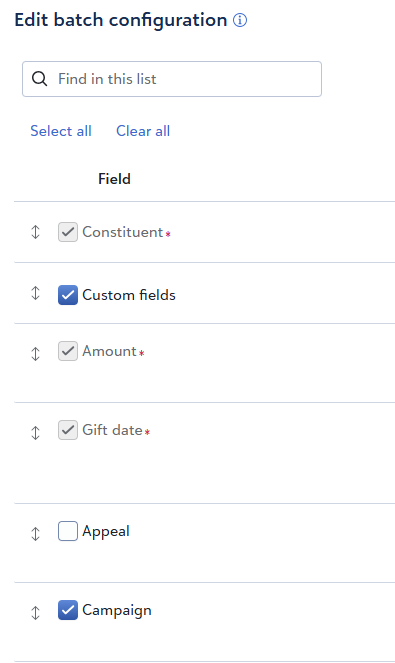 1
1 -
Not sure the correct place for this comment, but it would be so helpful if the pledge information would auto fill in the batch details when a gift is applied to a pledge during gift batch entry.
2 -
I finally found where this is planned.
2 -
I'm happy I finally have a control report!
Not sure if this is possible yet, but it would be great if I could edit what fields appear on the control report. In DB I had far fewer fields appear on the report which suited our purposes. Does this exist and I just can't find it or is the final version?
0























Categories
- All Categories
- New K-12 Community Home (TEST)
- New Higher Education Home Page (Test)
- New Impact Edge Community TEST
- New YourCause Community TEST
- New SKY Community TEST
- New Grantmaking TEST Community
- New Altru Test Community
- New bbcon Community - TEST
- 12 Blackbaud Agents for Good™
- New Raiser's Edge NXT Community
- 8 Blackbaud Community Help
- 222 bbcon®
- 1.4K Blackbaud Altru®
- 410 Blackbaud Award Management™ and Blackbaud Stewardship Management™
- 1.2K Blackbaud CRM™ and Blackbaud Internet Solutions™
- 16 donorCentrics®
- 361 Blackbaud eTapestry®
- 2.7K Blackbaud Financial Edge NXT®
- 687 Blackbaud Grantmaking™
- 604 Blackbaud Education Management Solutions for Higher Education
- 3.3K Blackbaud Education Management Solutions for K-12 Schools
- 954 Blackbaud Luminate Online® and Blackbaud TeamRaiser®
- 85 JustGiving® from Blackbaud®
- 7K Blackbaud Raiser's Edge NXT®
- 4K SKY Developer
- 258 ResearchPoint™
- 123 Blackbaud Tuition Management™
- 165 Organizational Best Practices
- 248 Member Lounge (Just for Fun)
- 40 Blackbaud Community Challenges
- 37 PowerUp Challenges
- 3 (Closed) PowerUp Challenge: Grid View Batch
- 3 (Closed) PowerUp Challenge: Chat for Blackbaud AI
- 3 (Closed) PowerUp Challenge: Data Health
- 3 (Closed) Raiser's Edge NXT PowerUp Challenge: Product Update Briefing
- 3 (Closed) Raiser's Edge NXT PowerUp Challenge: Standard Reports+
- 3 (Closed) Raiser's Edge NXT PowerUp Challenge: Email Marketing
- 3 (Closed) Raiser's Edge NXT PowerUp Challenge: Gift Management
- 4 (Closed) Raiser's Edge NXT PowerUp Challenge: Event Management
- 3 (Closed) Raiser's Edge NXT PowerUp Challenge: Home Page
- 4 (Closed) Raiser's Edge NXT PowerUp Challenge: Standard Reports
- 4 (Closed) Raiser's Edge NXT PowerUp Challenge: Query
- 829 Community News
- 3.1K Jobs Board
- 57 Blackbaud SKY® Reporting Announcements
- 47 Blackbaud CRM Higher Ed Product Advisory Group (HE PAG)
- 19 Blackbaud CRM Product Advisory Group (BBCRM PAG)