Black Friday Online Sales Discount Codes





Hi,
Trying this in a different topic... We are working on setting up our Black Friday promotions. We have programs set up for Exclusive Museum Use and Private Playtimes. For the promo, we would like to have a code that people can use for a $25 discount. I set up the code and it words for Advanced Sales, but I can't figure out how it works for Online Sales. It takes me to enter my credit card info before it asks me to enter the promo code. Does anyone know how they typically work? We have not used discount codes yet. Any words of wisdom are appreciated!
Thank you,
Tamara
P.S. Here is the link to one of the programs: https://63247.blackbaudhosting.com/63247/page.aspx?pid=196&tab=2&txobjid=f68bde1e-5147-4883-9f0b-4ca1072ec2e0
Trying this in a different topic... We are working on setting up our Black Friday promotions. We have programs set up for Exclusive Museum Use and Private Playtimes. For the promo, we would like to have a code that people can use for a $25 discount. I set up the code and it words for Advanced Sales, but I can't figure out how it works for Online Sales. It takes me to enter my credit card info before it asks me to enter the promo code. Does anyone know how they typically work? We have not used discount codes yet. Any words of wisdom are appreciated!
Thank you,
Tamara
P.S. Here is the link to one of the programs: https://63247.blackbaudhosting.com/63247/page.aspx?pid=196&tab=2&txobjid=f68bde1e-5147-4883-9f0b-4ca1072ec2e0
Tagged:
0
Comments
-
did you get this to work?0
-
Not yet. I don't think anyone has answered yet. I will probably have to try chat. I'm not sure why a discount code field doesn't pop up for online sales. - Tamara0
-
i tried to test it today but the event date expired....0
-
for our tickets, which you probably know - you pick the quantity, add to cart and go to the next page for the discount code0
-
I just looked at your ticket page and yes, you do have a discount code field come up. Ours doesn't do that. I have it set up for online sales too.
Yours looks like this: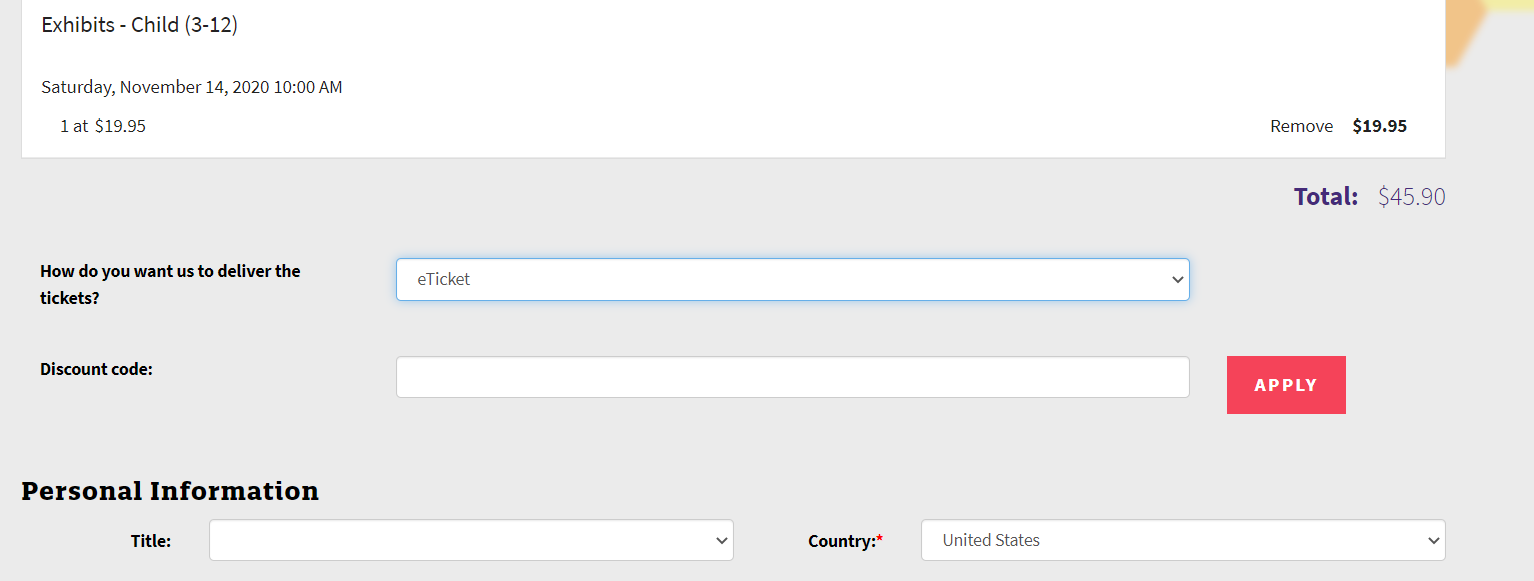
Mine looks like this (missing both those field):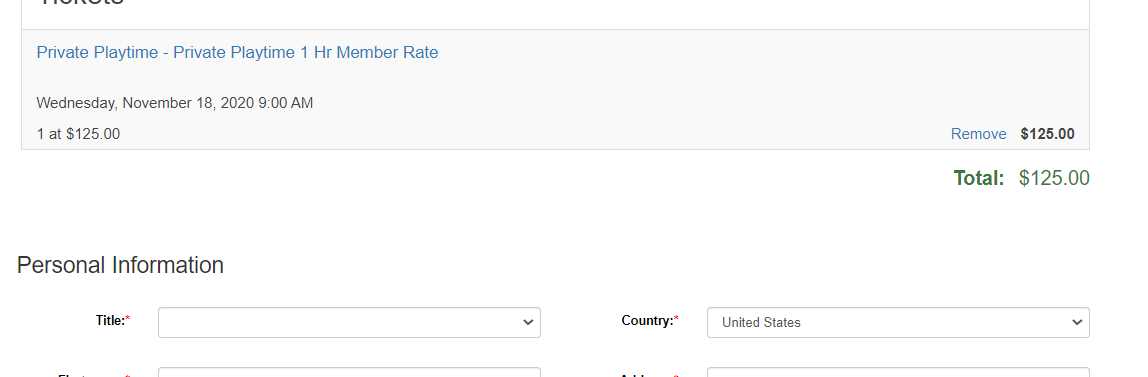
I'm thinking that I must have something disabled but I've tried looking everywhere and can't find anything to change to get it to show up.
Hope fully can find the answer in the next 4 days before Black Friday starts!
Thanks,
Tamara
0 -
Hi Tamara,
You can edit the availability of sales on your discount. Maybe you didn't tick the "Online Sales" box? It looks like this: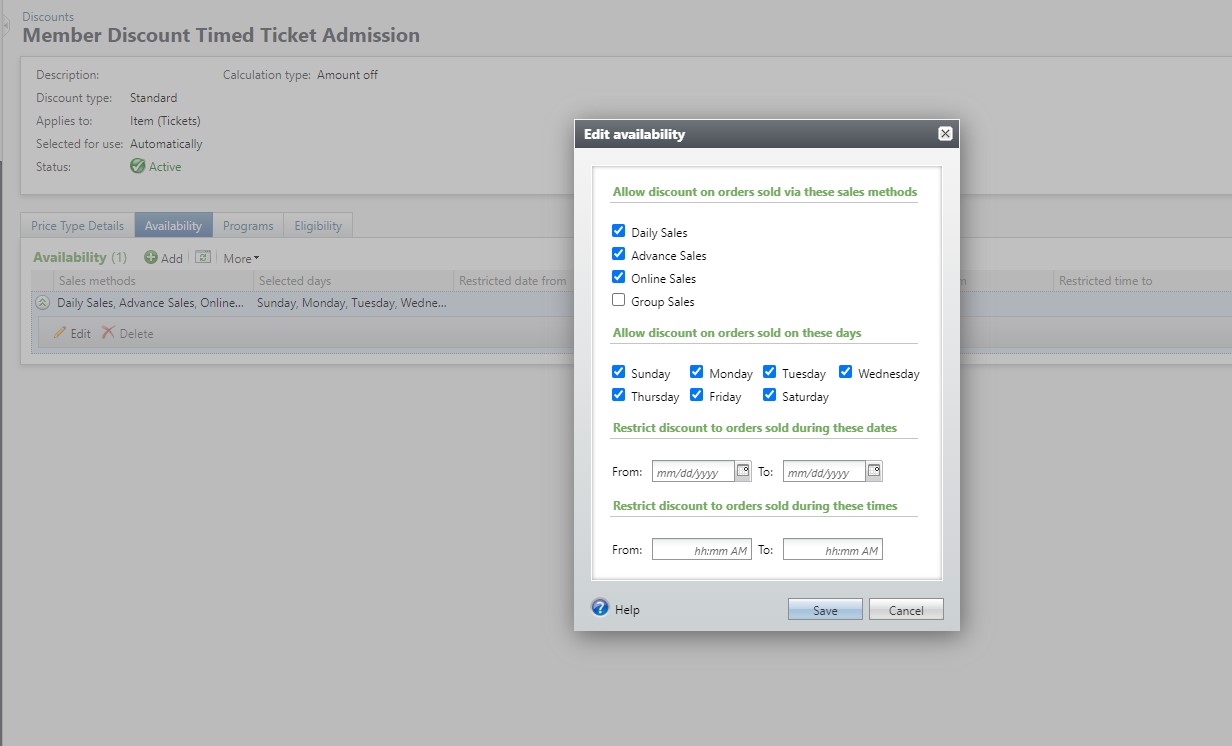 As long as you've made the discount available in Online Sales and in your Program set up, you should be good to go... Did you create a "With Code" discount? If you did and you already set up the time frame for Black Friday, that might be why the discount code box is not appearing...
Hope you get this worked out!
Sarah Osborne0 -
Thanks Sarah,
I do already have that checked and am in the time range...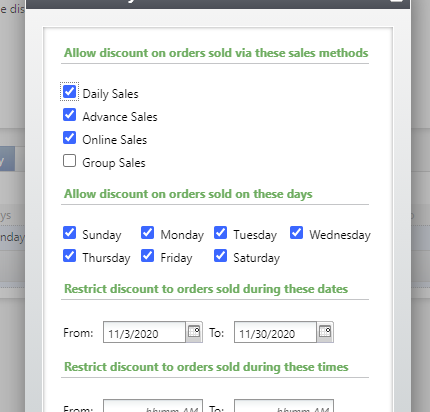
I suspect that it has something to do with the webforms and what shows on them, but I've looked and looked and can't find a place that says to enable discount codes on webforms or anything like that. I'm also missing the delivery method dropdown. I could have removed it at one point thinking we would never use eTickets or discount codes?
Thank you,
Tamara0 -
I assume it's a Scheduled Program and not a Special Event set up, right? If it is a Special Event Altru doesn't allow discounts for those online... (pretty annoying).
Did you set the discount up as a Standard Discount or one with Required Purchase? The Required Purchase Discounts have a little more customization in the set up, like you can choose which Schedule Programs you're allowing to be discounted.
For Web Payment settings there is only the option to change the label on Discount Codes, no little check box for activation, so I assume you didn't just remove it!
0 -
Hi Sarah, Yes, it is active and it works with Advance Sales. We have an idea for a workaround - adding in a Black Friday price type for the duration of the sale and then removing it at the end. Or we could just have it be phone orders only? If I have time, I will try Altru chat later... Thanks, Tamara0
-
Thanks for your help, Sarah and Regina!
I worked with Caroline in Chat this morning and I am all fixed now! Sarah - the first questions she asked were the same ones as you! It turns out though, that I was correct about the webforms. I had changed the code a couple of years ago to remove those fields and she helped me figure out where that was so I could add them back in. I think I may be the queen of creating my own problems:)
2






Categories
- All Categories
- 6 Blackbaud Community Help
- 213 bbcon®
- 1.4K Blackbaud Altru®
- 403 Blackbaud Award Management™ and Blackbaud Stewardship Management™
- 1.1K Blackbaud CRM™ and Blackbaud Internet Solutions™
- 15 donorCentrics®
- 360 Blackbaud eTapestry®
- 2.6K Blackbaud Financial Edge NXT®
- 656 Blackbaud Grantmaking™
- 577 Blackbaud Education Management Solutions for Higher Education
- 3.2K Blackbaud Education Management Solutions for K-12 Schools
- 939 Blackbaud Luminate Online® and Blackbaud TeamRaiser®
- 84 JustGiving® from Blackbaud®
- 6.6K Blackbaud Raiser's Edge NXT®
- 3.7K SKY Developer
- 249 ResearchPoint™
- 119 Blackbaud Tuition Management™
- 165 Organizational Best Practices
- 241 Member Lounge (Just for Fun)
- 34 Blackbaud Community Challenges
- 37 PowerUp Challenges
- 3 (Open) PowerUp Challenge: Grid View Batch
- 3 (Closed) PowerUp Challenge: Chat for Blackbaud AI
- 3 (Closed) PowerUp Challenge: Data Health
- 3 (Closed) Raiser's Edge NXT PowerUp Challenge: Product Update Briefing
- 3 (Closed) Raiser's Edge NXT PowerUp Challenge: Standard Reports+
- 3 (Closed) Raiser's Edge NXT PowerUp Challenge: Email Marketing
- 3 (Closed) Raiser's Edge NXT PowerUp Challenge: Gift Management
- 4 (Closed) Raiser's Edge NXT PowerUp Challenge: Event Management
- 3 (Closed) Raiser's Edge NXT PowerUp Challenge: Home Page
- 4 (Closed) Raiser's Edge NXT PowerUp Challenge: Standard Reports
- 4 (Closed) Raiser's Edge NXT PowerUp Challenge: Query
- 794 Community News
- 3K Jobs Board
- 54 Blackbaud SKY® Reporting Announcements
- 47 Blackbaud CRM Higher Ed Product Advisory Group (HE PAG)
- 19 Blackbaud CRM Product Advisory Group (BBCRM PAG)