Entering 'Survey Monkey' Survey Responses into RE





We've been conducting surveys including questions with multiple choice options and with open-ended responses. I store the open-ended responses as an action but creating the import file using the data file exported from Survey Monkey is taking so long because all answers have to be in the same column in the import file in order to put them into a single action/notepad. I am wondering how you deal with this, do you have any better practices which also takes less time?
Tagged:
0
Comments
-
Alper, I'm not sure if this is helpful or not ... we also store survey data in RE under an Action, but we use action attributes. This allows us to store the variable responses as a text value and the menu responses as a table value.
Importing as action attributes also requires each field (each attribute) to be its own cell in the same column. You probably do this already: when moving items from a single row to separate lines in a single column, it helps how you sort your spreadsheet beforehand, so that you can just copy one big block of info at a time and paste it to the bottom rows of your spreadsheet.
So if your starting file looks like this: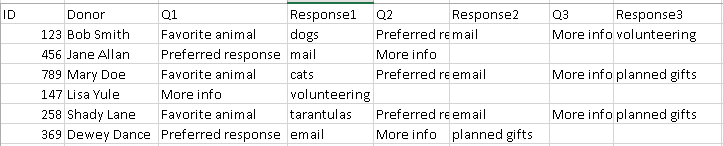
...you leave Q1 column alone, but sort by Q2, copy the block,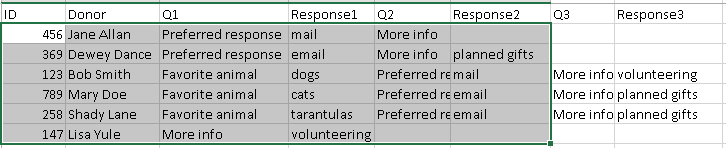
paste to the bottom (blank) portion of the file, then cut column Q2 values in that block...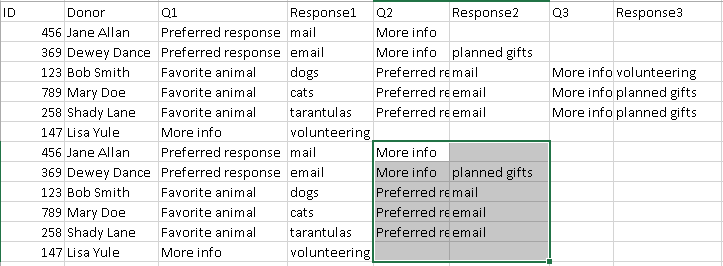
and paste over column Q1 values in that block. You can then delete the "old" (moved) columns Q2 and Response 2.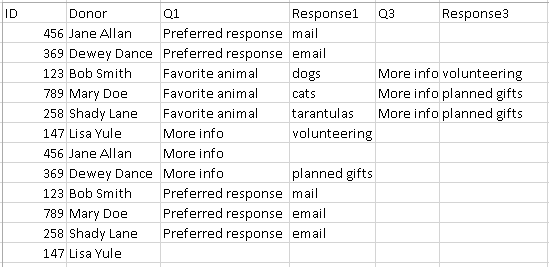
Repeat process for Q3/Response3 columns and all subsequent columns.
This process seems involved because of multiple steps, but once you get used to it, it takes literally a few minutes even with a large file of several hundred names. We do this frequently for manually importing Mailchimp data, where RE places multiple email addresses in one row, while Mailchimp requires one email per row as it uses the email address as the unique identifier.
If someone else has a smarter way of doing this, please share! I'm always open to more efficient methods, and maybe there's a formula in excel that I am overlooking.
0 -
Thanks Faith! Yes I do that already. It's not a problem for me to put each field in its own cell. But some questions are longer than 50 characters (the limit for attribute category) and responses are longer than 255 characters. Because of this, I had to import those as action notes instead of attributes in some cases which needs to be put all questions and responses in a single cell. I use some excel formulas to do that but I feel like it is not efficient as it takes long time.0




Categories
- All Categories
- 6 Blackbaud Community Help
- 211 bbcon®
- 1.4K Blackbaud Altru®
- 403 Blackbaud Award Management™ and Blackbaud Stewardship Management™
- 1.2K Blackbaud CRM™ and Blackbaud Internet Solutions™
- 15 donorCentrics®
- 360 Blackbaud eTapestry®
- 2.6K Blackbaud Financial Edge NXT®
- 659 Blackbaud Grantmaking™
- 579 Blackbaud Education Management Solutions for Higher Education
- 3.2K Blackbaud Education Management Solutions for K-12 Schools
- 943 Blackbaud Luminate Online® and Blackbaud TeamRaiser®
- 84 JustGiving® from Blackbaud®
- 6.7K Blackbaud Raiser's Edge NXT®
- 3.8K SKY Developer
- 250 ResearchPoint™
- 120 Blackbaud Tuition Management™
- 165 Organizational Best Practices
- 241 Member Lounge (Just for Fun)
- 36 Blackbaud Community Challenges
- 37 PowerUp Challenges
- 3 (Open) PowerUp Challenge: Grid View Batch
- 3 (Closed) PowerUp Challenge: Chat for Blackbaud AI
- 3 (Closed) PowerUp Challenge: Data Health
- 3 (Closed) Raiser's Edge NXT PowerUp Challenge: Product Update Briefing
- 3 (Closed) Raiser's Edge NXT PowerUp Challenge: Standard Reports+
- 3 (Closed) Raiser's Edge NXT PowerUp Challenge: Email Marketing
- 3 (Closed) Raiser's Edge NXT PowerUp Challenge: Gift Management
- 4 (Closed) Raiser's Edge NXT PowerUp Challenge: Event Management
- 3 (Closed) Raiser's Edge NXT PowerUp Challenge: Home Page
- 4 (Closed) Raiser's Edge NXT PowerUp Challenge: Standard Reports
- 4 (Closed) Raiser's Edge NXT PowerUp Challenge: Query
- 798 Community News
- 3K Jobs Board
- 56 Blackbaud SKY® Reporting Announcements
- 47 Blackbaud CRM Higher Ed Product Advisory Group (HE PAG)
- 19 Blackbaud CRM Product Advisory Group (BBCRM PAG)