?️ Following up: Your feedback and LMS updates





Hi all!
I just wanted to provide another update (previous update here) on recent updates in the LMS based on your feedback, along with what’s still in the works.
Here’s a sampling of recent updates – and be sure to check out the What's New letter for more info!
- New Submitted indicator: Teachers can now see at a glance whether students have submitted an assignment through our new Submitted indicator. A blue background indicates an on-time submission, while a yellow indicates a late submission. Desktop users can hover over the indicator to see the date and time of submission.
- Student assignment preview: Teachers can now preview an assignment as a student would (approximately) see it through See student preview. This feature is in direct response to the feedback we heard from you about needing a view that felt comfortable screensharing or projecting with your classes.
- Keyboard shortcuts for gradebook: Teachers can once again type M, X, I, and now C in the gradebook for Missing, Exempt, Incomplete, and Collected.
- Discussion replies: Discussions now show all of a student’s responses — original posts and replies to others — in discussion details. We also added back an indicator showing the number of discussion posts a student has made. As a plus, there’s a color-change for on-time vs. late posting, and you can hover over the indicator to see how many of the posts are original posts versus replies to others.
- Easier assignment scrolling: In assignment details, the header for the assignment is no longer “sticky” on the page, allowing more space to evaluate and view student work.
- Performance summary: As of today, performance summary is back in the gradebook! From the assignment column header dropdown, select See performance summary to access the same grade and submission statistics as last year. We are excited to bring back this functionality to the gradebook, and we appreciate your feedback around its importance.
- Add discussion from gradebook: As of today, you can add a Discussion from the gradebook! We look forward to expanding the Add functionality further moving forward.
And here’s what’s in the works:
- Updating date-picker to highlight the days teachers’ classes meet
- Deleting an assignment from the gradebook
- Updating commenting to reduce risk of leaving comments unsaved, based on your feedback
- Restoring the ability to add an overall comment for an assessment
- Seeing a full discussion thread through Student preview
- Accessing student submissions directly from the gradebook
- Faster navigation from student to student on assignment details
- Making email notifications for Google Drive submissions optional
- And much more!
Once again, we are so appreciative of your ongoing feedback. In the coming week or two, you will notice that that the “We’ve made some changes!” Box on My Day will be removed, but we’ll be providing some new ways to keep the lines of communication for feedback open. Stay tuned.
With appreciation,
Ben
Comments
-
Ben -
Our teachers will appreciate these new features.
I experimented with the performance summary feature. It works as expected for assignments with numeric grades, but I get no information in the left column for assignments in categories with a letter grade scale.
Is that what's supposed to happen?
1 -
Brian Gray Yes, as far as comparing with the previous gradebook functionality and testing this morning, letter grade assignments did not and do not yield a performance summary. However, for long-time users who have experienced differently, please let us know!0
-
Please add that to your (very long) list of things to consider.
We encourage teachers to record letter grades instead of numeric grades for assignments, so doing the same calculations for those assignments (using the numeric equivalent as defined in the letter grade scale) would be very helpful.
1 -
Very happy to have the performance summary back and looking forward to getting the “date-picker” again and making those Google Drive notifications optional! Thanks, @Ben Leddy and team for your work!
2 -
Something my teachers are asking for to be returned…the student gradebook view with charts and full info that used to be there -- this is when you click on the black arrow by a student's name in the gradebook. It has gone from really robust (the one with the bar charts and so forth) to really no info.
1 -
Michael Moulton Thanks for checking around this. We're actually looking for feedback around the graphs, which you can see a bit in this older post. We'd love to know what folks like about the previous graphs, what they'd like to see moving forward, etc. If your teachers would be willing to connect about this, please let me know and we can get in touch!0
-
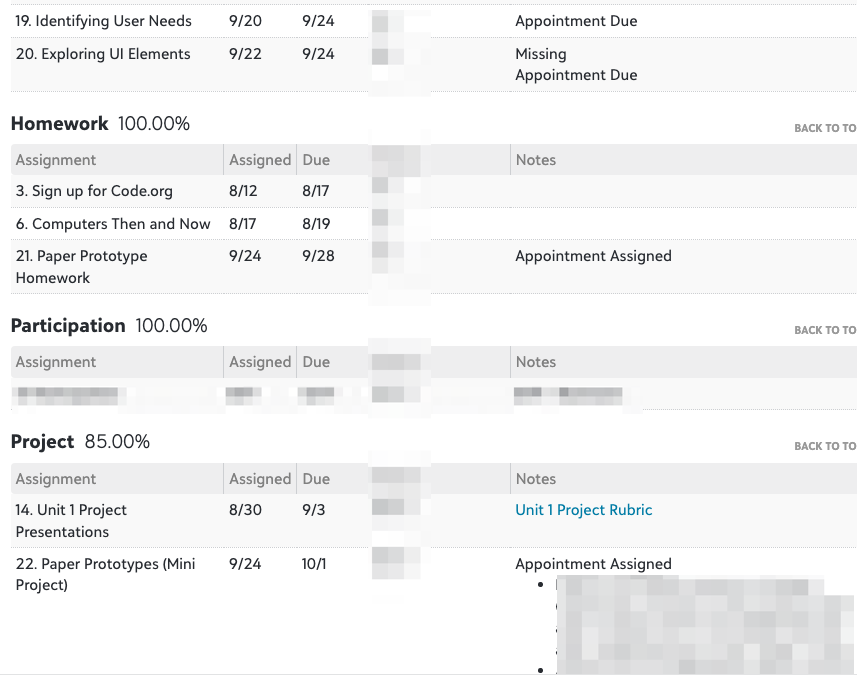
@Ben Leddy I know there are some updates eventually coming for the student's side of assignment pages and grades. Not sure if this issue/idea could be fit in with them but it's something that came up again today. I regularly have teacher's ask how/where students see their assignment comments. Currently, for teachers they are called assignment “comments” but on the student's side they're under “Notes”. This is already confusing but then today we realized that students also have their attendance listed under “Notes”. For example, if the student was absent when an assignment was due, it says “Absent Due”. The wording is definitely unclear ("Absent when due" would be better and would match the wording teachers see) and I'd argue that it isn't an appropriate place for this information either.
The “Attendance Type” (Absent or Tardy) also gets updated if an “Attendace Reason” is given. For example, one of my student's was marked Absent and our attendance office updated the reason to “Appointment”. Now she sees “Appointment Assigned" and “Appointment Due” in the Notes column for various assignments. Here is a screenshot:
 2
2 -
@Megan Day Thanks for the screenshot and examples, and for taking the time to redact student information. This is very helpful to bring to our team!
0









Categories
- All Categories
- 6 Blackbaud Community Help
- 213 bbcon®
- 1.4K Blackbaud Altru®
- 400 Blackbaud Award Management™ and Blackbaud Stewardship Management™
- 1.1K Blackbaud CRM™ and Blackbaud Internet Solutions™
- 15 donorCentrics®
- 360 Blackbaud eTapestry®
- 2.6K Blackbaud Financial Edge NXT®
- 655 Blackbaud Grantmaking™
- 576 Blackbaud Education Management Solutions for Higher Education
- 3.2K Blackbaud Education Management Solutions for K-12 Schools
- 939 Blackbaud Luminate Online® and Blackbaud TeamRaiser®
- 84 JustGiving® from Blackbaud®
- 6.6K Blackbaud Raiser's Edge NXT®
- 3.7K SKY Developer
- 248 ResearchPoint™
- 119 Blackbaud Tuition Management™
- 165 Organizational Best Practices
- 241 Member Lounge (Just for Fun)
- 34 Blackbaud Community Challenges
- 34 PowerUp Challenges
- 3 (Open) PowerUp Challenge: Chat for Blackbaud AI
- 3 (Closed) PowerUp Challenge: Data Health
- 3 (Closed) Raiser's Edge NXT PowerUp Challenge: Product Update Briefing
- 3 (Closed) Raiser's Edge NXT PowerUp Challenge: Standard Reports+
- 3 (Closed) Raiser's Edge NXT PowerUp Challenge: Email Marketing
- 3 (Closed) Raiser's Edge NXT PowerUp Challenge: Gift Management
- 4 (Closed) Raiser's Edge NXT PowerUp Challenge: Event Management
- 3 (Closed) Raiser's Edge NXT PowerUp Challenge: Home Page
- 4 (Closed) Raiser's Edge NXT PowerUp Challenge: Standard Reports
- 4 (Closed) Raiser's Edge NXT PowerUp Challenge: Query
- 790 Community News
- 2.9K Jobs Board
- 53 Blackbaud SKY® Reporting Announcements
- 47 Blackbaud CRM Higher Ed Product Advisory Group (HE PAG)
- 19 Blackbaud CRM Product Advisory Group (BBCRM PAG)