Microsoft Power Automate Modern Merge Automation Kit



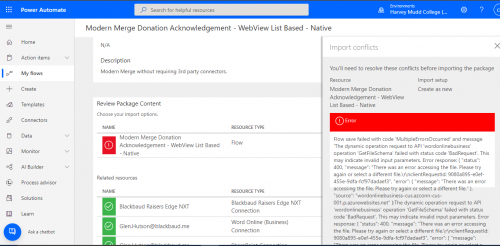
Hello - I am asked to evaluate the Acknowledgement Automation Kit from this link. I appreciate the video and step wise instructions, but I can't successfully import the zipped flow file into Power Automate. When I tried to import, I am getting the error below:
"Flow save failed with code 'MultipleErrorsOccurred' and message 'The dynamic operation request to API 'wordonlinebusiness' operation 'GetFileSchema' failed with status code 'BadRequest'. This may indicate invalid input parameters. Error response: { "status": 400, "message": "There was an error accessing the file. Please try again or select a different file.\\r\\nclientRequestId: 9080a895-e0ef-455e-9dfa-fcf97dadaef3", "error": { "message": "There was an error accessing the file. Please try again or select a different file." }, "source": "wordonlinebusiness-cus.azconn-cus-001.p.azurewebsites.net" };The dynamic operation request to API 'wordonlinebusiness' operation 'GetFileSchema' failed with status code 'BadRequest'. This may indicate invalid input parameters. Error response: { "status": 400, "message": "There was an error accessing the file. Please try again or select a different file.\\r\\nclientRequestId: 9080a895-e0ef-455e-9dfa-fcf97dadaef3", "error": { "message": "There was an error accessing the file. Please try again or select a different file." }, "source": "wordonlinebusiness-cus.azconn-cus-001.p.azurewebsites.net" };The dynamic operation request to API 'wordonlinebusiness' operation 'GetFileSchema' failed with status code 'BadRequest'. This may indicate invalid input parameters. Error response: { "status": 400, "message": "The selected file doesn't exist, please select a valid file and drive.\\r\\nclientRequestId: 9080a895-e0ef-455e-9dfa-fcf97dadaef3", "error": { "message": "The selected file doesn't exist, please select a valid file and drive." }, "source": "wordonlinebusiness-cus.azconn-cus-001.p.azurewebsites.net" };The dynamic operation request to API 'wordonlinebusiness' operation 'GetFileSchema' failed with status code 'BadRequest'. This may indicate invalid input parameters. Error response: { "status": 400, "message": "The selected file doesn't exist, please select a valid file and drive.\\r\\nclientRequestId: 9080a895-e0ef-455e-9dfa-fcf97dadaef3", "error": { "message": "The selected file doesn't exist, please select a valid file and drive." }, "source": "wordonlinebusiness-cus.azconn-cus-001.p.azurewebsites.net" }'."
The connections looked successful with the checks:
Has anyone successfully imported the flow and can share their two cents? Thank you.
Comments
-
I have heard several folks mention needing to import while in incognito/private mode depending on what your browser calls it. Here is an older article that seems to cover several popular browsers: https://www.howtogeek.com/269265/how-to-enable-private-browsing-on-any-web-browser/
1 -
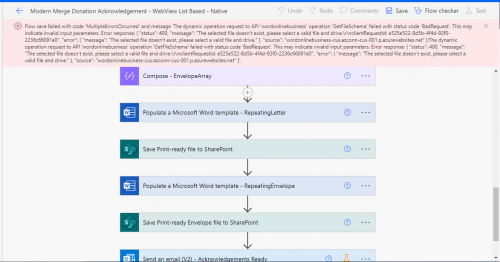
Hi Dan - thank you for your reply, the solution does not work on my side. I tried to establish connections as suggested by one post here: https://community.blackbaud.com/forums/viewtopic/586/58702
Upon trying to save the flow with connectors, I am unable to get the flow saved still, any thoughts from the community is appreciated.
 0
0 -
Hi Cynthia! Have you been able to get this to work? Once you get the connections established inside the flow as in your screenshot, have you clicked on the “Populate a Microsoft Word template” actions and selected your file?
0 -
@Cynthia Cheng a little late, but in case this helps someone else-- Blackbaud has an excellent step-by-step tutorial here.
Before importing the flow and creating your connections, you have to make sure your Microsoft Power Automate license is upgraded to the paid option so that you can access the premium connections. Then you must create a file in SharePoint, a Word template, and an NXT gift list for the workflow to reference. You will have to manually edit the workflow and link the SharePoint location, the Word template, and the NXT gift list. Once all of these boxes are checked, and all of your connections are made, you should be able to save and import your Modern Merge workflow to begin testing! ?
0











Categories
- All Categories
- 6 Blackbaud Community Help
- 213 bbcon®
- 1.4K Blackbaud Altru®
- 403 Blackbaud Award Management™ and Blackbaud Stewardship Management™
- 1.1K Blackbaud CRM™ and Blackbaud Internet Solutions™
- 15 donorCentrics®
- 360 Blackbaud eTapestry®
- 2.6K Blackbaud Financial Edge NXT®
- 656 Blackbaud Grantmaking™
- 577 Blackbaud Education Management Solutions for Higher Education
- 3.2K Blackbaud Education Management Solutions for K-12 Schools
- 939 Blackbaud Luminate Online® and Blackbaud TeamRaiser®
- 84 JustGiving® from Blackbaud®
- 6.6K Blackbaud Raiser's Edge NXT®
- 3.7K SKY Developer
- 249 ResearchPoint™
- 119 Blackbaud Tuition Management™
- 165 Organizational Best Practices
- 241 Member Lounge (Just for Fun)
- 34 Blackbaud Community Challenges
- 37 PowerUp Challenges
- 3 (Open) PowerUp Challenge: Grid View Batch
- 3 (Closed) PowerUp Challenge: Chat for Blackbaud AI
- 3 (Closed) PowerUp Challenge: Data Health
- 3 (Closed) Raiser's Edge NXT PowerUp Challenge: Product Update Briefing
- 3 (Closed) Raiser's Edge NXT PowerUp Challenge: Standard Reports+
- 3 (Closed) Raiser's Edge NXT PowerUp Challenge: Email Marketing
- 3 (Closed) Raiser's Edge NXT PowerUp Challenge: Gift Management
- 4 (Closed) Raiser's Edge NXT PowerUp Challenge: Event Management
- 3 (Closed) Raiser's Edge NXT PowerUp Challenge: Home Page
- 4 (Closed) Raiser's Edge NXT PowerUp Challenge: Standard Reports
- 4 (Closed) Raiser's Edge NXT PowerUp Challenge: Query
- 794 Community News
- 3K Jobs Board
- 54 Blackbaud SKY® Reporting Announcements
- 47 Blackbaud CRM Higher Ed Product Advisory Group (HE PAG)
- 19 Blackbaud CRM Product Advisory Group (BBCRM PAG)