Blackbaud ID: newly released sign-in efficiency





Hi all! John Vogel, the Product Manager for BBID, let me know that starting Wednesday (7/10) afternoon, users who sign in with an email address and BBID password will have one less step in their sign-in workflow.
Previously:
- They would enter their email address at yourschool.myschoolapp.com
- Select Continue with email from the 4 login type buttons on the BBID page
- Land on another page that showed the email previously entered, and click Continue
- Enter their password and sign in.
Now:
- They enter their email address at yourschool.myschoolapp.com
- Land on the page showing their email previously entered, and click Continue
- Enter their password and sign in.
This means that during the back to school season, your returning parents who sign in via Email/Password (instead of SSO or Sign in with Google/Apple) will not see the 4 authentication method buttons on the Blackbaud ID page - they skip over that step.
Additional enhancements since May:
- Users are alerted to Share My Email when creating a new BBID account with Apple ID (or if they are migrating to the new BBID for the first time)
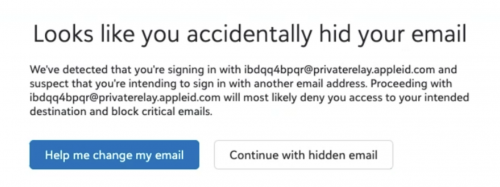
- Users who create a new BBID using their Apple ID + Hide My Email will be prompted to start over - proactively letting them know they can't access Blackbaud solutions with a hidden email address. It looks something like this
- Improved messaging displays for some Apple ID users who received an “Oops, something went wrong!” message when they try to sign in. The relevant small group of users are extra-stuck because they
- hid their email upon migration to the new BBID,
- then tried to fix it by disconnecting/breaking the Blackbaud-Apple connection from appleid.apple.com, which abandoned their BBID,
- and now they're trying to sign into BBID with their real (but already claimed) email address.
I know that's hard to follow. Just know that users in exactly this scenario will see an error message that provides detailed steps to resolve the problem themselves - instead of the generic Oops. View that warning message here.
Users who Continue with AppleID and see the Oops message can resolve the Hide My Email/Private relay setting by following the steps in this KB.
Big thanks to John Vogel and his team for streamlining the workflow!
Yours in partnership,
Jessi Walters
Sr. Product Manager - Core
Comments
-
@Jessi Walters Hi Jessi - thanks for this update! Two questions:
- Is there a way to eliminate the initial myschoolapp login screen and just start at what the second screen is with the school brand? The users are still entering their email on the myschoolapp page, then they have to click continue with their email address already entered before they enter a password. Could we just start on that second screen and they enter their email, then click continue to enter their password and login?
- Is there still an issue with MFA asking for the confirmation code either every time, or every day, as opposed to the 30 days? Pretty much everyone in our school (faculty wise) is seeing this - the MFA is not lasting for 30 days before needing the confirmation code even though the trust browser button is clicked. It is every login for some users, others it is every day.
0 -
@Chris Felinski hey there!
- Is there a way to eliminate the initial myschoolapp login screen and just start at what the second screen is with the school brand? The users are still entering their email on the myschoolapp page, then they have to click continue with their email address already entered before they enter a password. Could we just start on that second screen and they enter their email, then click continue to enter their password and login? This is a long-term goal, so yes, eventually. Requirement #1 was that BBID needed to modernize their landing page. The new page is lovely, but some schools also feel strongly about having a secondary color (or more) to further customize the page. Additionally, there is still a lot of workflow supported by the existing BEM login page that BBID isn't equipped to handle yet, especially the Apply Now workflow for Enrollment Management candidate applications.
- Is there still an issue with MFA asking for the confirmation code either every time, or every day, as opposed to the 30 days? Pretty much everyone in our school (faculty wise) is seeing this - the MFA is not lasting for 30 days before needing the confirmation code even though the trust browser button is clicked. It is every login for some users, others it is every day. This typically happens when a user's IP address changes; does your school regularly assign the same person different IP addresses throughout the day? If so, you could either reconfigure your network (which is usually not the preferred option) to minimze the recurrence of MFA prompts, or you could establish Single Sign-on with Blackbaud to bypass Blackbaud ID MFA altogether. If your users' IP addresses are more static than not, then please submit a Support case so they can help troubleshoot.
1 -
@Jessi Walters Hey Jessi, I just finished a call with a parent who brought up an issue that I didn't realize was an issue until now and wasn't sure if you or John was aware of.
The parent is using sign in with Apple, and his Apple ID is a gmail address. When he signed in with Apple, he (correctly) shared his email address and did not hide it, but the only option given was to use an icloud address. That created a mismatch between what was in our school database (his gmail address) and his BBID (the icloud address that was shared through sign in with Apple) and prevented him from logging in.
I am 100% sure this is an Apple thing and from some cursory googling I'm not sure if this is something that is able to be worked around. I wasn't able to see an easy way to share a different email address other than a user's icloud address. The issue is coming because BBID is pulling from the email address that's shared, not the email address associated with the Apple ID.
If that's the case, might it be possible to limit sign in with Apple options to only users who are creating a BBID with an @icloud.com address, even though Apple allows creation of an Apple ID with any email address? Or some other workaround to prevent situations like this?
I haven't opened a support ticket because I don't think this is really a Blackbaud issue; it's Apple being Apple, but I thought you all should know about it.
1 -
Hi @Brian LeBlanc, You're correct, this is an Apple ID nuance. Good news, users aren't required to use icloud emails with Sign in with Apple. I personally have my gmail linked up and just confirmed that you can choose from additional emails (although it's not immediately obvious). Assuming the parent has signed in with their icloud email address and left it there. These are the steps for the parent to take to get unstuck:
- Sign in to https://appleid.apple.com/account/manage/section/security
- Click Sign in with Apple
- Click the Blackbaud app
- Click Stop using Sign in with Apple
- Goto to the normal sign in page for the school school and complete steps as usual
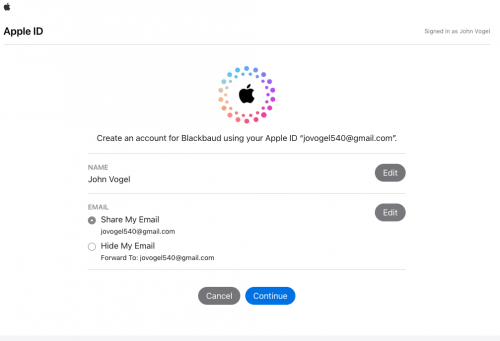
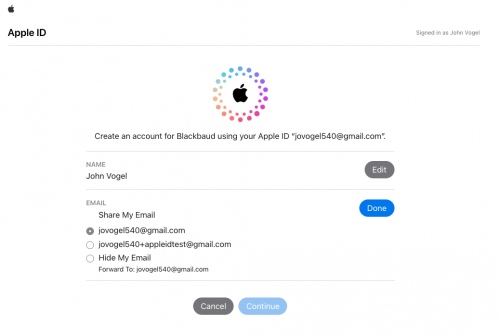
- After clicking Sign in with Apple and authenticating in Apple with your Apple ID you should see an image like the one below. Click edit on the right side for email and your additional emails with the account will display as seen in the 2nd image below.
I hope this helps.
1 -
@Jessi Walters Jessi - thanks for that information. Regarding MFA - all our teachers have laptops, so they take their computers home each night, or off campus at Starbucks or something like that during their free periods on block days, then come back on campus. Our school network has a static IP address, but when the teachers go off campus, it is a different IP, and my guess a dynamic IP address. Are you saying that this behavior will cause needing to do the 2 factor authentication every time they leave campus and then come back on campus, so it could be 3 or 4 times a day they need to use the authenticator app and enter a code? When they stay on campus between consecutive class periods, it isn't an issue.
1 -
@Chris Felinski we are in the same boat. Interested to hear reply.
0 -
@Chris Felinski that's correct. An SSO connection is really the only way to improve the experience for those faculty who have complete MFA multiple times each day. Blackbaud recommends establishing an SSO connection for many reasons. An SSO connection:
- eliminates the BBID MFA requirement for those who sign in that way
- streamlines the user's login experience with fewer pages to load with each login
- bypasses reCAPTCHA, which can occasionally inconvenience legitimate users and require them to enter a one-time password sent to their email address
- improves your organization's security posture by reducing the number of accounts an individual needs to manage.
Here's a link to our SSO documentation in case you're interested in pursuing that option:
1 -
@Jessi Walters
Hi Jessi, is this the new SSO setup instructions for those who are already on SSO but need to setup new SSO before October? Thanks!0 -
@Sandra Ross no, that page shows what's currently available. While the setup will be slightly different, the broad strokes (like reasons for SSO and options to consider) are largely the same. John's BBID team is nearing launch of the new experience. When an update is available, it will be published here:
That link also includes FAQs like, “If we aren't using SSO yet, should we wait?”
1 -
@Jessi Walters Thanks Jessi! Just wanted to confirm I had not missed the new SSO setup ? The page you provided link for is where I had been watching for it.
2 -
@Jessi Walters @John Vogel
Which instructions should parents follow if they use Sign in with Apple and are only seeing this error message?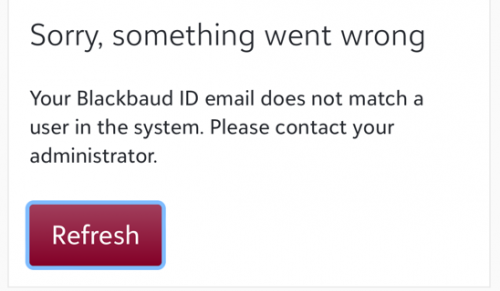 0
0 -
@Liz King please share https://kb.blackbaud.com/knowledgebase/articles/Article/204107 with the stuck parent. We have some updates forthcoming that will make this process simpler in the near future too.
1 -
@John Vogel While I'm looking forward to updates that will make this process easier, it seems all the updates thus far have made things more complicated for parents using Apple or Google sign in. The instructions you shared are especially difficult for the average user to follow. Most of our parents give up and request that they use a different email.
1 -
@Chris Felinski and @Jessi Walters
Agreeing with Chris #1 point:
We have also received complaints from parents about the lengthly 3 screen login. I would be great to eliminate a step if possible.0 -
@Veronica Zermani I completely empathize with parents that get themselves stuck with Apple. The good news is that far more parents receive benefit from the option than have trouble with it.
A favor to ask, would you mind sharing specific examples of what has become more difficult about signing in with Apple or Google? Ultimately I want to make your life and your parents lives easier where no one is thinking about authentication (except me of course).
0 -
@John Vogel I wouldn't say the parents “got themselves stuck with Apple” since they were just following instructions the first time they logged in. It was the update that got them stuck.
As for what has become more difficult about signing in… signing in, period, has become difficult. It is not intuitive to parents on how to fix the “oops something went wrong” error, so they contact us. We run through a long list of troubleshooting (clear cookies and cache, use a different browser, do the multi-step process to unhide your Apple email, etc.) and it's never clear which one will work until we run through all of them.
A few parents have gone through the steps of unhiding their email, but they either come in person or we have a video conference to walk them through the steps. Most parents are too frustrated with that process, so they ask us to update their account with a new email. They don't trust connecting back with Apple or Google so they sign in with email.
0 -
@Veronica Zermani Agreed! Our parents are also giving up and creating different accounts to connect with the school. The KB is beyond the ability of most of our parents and the ones that would understand the instructions, don't need it because they have figured it out on their own.
1



















Categories
- All Categories
- 6 Blackbaud Community Help
- 213 bbcon®
- 1.4K Blackbaud Altru®
- 402 Blackbaud Award Management™ and Blackbaud Stewardship Management™
- 1.1K Blackbaud CRM™ and Blackbaud Internet Solutions™
- 15 donorCentrics®
- 360 Blackbaud eTapestry®
- 2.6K Blackbaud Financial Edge NXT®
- 655 Blackbaud Grantmaking™
- 576 Blackbaud Education Management Solutions for Higher Education
- 3.2K Blackbaud Education Management Solutions for K-12 Schools
- 939 Blackbaud Luminate Online® and Blackbaud TeamRaiser®
- 84 JustGiving® from Blackbaud®
- 6.6K Blackbaud Raiser's Edge NXT®
- 3.7K SKY Developer
- 248 ResearchPoint™
- 119 Blackbaud Tuition Management™
- 165 Organizational Best Practices
- 241 Member Lounge (Just for Fun)
- 34 Blackbaud Community Challenges
- 34 PowerUp Challenges
- 3 (Open) PowerUp Challenge: Chat for Blackbaud AI
- 3 (Closed) PowerUp Challenge: Data Health
- 3 (Closed) Raiser's Edge NXT PowerUp Challenge: Product Update Briefing
- 3 (Closed) Raiser's Edge NXT PowerUp Challenge: Standard Reports+
- 3 (Closed) Raiser's Edge NXT PowerUp Challenge: Email Marketing
- 3 (Closed) Raiser's Edge NXT PowerUp Challenge: Gift Management
- 4 (Closed) Raiser's Edge NXT PowerUp Challenge: Event Management
- 3 (Closed) Raiser's Edge NXT PowerUp Challenge: Home Page
- 4 (Closed) Raiser's Edge NXT PowerUp Challenge: Standard Reports
- 4 (Closed) Raiser's Edge NXT PowerUp Challenge: Query
- 792 Community News
- 2.9K Jobs Board
- 53 Blackbaud SKY® Reporting Announcements
- 47 Blackbaud CRM Higher Ed Product Advisory Group (HE PAG)
- 19 Blackbaud CRM Product Advisory Group (BBCRM PAG)