Grid View Batch





Am I missing something? I just watched the grid view batch video and there's a feature to add new grid batch under Add drop down menu or under the ellipsis menu for unapproved batches. But when I click on Add drop down I don't see that option nor do I see it for unapproved batches. Is there a place where I can enable it.
Ugh because now I have to configure each unapproved batch with the fields I need because it only applies to that specific gift batch.
Don't know if anyone else is having this issue.

Answers
-
It hasn't been released to everyone yet so that may be the case for. I know that is the reason for me.
1 -
@Chris Hounsell ugh they should wait on changing things until all users can access all new added features and not post videos about it because now it takes longer to process unapproved batches due to having to configure each field over and over again. Ok I'm done with my rant.
Thank you for your response 😊
9 -
That is how our gift management looks as well. Hoping that we see a change this coming week. I thought it was supposed to be rolled out to everyone by the end of February.
2 -
Hi Kathy — I may be misunderstanding which part you’re running into, so I want to clarify both possibilities. Right now, even those of us who do have access to the new grid‑view batch see exactly what you’re seeing. The option shown in the video to use Add → New grid batch isn’t visible to anyone at the moment.
It’s very likely the video you watched was recorded during the EAP phase, when that language was present, but it didn’t make it into the current release.
If your frustration is more about not being able to apply a template to batches in web view (like NXT Web Forms, automated recurring gift batches, automated pledge payment batches, Omatic Cloud batches, etc.), then you’re absolutely not alone — that functionality isn’t available yet. Blackbaud has said it should be coming in early March, which will make this much smoother.
In the meantime, here’s a workaround I’ve tested with a few clients that may help:
- Set up your batch template with the fields you need.
- Manually create a new batch and select your template.
- Open the automatically created batch.
- Select all gifts in that batch.
- Use Move → To another batch and move them into the batch you created with your template applied.
Some folks have reported they can’t bulk‑move gifts and have to move them individually — if that happens, I recommend opening a Blackbaud support ticket so you’ll be notified once it’s fixed.
And just to add: this grid‑view work represents a big lift with a lot of moving parts. While there are always some rough edges during a rollout, the direction is strong and the BB team is iterating quickly. I’m optimistic the early‑March updates they’ve told us about will smooth out a lot of this. In the meantime, keep asking questions here!
5 -
@Carlene Johnson Great workaround! Sharing this with @Marci Nelligan
1 -
@Carlene Johnson Thank you so much I will definitely try this to see if it works.
1 -
Yes, this is a big problem and a work around is not helpful. We need to be able to have our batches from online data review have a set configuration so we don't have to do extra work just to work on batches. Also, campaigns tied to funds are not automatically populating if a fund is changed.
Please don't add new features until they're at least as good as what it's replacing!
1 -
@Cathi Christopher Yup that was my rant. Don't release stuff until it is fully functional.
I attended a webinar and they are working on it. But they should have waited until the full tool was functional. Thank you for agreeing with me 😣
1 -
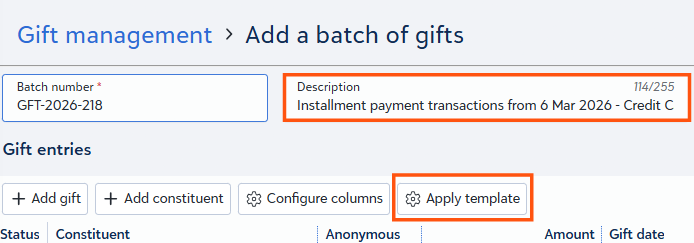
@Kathy Arocho @Cathi Christopher @Marci Nelligan @Elizabeth Johnson @Wendy Bondeson thought you all might like to know that the ability to apply a template to ANY batch in grid view now exists!
 2
2 -
@Carlene Johnson no I didn't know. WOO HOO! thank you!
0















Categories
- All Categories
- 6 Blackbaud Community Help
- 211 bbcon®
- 1.4K Blackbaud Altru®
- 403 Blackbaud Award Management™ and Blackbaud Stewardship Management™
- 1.2K Blackbaud CRM™ and Blackbaud Internet Solutions™
- 15 donorCentrics®
- 360 Blackbaud eTapestry®
- 2.6K Blackbaud Financial Edge NXT®
- 658 Blackbaud Grantmaking™
- 579 Blackbaud Education Management Solutions for Higher Education
- 3.2K Blackbaud Education Management Solutions for K-12 Schools
- 943 Blackbaud Luminate Online® and Blackbaud TeamRaiser®
- 84 JustGiving® from Blackbaud®
- 6.7K Blackbaud Raiser's Edge NXT®
- 3.8K SKY Developer
- 250 ResearchPoint™
- 120 Blackbaud Tuition Management™
- 165 Organizational Best Practices
- 241 Member Lounge (Just for Fun)
- 36 Blackbaud Community Challenges
- 37 PowerUp Challenges
- 3 (Open) PowerUp Challenge: Grid View Batch
- 3 (Closed) PowerUp Challenge: Chat for Blackbaud AI
- 3 (Closed) PowerUp Challenge: Data Health
- 3 (Closed) Raiser's Edge NXT PowerUp Challenge: Product Update Briefing
- 3 (Closed) Raiser's Edge NXT PowerUp Challenge: Standard Reports+
- 3 (Closed) Raiser's Edge NXT PowerUp Challenge: Email Marketing
- 3 (Closed) Raiser's Edge NXT PowerUp Challenge: Gift Management
- 4 (Closed) Raiser's Edge NXT PowerUp Challenge: Event Management
- 3 (Closed) Raiser's Edge NXT PowerUp Challenge: Home Page
- 4 (Closed) Raiser's Edge NXT PowerUp Challenge: Standard Reports
- 4 (Closed) Raiser's Edge NXT PowerUp Challenge: Query
- 798 Community News
- 3K Jobs Board
- 56 Blackbaud SKY® Reporting Announcements
- 47 Blackbaud CRM Higher Ed Product Advisory Group (HE PAG)
- 19 Blackbaud CRM Product Advisory Group (BBCRM PAG)