Adding Constituent ID at New Individual Record Creation





I found only one voting area within the "idea bank" to be able to add a specific constituent ID# in NXT at the time of creating a new individual record. Currently we're having to create a record and then go back in and change the ID#. Our example of why is for any that are our alumni and/or current students we're adding that have an ID that is not auto-generated by BB. Curious if you're aware of any upcoming solutions to this as of yet? Thank you!
Best Answer
-
Are you saying that you want to apply a specific ID# to alumni and/or current students? I assume that you want that ID# to match your student record database or similar?
I, personally, subscribe to the system of the cons ID should be whatever the system assigns and that additional IDs should be added as an alias.
To my knowledge, there are no plans for BB to change this.
One option would be to go to configuration in Database View - turn off the option for making Cons ID required: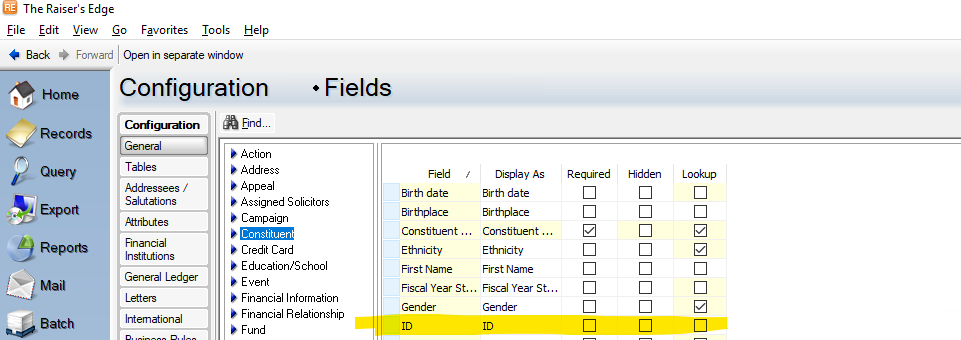
and also turn off the option for automatically generate ids
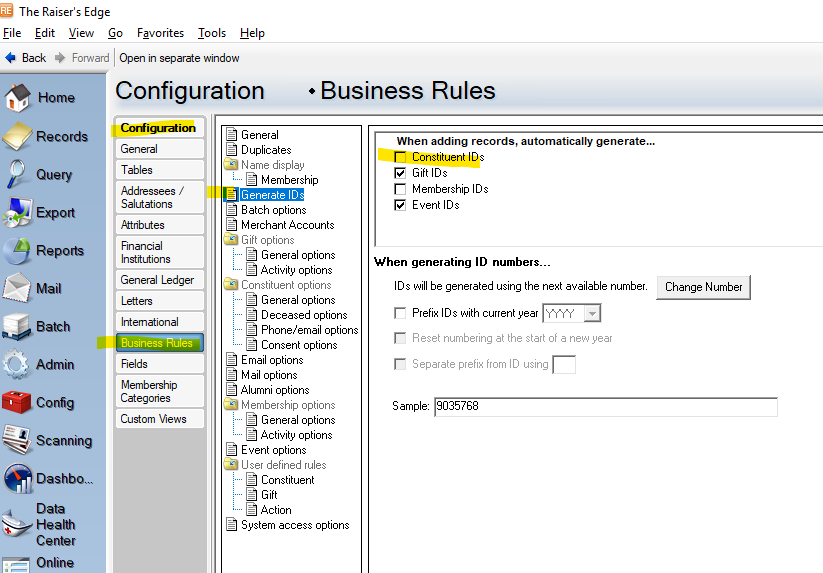
However, if you are creating new records in WV you would still need to save the record and then open it to add the ID# of your choosing.
In DBV, you since you add and edit the new record from the same screen it is one less step than in WV.
Editing to add that one should then have an "audit" or "maintenance" query which is run on a regular basis to identify all records where Cons ID = Blank.3






Answers
-
Oh, that's weird! We're still creating all ours in RE7 (using student IDs), so thanks for flagging this, as I hadn't even realised that's a thing.
2 -
Hi @Carlene Johnson! Prior to our migration, not all of our constituents had ID#s and it was recommended that we cleaned that piece up. After doing so, I went ahead and set it to assign the #s moving forward automatically. In DB view, we could still create a new record and input a # before we saved and the system auto-generated it for us. Now, with WV, that's not an option. :( And, it works the same for needing to add in additional phone #s and email addresses as well so in any event, we'll still need to go back in for those pieces as well. I was just hopeful. :) Thanks so much your quick responses as always, much appreciated! I am generally importing this information so I haven't physically been creating new records over in WV yet and then it hit me today when I did about 4 late graduates that I didn't see where I could add that at time of their record creation. Now I know - HA! ~Denise
0 -
@Jack Briggs that is how I stumble upon some of these what used-to-be-norms now functioning a bit differently. I am still working probably 65-70% in DB yet given the various processes I am only able to do on that side so far. Happy Spring!
1 -
@Denise Miller on a related but different note, you know in dbv how you can only have one active phone type for a constituent record? You can't have two email address records where type = Email? We are using an NXT donation "part" on a BBNC donation page and noticed that the NXT "part" was adding additional email address records where type = Email.
We were wondering why/how it was possible for a constituent to be listed on a BBNC mailing twice since BBNC pulls from type = Email. Our work around was to configure information deposited from an NXT donation part to a constituent record prefaced with NXT: NXT-email, NXT-phone. And as @Carlene Johnson would recommend, we have a routine maintenance query looking for records with information prefaced NXT.
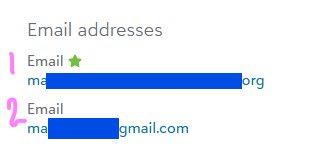
Two email addresses where email type = Email. Not possible in dbv. The address that comes in from the NXT donation part is auto-determined as "preferred." Maddening!
0 -
Hmmmm, we are no longer using net community and are only using online express for our email system in DBV. We are using NXT fully for our online gift forms/transactions. I don't know that we've had that situation arise. Our gift processor watches when the online gift review is taking place to link if it's listing additional email addresses so as to not change in the system, but I feel like the ones that show a different email are where it's a company making a donation and the contact we have for them may have a different email address. We pay close attention also to the information coming in to us as the email notification of donations made also to monitor information that may be different than what we currently have on that constituent's record.
Not sure this is helping with what you're asking at this point.
0




Categories
- All Categories
- 6 Blackbaud Community Help
- 211 bbcon®
- 1.4K Blackbaud Altru®
- 403 Blackbaud Award Management™ and Blackbaud Stewardship Management™
- 1.2K Blackbaud CRM™ and Blackbaud Internet Solutions™
- 15 donorCentrics®
- 360 Blackbaud eTapestry®
- 2.6K Blackbaud Financial Edge NXT®
- 658 Blackbaud Grantmaking™
- 579 Blackbaud Education Management Solutions for Higher Education
- 3.2K Blackbaud Education Management Solutions for K-12 Schools
- 943 Blackbaud Luminate Online® and Blackbaud TeamRaiser®
- 84 JustGiving® from Blackbaud®
- 6.7K Blackbaud Raiser's Edge NXT®
- 3.8K SKY Developer
- 250 ResearchPoint™
- 120 Blackbaud Tuition Management™
- 165 Organizational Best Practices
- 241 Member Lounge (Just for Fun)
- 34 Blackbaud Community Challenges
- 37 PowerUp Challenges
- 3 (Open) PowerUp Challenge: Grid View Batch
- 3 (Closed) PowerUp Challenge: Chat for Blackbaud AI
- 3 (Closed) PowerUp Challenge: Data Health
- 3 (Closed) Raiser's Edge NXT PowerUp Challenge: Product Update Briefing
- 3 (Closed) Raiser's Edge NXT PowerUp Challenge: Standard Reports+
- 3 (Closed) Raiser's Edge NXT PowerUp Challenge: Email Marketing
- 3 (Closed) Raiser's Edge NXT PowerUp Challenge: Gift Management
- 4 (Closed) Raiser's Edge NXT PowerUp Challenge: Event Management
- 3 (Closed) Raiser's Edge NXT PowerUp Challenge: Home Page
- 4 (Closed) Raiser's Edge NXT PowerUp Challenge: Standard Reports
- 4 (Closed) Raiser's Edge NXT PowerUp Challenge: Query
- 798 Community News
- 3K Jobs Board
- 56 Blackbaud SKY® Reporting Announcements
- 47 Blackbaud CRM Higher Ed Product Advisory Group (HE PAG)
- 19 Blackbaud CRM Product Advisory Group (BBCRM PAG)