Beyond Solicit Codes: Building a Modern Communication Preference Strategy with Consent





If you joined our recent webinar, Simplifying Communication Preferences with Consent in Raiser's Edge NXT, you heard a recurring theme:
Consent isn't replacing your communication strategy—it's helping you build a stronger foundation for it.
For many organizations, communication preferences have evolved over time through a combination of solicit codes, constituent attributes, notes, and institutional knowledge. While these tools have served important purposes, they can become difficult to manage as donor expectations, compliance requirements, and communication channels continue to evolve.
Consent in Raiser's Edge NXT provides a more structured approach by capturing a constituent's communication preference history and automatically maintaining the related solicit code rules that support those decisions
The good news? You don't need to start from scratch.
Consent and Solicit Codes: Better Together
One of the biggest misconceptions we hear is: "We're already using solicit codes, so why do we need Consent?"
The reality is that Consent and solicit codes serve different purposes.
- Consent captures the constituent's choice
- Solicit codes operationalize that choice
- The two work together to support communication preferences, reporting, segmentation, and compliance efforts
A constituent might opt out of receiving email newsletters. When that preference is recorded as Consent, the related solicit code can automatically be added. If they later opt back in, the system can remove the solicit code automatically. Additionally, you will now have a date added, start date to the code, a source of how the preference came and who entered it into the system—data points that we just don’t get with solicit codes.
Rather than thinking of Consent as a replacement for solicit codes, think of it as the layer that brings consistency, visibility, and future flexibility to your communication preference strategy.
Consent in the Real World—including the missing fourth scenario
Some of our customers are having great success with Consent in Raiser's Edge NXT. Consent can support your annual communications calendar as well as any internal coding and nuanced donor communication preferences.
Some real user scenarios (including the bonus number four that was omitted from my webinar slide) are:
- Annual giving: a donor happy to receive fundraising emails but not event promotions.
- Channel preference: newsletters by email but event reminders by text.
- Internal use only: adding a constituent to the President's holiday card list.
- Donor recognition permission: a webinar attendee had a great scenario! She shared “NC just passed a donor privacy law that means we need explicit donor opt-in to share any giving info (including annual lists). Do you have suggestions for how best to use Consent to track this? This is exactly what the “Other” Channel is for! And the category could be something like Donor Recognition or Donor Data Sharing – you get to choose.
- Segmented lists: a donor who only wants emails about reunion and athletics events
Consent Category Examples
One of the first questions organizations ask is: "What consent categories should we create?"
There is no single right answer. Categories should reflect the types of communications your organization sends and the choices you want constituents to make
Some common examples include:
Development & Fundraising
- Appeals
- Annual Giving
- Major Gifts
- Planned Giving
- Capital Campaigns
Events & Engagement
- Event Invitations
- Volunteer Opportunities
- Membership Activities
- Advocacy Alerts
Organizational Communications
- Organization News
- Impact Reports
- Newsletters
- Program Updates
Special Communication Types
- SMS Text Messages
- Development Agent Communications
- Regional Communications
- Interest-Specific Updates
The key is creating categories that are:
- Meaningful to constituents
- Easy for staff to understand
- Sustainable to maintain over time
Avoid creating dozens of highly specific categories that become difficult to manage. Instead, focus on the major communications on your calendar across your organization as well as options you even want to offer a constituent to respond to. Don’t offer categories to donors if you can’t honor their preferences.

Solicit Code Best Practices Before You Begin Mapping
A Consent implementation is often the perfect opportunity to evaluate your existing solicit code structure.
Before creating Consent mappings, consider the following best practices:
Treat Solicit Codes as Rules, Not Labels
Ask yourself:
"What business action should happen when this code is present?"
Every solicit code should have a clear, documented purpose. If nobody knows why a code exists anymore, it may be time to retire it.
Eliminate Duplicates and Conflicts
Review your codes for situations where:
- Multiple codes perform the same function
- Codes contradict one another
- Legacy codes are no longer being used
A cleaner, well-defined structure makes Consent mapping much easier.
Broaden your Approach
Consent opens up the possibility of two new types of solicit codes – positive solicit codes and more granular codes.
As you refine your strategy, consider whether introducing positive solicit codes—such as “Send Event Emails”—would help staff more easily identify constituents who have explicitly opted in to a specific communication when building their lists. While not a requirement, it could be a great time to introduce some specific positive values, especially when capturing internal, back-office use only codes such as “President’s Holiday Card List”.
Need some help? Review our Consent and Solicit Code Strategy recommendations.

Included Resource: Solicit Code to Consent Mapping Workbook
To help organizations get started, we're providing a Solicit Code to Consent Mapping Workbook that can be used as a planning tool before configuration begins.
The workbook helps you:
Inventory Existing Solicit Codes
Document:
- Solicit code name
- Current definition
- Communication channel impacted
Identify Desired Consent Categories
Determine:
- What communication type does this represent?
- Should it become a Consent category?
- Is the preference channel-specific?
Define Mapping Relationships
For each category:
Consent Category | Channel | Opt-In Action | Opt-Out Action |
|---|---|---|---|
Newsletter | Remove Do Not Newsletter | Add Do Not Newsletter | |
Events | Remove No Event Invites | Add No Event Invites | |
Solicitations | Remove No Solicitations | Add Do Not Solicit |
Document Governance Decisions
Capture:
- Who owns Consent management
- Naming conventions
- Future category creation guidelines
- Review and maintenance schedules
By completing this workbook before configuration starts, organizations can significantly reduce implementation effort and gain alignment across fundraising, marketing, and database teams.
What’s Next
Learn more via our Help Files and the brand-new Consent Management e-learning in Blackbaud University.
Download the Solicit Code to Consent Mapping Workbook, gather your current communication preference rules, and begin identifying where Consent can simplify and strengthen your constituent experience.
Your solicit codes have carried the load for years. Consent helps them work smarter.
Frequently Asked Questions from the Webinar
1. How does Consent relate to the unsubscribe link in Raiser’s Edge NXT Email?
When a constituent clicks the unsubscribe link in an email, an Email channel opt-out is added in Consent and the status of their primary email address changes to "do not email". Some users do not like the flag on the primary email because it causes confusion internally so they will remove it however, this does not re-subscribe the constituents to Raiser’s Edge NXT emails or opt-them back in – it is simply changing how that data displays so internal users know the email is still usable for personal outreach.
Want to add communication preferences for recipients who opted out before you set your consent rules (think Online Express or Blackbaud NetCommunity users)? Query constituents who don’t have the consent on their record, but do have emails with Do not Email. Learn more about Email Consent and Suppression Criteria.
2. How does Consent work with Constant Contact or Luminate Online?
Using the Constant Contact integration in the Raiser’s Edge NXT allows organizations to leverage constituent communication preferences within Raiser’s Edge NXT as the system of record when syncing contacts. When setting up an import of constituents from Raiser’s Edge NXT into a Constant Contact child account, a Raiser’s Edge NXT Consent Category is selected. Each child account must be mapped to a unique category to avoid overlap. Constituents are imported only if they are eligible for that category, meaning they are opted in and not marked as “do not email” in Raiser’s Edge NXT. Then if a contact opts-out they will only be opted-out of that category, not all emails in general. Learn more about Constant Contact for Raiser’s Edge NXT and utilizing consent mapping.
Today, Luminate Online syncs to the “Requests no Email” flag in Raiser’s Edge NXT. Users could elect to add a consent response after the sync is completed via a query and import. If you would like to see a change to this workflow, I encourage you to submit an idea in the Blackbaud Community Idea Bank
3. Are solicit codes going away?
No. Solicit codes continue to play an important operational role. Many organizations are finding success by allowing Consent to manage solicit code activity rather than replacing solicit codes entirely.
4. Can I query, filter, segment, and export using Consent?
When preparing lists for communications, organizations will still rely on Solicit Codes in your filtering criteria. You can query on consent records to report on the consent history for individuals or a group. For example, you can use consent fields as query criteria to answer questions such as:
- Which constituents opted out of mailed newsletters in the month of March?
- Which constituents have opted out of phone calls at any point in time?
TIP: These types of queries are good for showing trends and changes over time, but shouldn't be used to generate lists for communications because they may reflect preferences that are now out of date.
5. How do I transition from my current communication preference strategy?
The recommended approach is to start small, map existing solicit codes, and roll out Consent in phases rather than attempting a complete redesign all at once.
6. What if I don't use Blackbaud Online Giving Forms, Raiser’s Edge NXT Email, or other Blackbaud products?
Consent is still valuable for tracking opt-outs from other platforms as well as what your donors request from you when they call or email you.
7. How does Consent work when constituents have multiple email addresses or phone numbers?
Consent applies to the entire constituent, not the specific phone or email addresses they have. It is meant to track what kind of communications they want from you, not which email inbox they want to receive it in.
8. How many Consent categories should we create?
There is no right answer here, but the guidance is that you should have a category for every type of communication you send in the year – solicitations, event invitations, newsletters, etc. Check out Plan your Consent Strategy for some inspiration.
9. How does Consent help support compliance requirements such as CASL, GDPR, UK soft opt-in rules, and emerging state privacy laws?
Consent allows users to capture both opt-ins and opt-out consent preferences to help organizations abide by national and state legislation.
10. If a constituent unsubscribes today and changes their mind later, how can they opt back in?
There are a number of ways a constituent can change their consent preferences – by contacting the organization directly, updating their preference through the donor portal (if the organization uses this SKY Add-Ins Flow template), filling out a constituent form that is specifically set up for consent), or updating their preferences the next time they access a Raiser’s Edge NXT giving or event registration form.
Comments
-
This is a terrific article, @Krista Matia, thank you! My apologies if I'm overlooking it, but I don't see how to download the workbook. Can you share the link? Thanks!d
4 -
-
@Krista Matia — terrific, got it, thanks!
1 -
Is there a way to map the consent created after someone clicks the unsubscribe link to solicit codes? Right now I'm having to go in and add additional consents so the correct solicit codes are triggered. It would be great if I didn't have to do that extra work - hopefully I'm just missing something!
1 -
Hi Helen, there is not currently a way to leverage the solicit codes from consent when the constituent opts out of email. This is because that opt-out goes to the opt out at the Channel level, not category level which is where the solicit codes are mapping. Opting out of the entire channel of email, just checks the box in Consent and nothing else. I believe there are some ideas in the Idea Bank about this so please help vote on those ideas to get some improvements :)
0 -
@Krista Matia So to have things automated do we want to just have consent/constituent code be based on channel? Using example of all emails. That is desire of some of our team. How the auto coding happens will definitely something we want to be clear on.
Are you saying that if the consent form has email categories, opting out of ALL email will show on consent tab but not auto update any solicit codes? It can't be structured

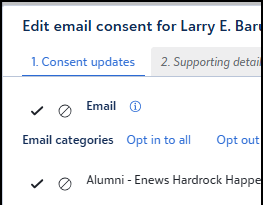
The Opt-in solicit code action and Opt-out solicit code action can only be structured by category. And not by channel.
0 -
Hi Helen, I read your first comment mentioning 'unsubscribes' being about email unsubscribes, but it sounds like you're talking about constituent responses on the consent section of a form? if the latter, then yes you can map the opt-in and opt-out solicit codes via email category you set up and offer to constituents to select on a form. But the channel cannot trigger solicit codes.
0 -
@Krista Matia So to have things automated do we want to just have consent/constituent code be based on channel? Using example of all emails. That is desire of some of our team. How the auto coding happens will definitely something we want to be clear on.
So you saying that on the consent form opting out of ALL email will show on consent tab but not auto update any solicit codes?
The Opt-in solicit code action and Opt-out solicit code action can only be structured by category. And not by channel.
0












Categories
- All Categories
- New K-12 Community Home (TEST)
- New Higher Education Home Page (Test)
- New Impact Edge Community TEST
- New YourCause Community TEST
- New SKY Community TEST
- New Grantmaking TEST Community
- New Altru Test Community
- New bbcon Community - TEST
- 12 Blackbaud Agents for Good™
- New Raiser's Edge NXT Community
- 8 Blackbaud Community Help
- 222 bbcon®
- 1.4K Blackbaud Altru®
- 410 Blackbaud Award Management™ and Blackbaud Stewardship Management™
- 1.2K Blackbaud CRM™ and Blackbaud Internet Solutions™
- 16 donorCentrics®
- 361 Blackbaud eTapestry®
- 2.7K Blackbaud Financial Edge NXT®
- 687 Blackbaud Grantmaking™
- 604 Blackbaud Education Management Solutions for Higher Education
- 3.3K Blackbaud Education Management Solutions for K-12 Schools
- 954 Blackbaud Luminate Online® and Blackbaud TeamRaiser®
- 85 JustGiving® from Blackbaud®
- 7K Blackbaud Raiser's Edge NXT®
- 4K SKY Developer
- 258 ResearchPoint™
- 123 Blackbaud Tuition Management™
- 165 Organizational Best Practices
- 248 Member Lounge (Just for Fun)
- 40 Blackbaud Community Challenges
- 37 PowerUp Challenges
- 3 (Closed) PowerUp Challenge: Grid View Batch
- 3 (Closed) PowerUp Challenge: Chat for Blackbaud AI
- 3 (Closed) PowerUp Challenge: Data Health
- 3 (Closed) Raiser's Edge NXT PowerUp Challenge: Product Update Briefing
- 3 (Closed) Raiser's Edge NXT PowerUp Challenge: Standard Reports+
- 3 (Closed) Raiser's Edge NXT PowerUp Challenge: Email Marketing
- 3 (Closed) Raiser's Edge NXT PowerUp Challenge: Gift Management
- 4 (Closed) Raiser's Edge NXT PowerUp Challenge: Event Management
- 3 (Closed) Raiser's Edge NXT PowerUp Challenge: Home Page
- 4 (Closed) Raiser's Edge NXT PowerUp Challenge: Standard Reports
- 4 (Closed) Raiser's Edge NXT PowerUp Challenge: Query
- 829 Community News
- 3.1K Jobs Board
- 57 Blackbaud SKY® Reporting Announcements
- 47 Blackbaud CRM Higher Ed Product Advisory Group (HE PAG)
- 19 Blackbaud CRM Product Advisory Group (BBCRM PAG)