eTapestry Data Entry Procedures and Guidelines




We are new to eTapestry and needing to develop our own user manual as I understand from Blackbaud as this is something organizations need to create individually due to the amount of user defined fields, standards, etc. Does anyone have something that I can even start to use as a template?
Hoping to create instructions on the basics such as:
- How to create an account
- How to enter a gift
- How to enter a donor contact
If anyone is willing to share their editable manuals please email me at mstevenson@elmwoodyxe.ca. I have tried to research through the knowledgebase and community but can't seem to search what I am looking for.
Comments
-
Maggie, eTapestry has basic instructions for the things you're asking about.
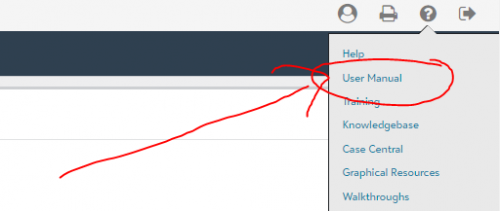
In the dropdown menu under the Help/QuestionMark at the upper right of the screen, there's a section called “Walkthroughs.”
That should show you how to create accounts and add gifts.1 -
HI @Maggie Stevenson. I also suggest creating a User Manual online. In the link to user manual, there are directions but I have copied them for your convenience:
**As you develop practices for your database, you can document these guidelines in a user manual. Your current users may not be the only people who will perform those functions at your organization, and future staff will need instructions.
Once you create your organization's manual, you can upload it here. To upload your manual, select Browse. Locate your file and choose Open. Then, select Save under Tasks. Your users will now be able to access the user manual in the eTapestry database.
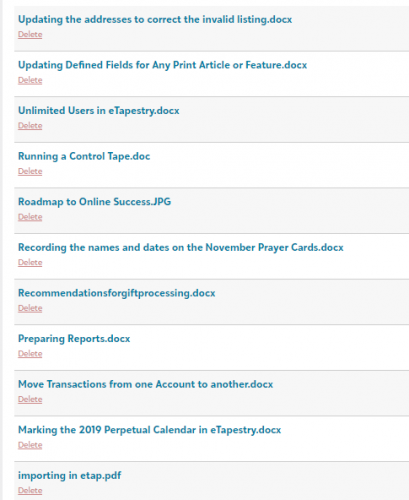
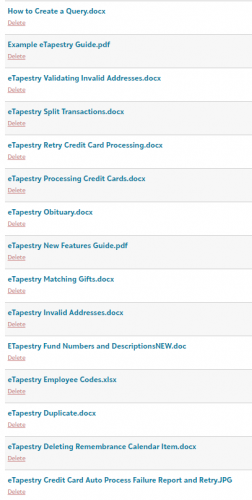
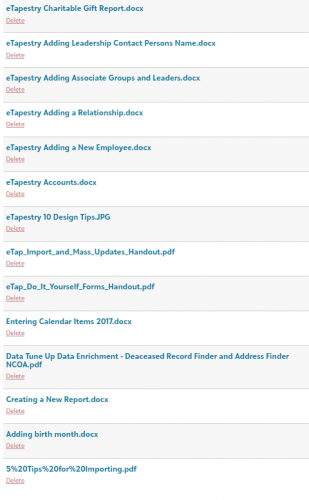
Here is a screenshot and a screenshot of what we have in ours:
 0
0 -
Thank you for sharing with me that the user manual we create can be uploaded directly to the database! Now do just create all the different processes. This seems like such a massive undertaking without templates generally already being available.
0 -
Did you manually create all those processes and files you captured in your screenshot? Willing to share your individual files on some of them that I can use as a starting point?
0 -
Thank you! I see these walkthroughs however unfortunately aren't quite something we can use in a manual format to share with colleagues who are new to the system, however they are great reminders for staff to refer too during their training process.
0






Categories
- All Categories
- New K-12 Community Home (TEST)
- New Higher Education Home Page (Test)
- New Impact Edge Community TEST
- New YourCause Community TEST
- New SKY Community TEST
- New Grantmaking TEST Community
- New Altru Test Community
- New bbcon Community - TEST
- 12 Blackbaud Agents for Good™
- New Raiser's Edge NXT Community
- 8 Blackbaud Community Help
- 222 bbcon®
- 1.4K Blackbaud Altru®
- 410 Blackbaud Award Management™ and Blackbaud Stewardship Management™
- 1.2K Blackbaud CRM™ and Blackbaud Internet Solutions™
- 16 donorCentrics®
- 361 Blackbaud eTapestry®
- 2.7K Blackbaud Financial Edge NXT®
- 687 Blackbaud Grantmaking™
- 604 Blackbaud Education Management Solutions for Higher Education
- 3.3K Blackbaud Education Management Solutions for K-12 Schools
- 954 Blackbaud Luminate Online® and Blackbaud TeamRaiser®
- 85 JustGiving® from Blackbaud®
- 7K Blackbaud Raiser's Edge NXT®
- 4K SKY Developer
- 258 ResearchPoint™
- 123 Blackbaud Tuition Management™
- 165 Organizational Best Practices
- 248 Member Lounge (Just for Fun)
- 40 Blackbaud Community Challenges
- 37 PowerUp Challenges
- 3 (Closed) PowerUp Challenge: Grid View Batch
- 3 (Closed) PowerUp Challenge: Chat for Blackbaud AI
- 3 (Closed) PowerUp Challenge: Data Health
- 3 (Closed) Raiser's Edge NXT PowerUp Challenge: Product Update Briefing
- 3 (Closed) Raiser's Edge NXT PowerUp Challenge: Standard Reports+
- 3 (Closed) Raiser's Edge NXT PowerUp Challenge: Email Marketing
- 3 (Closed) Raiser's Edge NXT PowerUp Challenge: Gift Management
- 4 (Closed) Raiser's Edge NXT PowerUp Challenge: Event Management
- 3 (Closed) Raiser's Edge NXT PowerUp Challenge: Home Page
- 4 (Closed) Raiser's Edge NXT PowerUp Challenge: Standard Reports
- 4 (Closed) Raiser's Edge NXT PowerUp Challenge: Query
- 829 Community News
- 3.1K Jobs Board
- 57 Blackbaud SKY® Reporting Announcements
- 47 Blackbaud CRM Higher Ed Product Advisory Group (HE PAG)
- 19 Blackbaud CRM Product Advisory Group (BBCRM PAG)