January Challenge: What's your favorite product tip/trick?





This month, we want to hear from you about your favorite product tip/trick that you use to make your work life easier and more productive.
Maybe you have a shortcut that saves you time, a feature that enhances your workflow, or a creative way to use our products that others might not know about. Whatever it is, we would love to learn from you and see how you use our products to achieve your goals.
To participate, simply reply to this post with your favorite product tip/trick and explain how it helps you. You can also comment on other members' posts and ask questions or give feedback.
The more we share, the more we grow as a community!
Comments
-
@Crystal Bruce - Running OLX transaction downloads through the “Bulk Processing” option enables you to keep your reviewed changes, with one additional step. Check out this post for additional information:
3 -
@Crystal Bruce, I love having templates for data entry, pre-built queries to routinely check for constituent updates that were done incorrectly/missed, pre-built donor acknowledgement export for December gifts after January rolls around to automatically input YTD totals, but one of my favorites brings me back to the simple basics - shortcut keys!
2 -
@Crystal Bruce When creating an online event form, it's helpful to use participant attributes to gather info from registrants, such as how did they hear about the event, for medical professionals - their credentials and/or specialty.
1 -
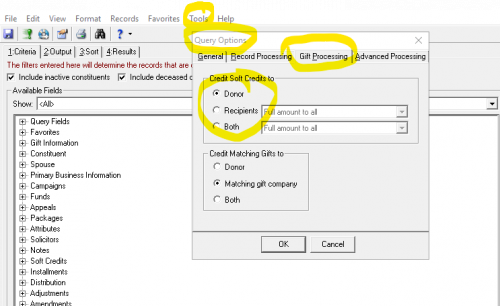
Soft Credit info in Query Learning how to deal with Soft Credits in database view and NXT is big for my team.
In database view, when building a query, you can decide if you want to show the main donor information to the Donor (where the hard credit is applied), the Recipient (where the soft credit is applied), or Both. Just be careful with the BOTH option--don't use it for financial reporting as it will double count the gifts. This is also the spot to define whose info you want to see for matching gifts.2













Categories
- All Categories
- New K-12 Community Home (TEST)
- New Higher Education Home Page (Test)
- New Impact Edge Community TEST
- New YourCause Community TEST
- New SKY Community TEST
- New Grantmaking TEST Community
- New Altru Test Community
- New bbcon Community - TEST
- 12 Blackbaud Agents for Good™
- New Raiser's Edge NXT Community
- 8 Blackbaud Community Help
- 222 bbcon®
- 1.4K Blackbaud Altru®
- 411 Blackbaud Award Management™ and Blackbaud Stewardship Management™
- 1.2K Blackbaud CRM™ and Blackbaud Internet Solutions™
- 16 donorCentrics®
- 361 Blackbaud eTapestry®
- 2.7K Blackbaud Financial Edge NXT®
- 688 Blackbaud Grantmaking™
- 604 Blackbaud Education Management Solutions for Higher Education
- 3.3K Blackbaud Education Management Solutions for K-12 Schools
- 954 Blackbaud Luminate Online® and Blackbaud TeamRaiser®
- 85 JustGiving® from Blackbaud®
- 7.1K Blackbaud Raiser's Edge NXT®
- 4K SKY Developer
- 258 ResearchPoint™
- 123 Blackbaud Tuition Management™
- 165 Organizational Best Practices
- 249 Member Lounge (Just for Fun)
- 40 Blackbaud Community Challenges
- 37 PowerUp Challenges
- 3 (Closed) PowerUp Challenge: Grid View Batch
- 3 (Closed) PowerUp Challenge: Chat for Blackbaud AI
- 3 (Closed) PowerUp Challenge: Data Health
- 3 (Closed) Raiser's Edge NXT PowerUp Challenge: Product Update Briefing
- 3 (Closed) Raiser's Edge NXT PowerUp Challenge: Standard Reports+
- 3 (Closed) Raiser's Edge NXT PowerUp Challenge: Email Marketing
- 3 (Closed) Raiser's Edge NXT PowerUp Challenge: Gift Management
- 4 (Closed) Raiser's Edge NXT PowerUp Challenge: Event Management
- 3 (Closed) Raiser's Edge NXT PowerUp Challenge: Home Page
- 4 (Closed) Raiser's Edge NXT PowerUp Challenge: Standard Reports
- 4 (Closed) Raiser's Edge NXT PowerUp Challenge: Query
- 829 Community News
- 3.1K Jobs Board
- 57 Blackbaud SKY® Reporting Announcements
- 47 Blackbaud CRM Higher Ed Product Advisory Group (HE PAG)
- 19 Blackbaud CRM Product Advisory Group (BBCRM PAG)