Blackbaud’s Education Management Solutions: What’s New For May 9, 2023





Here are the latest changes, updates, and new features for the Education management products for May 9, 2023.
To get started, check out this visual tutorial with instructions for using the new lists to find, export, and organize data for IPEDS.
A platform manager who is an environment admin or an organization (site) admin should configure security roles and role membership. This determines who has access to the lists and their data.
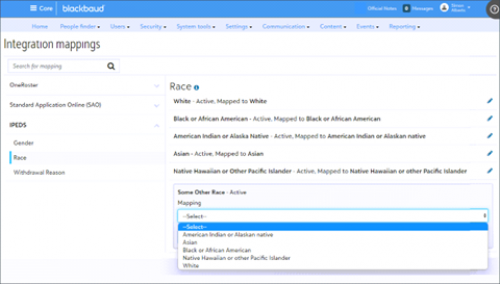
Since some fields of data in Blackbaud Education Management may not exactly match those required by IPEDS, you should also configure how you want the data from Core and Academics to map to corresponding fields for IPEDS. As a platform manager, go to Core, Settings, Integration Mappings, IPEDS, then Edit any values that are Not mapped, and select Save.
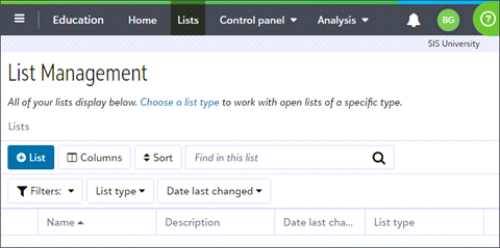
Users with access to the new higher ed lists should go to the lists by selecting Analysis from the top navigation menu and then selecting Lists. Alternatively, from your Home dashboard in Core, select Go to Education area, and then select Lists.
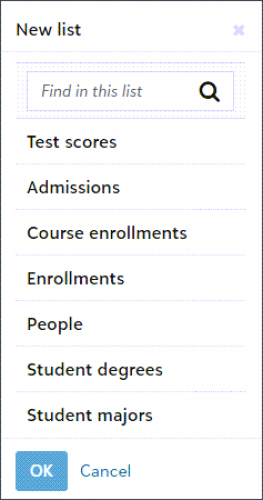
Some list types correspond to multiple IPEDS components. Thus, you'll use those list types multiple times to report data:
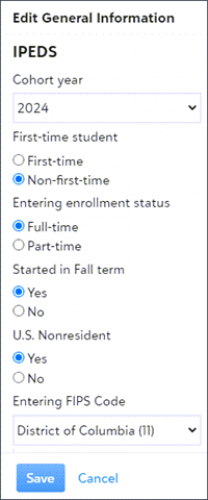
Students' user profiles are the source of some IPEDS specific data fields for these lists. To update the data for a student in the list, go to the student's user profile in Core and select Contact card. Then select Edit under General information.
Once the list is populated with one, or many users, select the user you need and then head to the next page. The Candidate Information page is where you add their information like First and Last name, as well as their Admissions information. If you’re looking to add a candidate to a user, the page also displays any current relationships as well, including their role and access levels.
To manage your community subscriptions:
Core
IPEDS Lists
Lists specifically designed for Integrated Postsecondary Education Data System (IPEDS) are now generally available. We’d like to thank all of the higher education organizations who participated in the early adopter program (EAP) that helped to make this update possible.To get started, check out this visual tutorial with instructions for using the new lists to find, export, and organize data for IPEDS.
A platform manager who is an environment admin or an organization (site) admin should configure security roles and role membership. This determines who has access to the lists and their data.
Since some fields of data in Blackbaud Education Management may not exactly match those required by IPEDS, you should also configure how you want the data from Core and Academics to map to corresponding fields for IPEDS. As a platform manager, go to Core, Settings, Integration Mappings, IPEDS, then Edit any values that are Not mapped, and select Save.
| Note: After you configure Integration Mappings for IPEDS, wait until the following day to take further action. The mapped data (IPEDS gender, IPEDS race, and IPEDS withdrawal reason) are updated in the lists overnight. |

Users with access to the new higher ed lists should go to the lists by selecting Analysis from the top navigation menu and then selecting Lists. Alternatively, from your Home dashboard in Core, select Go to Education area, and then select Lists.

Some list types correspond to multiple IPEDS components. Thus, you'll use those list types multiple times to report data:
- Admissions
- Admissions: Part 2 (Selection Process - A/A/E),
- Course enrollments
- 12-month Enrollment: Part B - Instructional Activity,
- Enrollments
- 12-month Enrollment: Part A - Unduplicated counts,
- Fall enrollment
- Student degrees
- Completions,
- Graduation rates,
- Graduation rates 200%,
- Outcome measures,
- Test scores
- Admissions: Part 3 (Selection Process - Test scores).
- People
- Student Majors

Students' user profiles are the source of some IPEDS specific data fields for these lists. To update the data for a student in the list, go to the student's user profile in Core and select Contact card. Then select Edit under General information.

Enrollment management
Create Candidate Has A New Look!
Last month, we gave you a sneak preview of an upcoming visual overhaul for Create Candidate and with this release, it has finally arrived. We've taken the Create Candidate experience and overhauled it to the SKY list style seen in other places within Blackbaud's Education management products. Functionally, it remains pretty much the same as you remember, though now, you can use the customizable filters and columns to tailor the experience to what you want. In addition, there's a search bar for finding specific candidates, there's a User Criteria Search which lets you drill down even further by incorporating details like grad years, roles, User ID, and more. Candidate Criteria lets you either create a new candidate record for an existing user or Create a new child with a candidate record for an existing parent.Once the list is populated with one, or many users, select the user you need and then head to the next page. The Candidate Information page is where you add their information like First and Last name, as well as their Admissions information. If you’re looking to add a candidate to a user, the page also displays any current relationships as well, including their role and access levels.
API and Integrations
Various School API endpoints no longer in BETA
The following endpoints have now transitioned out of BETA:- GET Academics assignments for student
- GET Academics graded assignments for student
- GET Academics sections for student
- GET Academics student enrollments changes
- GET Content News categories
- GET Content News items
- GET Core custom fields
- GET Degrees student degrees by ID
- GET Directories
- GET Directories results
- GET Schedules meetings
- GET Schedules - meetings for a student
- GET Test and Subtest types
- POST Test Score create
- GET Users Children of Parent
- GET Users emergency contact changes
- POST Users emergency contact non-user create
- POST Users emergency contact user create
- GET Users emergency contacts by user ID
- GET Users Get Me
- GET Users enrollments by year
School API and OneRoster API Changelog
For information about recently added endpoints and other updates, view the School API and OneRoster API changelog.Subscribe to “What’s New”
To receive email notifications when the What’s new update appears, make sure to subscribe to the Higher education community’s blog by logging into the community site and selecting the Subscribe button.To manage your community subscriptions:
- Log into the community and locate your name and profile picture in the upper right corner.
- Select the drop-down arrow and select My Account.
- From the My Account page, select the Subscriptions tab and scroll down to the Blogs section.
- Locate Blackbaud Higher Education solutions Blog. If you want to be notified as soon as the What’s new content goes live on the community, select the Instant option. You can also opt for Daily and Weekly notifications.
- Scroll to the end of the page and select Save changes.
What’s Recent
Missed any of our weekly releases? You can catch up on everything in our Month in Review blog posts, which cover every feature and update Education management releases each month.0
Categories
- All Categories
- New YourCause Community TEST
- New SKY Community TEST
- New Grantmaking TEST Community
- New Altru Test Community
- New bbcon Community - TEST
- 12 Blackbaud Agents for Good™
- New Raiser's Edge NXT Community
- 7 Blackbaud Community Help
- 218 bbcon®
- 1.4K Blackbaud Altru®
- 409 Blackbaud Award Management™ and Blackbaud Stewardship Management™
- 1.2K Blackbaud CRM™ and Blackbaud Internet Solutions™
- 16 donorCentrics®
- 361 Blackbaud eTapestry®
- 2.7K Blackbaud Financial Edge NXT®
- 680 Blackbaud Grantmaking™
- 598 Blackbaud Education Management Solutions for Higher Education
- 3.3K Blackbaud Education Management Solutions for K-12 Schools
- 952 Blackbaud Luminate Online® and Blackbaud TeamRaiser®
- 85 JustGiving® from Blackbaud®
- 7K Blackbaud Raiser's Edge NXT®
- 3.9K SKY Developer
- 257 ResearchPoint™
- 123 Blackbaud Tuition Management™
- 165 Organizational Best Practices
- 247 Member Lounge (Just for Fun)
- 40 Blackbaud Community Challenges
- 37 PowerUp Challenges
- 3 (Closed) PowerUp Challenge: Grid View Batch
- 3 (Closed) PowerUp Challenge: Chat for Blackbaud AI
- 3 (Closed) PowerUp Challenge: Data Health
- 3 (Closed) Raiser's Edge NXT PowerUp Challenge: Product Update Briefing
- 3 (Closed) Raiser's Edge NXT PowerUp Challenge: Standard Reports+
- 3 (Closed) Raiser's Edge NXT PowerUp Challenge: Email Marketing
- 3 (Closed) Raiser's Edge NXT PowerUp Challenge: Gift Management
- 4 (Closed) Raiser's Edge NXT PowerUp Challenge: Event Management
- 3 (Closed) Raiser's Edge NXT PowerUp Challenge: Home Page
- 4 (Closed) Raiser's Edge NXT PowerUp Challenge: Standard Reports
- 4 (Closed) Raiser's Edge NXT PowerUp Challenge: Query
- 822 Community News
- 3.1K Jobs Board
- 57 Blackbaud SKY® Reporting Announcements
- 47 Blackbaud CRM Higher Ed Product Advisory Group (HE PAG)
- 19 Blackbaud CRM Product Advisory Group (BBCRM PAG)