Changes to Actions interface





Today our DOs notified me that the Actions interface in web view looks totally different. Fine and dandy except that now I have to change my screenshot-heavy documentation.
Has anyone else had this rolled out? Did you have warning that it was coming? I didn't get a "What's New" for the week.
Screenshot of new layout:

.
Has anyone else had this rolled out? Did you have warning that it was coming? I didn't get a "What's New" for the week.
Screenshot of new layout:

.
0
Comments
-
There's a thread about this here
https://community.blackbaud.com/forums/viewtopic/184/50434
But you're not alone. There was no notification about this change given ahead of time.3 -
Thanks so much for the link, Dariel! I did try to search first but didn't have any luck. Appreciate it.0
-
I think some of the changes are good - less clutter overall. But yeah, this is kind of a big change with zero advance notice. I'm surprised (yet not surprised) that this just . . . . showed up one day. It isn't as if we can't figure it out. But being able to give fundraisers a heads up, and planning time to rework your documentation sure would have been nice.0
-
Thank you for posting that link.
https://community.blackbaud.com/forums/viewtopic/184/50434
I replied there with the update and if you can direct any questions there that would help us get it answered as quick as possible.0 -
Hey Everyone,
We are getting ready to roll this update back out. The plan for our SKY UX updates has always been to recreate existing forms the best we can. This action form was one that proved difficult because the icons were created before we had our standard design practices in place. The previous update did change too much and we heard that feedback and made the call to pull it back and re-evaluate. Some of the changes are staying and some are being changed back to the what the form previously looked like. In the end, we feel it is a great compromise and it meets all the accessibility and design standards we were aiming for.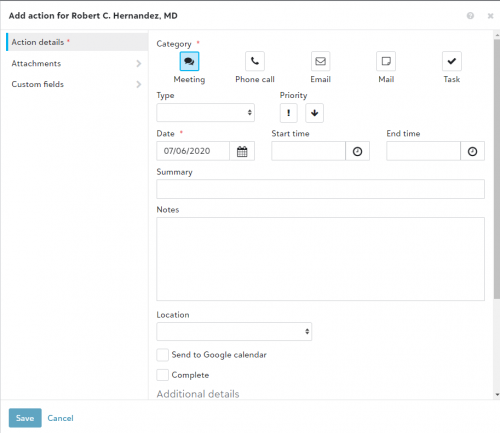
Returned:
The icons are back but they are new SKY icons and the size is a bit smaller.
The overall layout of the form is back, this is mainly seen with the date, time and location areas some of those fields (not all) were previously moved to a separate Appointment tab.
Changes:
The Past and Future buttons are gone. All options for the form now show and can be selected whenever without having to select past for previous actions and future for upcoming ones.
The Attachments and Custom fields areas are now in a tabbed/sectioned form view instead of being buried at the bottom
This form will be pushed to all sites this week and we will have our documentation updated accordingly.
If anyone has questions or concerns please feel free to let me know.
Thanks,
Anthony2












Categories
- All Categories
- New eTapestry Home Community
- New K-12 Community Home (TEST)
- New Higher Education Home Page (Test)
- New Impact Edge Community TEST
- New YourCause Community TEST
- New SKY Community TEST
- New Grantmaking TEST Community
- New Altru Test Community
- New bbcon Community - TEST
- 12 Blackbaud Agents for Good™
- New Raiser's Edge NXT Community
- 8 Blackbaud Community Help
- 223 bbcon®
- 1.4K Blackbaud Altru®
- 411 Blackbaud Award Management™ and Blackbaud Stewardship Management™
- 1.2K Blackbaud CRM™ and Blackbaud Internet Solutions™
- 16 donorCentrics®
- 361 Blackbaud eTapestry®
- 2.7K Blackbaud Financial Edge NXT®
- 688 Blackbaud Grantmaking™
- 604 Blackbaud Education Management Solutions for Higher Education
- 3.3K Blackbaud Education Management Solutions for K-12 Schools
- 954 Blackbaud Luminate Online® and Blackbaud TeamRaiser®
- 85 JustGiving® from Blackbaud®
- 7.1K Blackbaud Raiser's Edge NXT®
- 4K SKY Developer
- 258 ResearchPoint™
- 124 Blackbaud Tuition Management™
- 165 Organizational Best Practices
- 249 Member Lounge (Just for Fun)
- 40 Blackbaud Community Challenges
- 37 PowerUp Challenges
- 3 (Closed) PowerUp Challenge: Grid View Batch
- 3 (Closed) PowerUp Challenge: Chat for Blackbaud AI
- 3 (Closed) PowerUp Challenge: Data Health
- 3 (Closed) Raiser's Edge NXT PowerUp Challenge: Product Update Briefing
- 3 (Closed) Raiser's Edge NXT PowerUp Challenge: Standard Reports+
- 3 (Closed) Raiser's Edge NXT PowerUp Challenge: Email Marketing
- 3 (Closed) Raiser's Edge NXT PowerUp Challenge: Gift Management
- 4 (Closed) Raiser's Edge NXT PowerUp Challenge: Event Management
- 3 (Closed) Raiser's Edge NXT PowerUp Challenge: Home Page
- 4 (Closed) Raiser's Edge NXT PowerUp Challenge: Standard Reports
- 4 (Closed) Raiser's Edge NXT PowerUp Challenge: Query
- 829 Community News
- 3.1K Jobs Board
- 57 Blackbaud SKY® Reporting Announcements
- 47 Blackbaud CRM Higher Ed Product Advisory Group (HE PAG)
- 19 Blackbaud CRM Product Advisory Group (BBCRM PAG)