Tracking Minority/Women Owned Status in Vendor Records




Has anyone figured out a way to track and report on vendor status as minority or women-owned business in FE NXT?
It looks to me like this would have to be a custom field with a drop down of several options (Women-owned, Black-owned, Latinx-owned, Other POC-owned, etc).
As our organization seeks to engage in meaningful DEAI work and measure progress, I am eager to find a way to reliably track and report this information.
Would welcome suggestions or any solutions others have found.
It looks to me like this would have to be a custom field with a drop down of several options (Women-owned, Black-owned, Latinx-owned, Other POC-owned, etc).
As our organization seeks to engage in meaningful DEAI work and measure progress, I am eager to find a way to reliably track and report this information.
Would welcome suggestions or any solutions others have found.
2
Comments
-
Hey there Matt! I'm glad that you're asking - this has been a little passion project of mine for years. When I worked in training in FENXT, custom fields for Minority Owned, Women Owned, or Locally Owned businesses were the number one example of how and why to use custom fields (attributes in FE7). You can use those custom fields in reports in order to evaluate your impact in that regard.
Other common custom fields that FENXT users apply to Vendor records include:- Solicit=Yes/No
- Approved Vendor=Yes/No (if there's a need for an approved vendor list)
- W2 on File=Yes/No
3 -
Love all of Michael's examples - also, it's awesome that you can FILTER your vendor list by a Custom field. This is super helpful if you're looking in Financial Edge NXT for only women owned, or minority owned vendors.
Little trick you could also do - create the Custom field/attribute and then in database view, create queries using those Custom fields - then you can use the queries on some of the Payables reports to filter. I tried it on the AP Account Distribution report and the Open Invoice report and while my little sample database looks pretty sad, you probably will get some cool results.
Hope these tips help you!1 -
Thank you Mary & Michael; this is a great start!
I think I have a handle on how to set up the custom field. I included screenshots in case helpful for others. Instructions are also available in the help panel - search "custom fields".
But I'd be curious for some specific examples or screenshots of queries to ensure our reports function as intended.
If you're willing and able to share any of that Mary, I'd find it helpful & hopefully so would others.
Thanks again to you both for taking time to respond. Stay safe & healthy!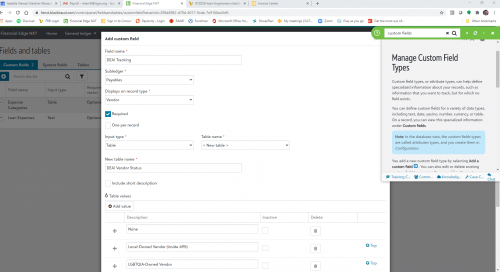
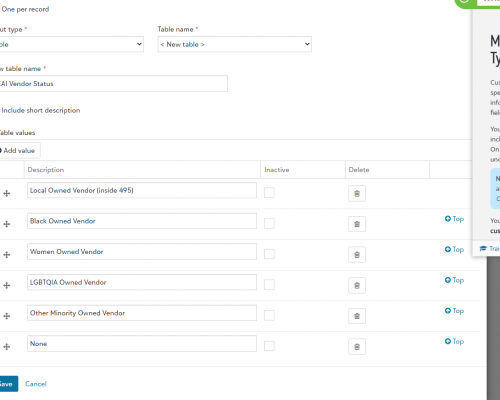
1 -
Hey Matt - I'll set some stuff up...my sample has *nothing* so I've gotta do some pre-work but I'll post the Query criteria you might be able to use.0
-
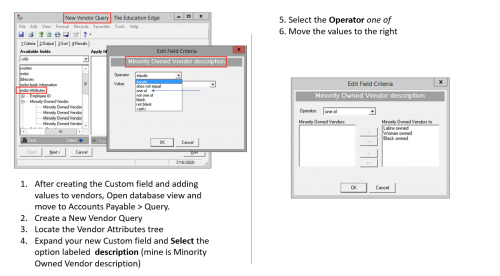
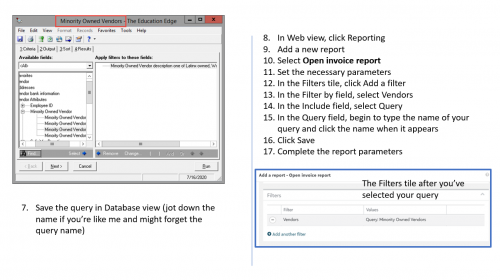
Matt, hope this is helpful - feel free to reach out if you need clarification on any of the steps - I admit, I did this quickly so you had a resource.
2









Categories
- All Categories
- New YourCause Community TEST
- New SKY Community TEST
- New Grantmaking TEST Community
- New Altru Test Community
- New bbcon Community - TEST
- 12 Blackbaud Agents for Good™
- New Raiser's Edge NXT Community
- 7 Blackbaud Community Help
- 218 bbcon®
- 1.4K Blackbaud Altru®
- 409 Blackbaud Award Management™ and Blackbaud Stewardship Management™
- 1.2K Blackbaud CRM™ and Blackbaud Internet Solutions™
- 16 donorCentrics®
- 361 Blackbaud eTapestry®
- 2.7K Blackbaud Financial Edge NXT®
- 680 Blackbaud Grantmaking™
- 598 Blackbaud Education Management Solutions for Higher Education
- 3.3K Blackbaud Education Management Solutions for K-12 Schools
- 952 Blackbaud Luminate Online® and Blackbaud TeamRaiser®
- 85 JustGiving® from Blackbaud®
- 7K Blackbaud Raiser's Edge NXT®
- 3.9K SKY Developer
- 257 ResearchPoint™
- 123 Blackbaud Tuition Management™
- 165 Organizational Best Practices
- 247 Member Lounge (Just for Fun)
- 40 Blackbaud Community Challenges
- 37 PowerUp Challenges
- 3 (Closed) PowerUp Challenge: Grid View Batch
- 3 (Closed) PowerUp Challenge: Chat for Blackbaud AI
- 3 (Closed) PowerUp Challenge: Data Health
- 3 (Closed) Raiser's Edge NXT PowerUp Challenge: Product Update Briefing
- 3 (Closed) Raiser's Edge NXT PowerUp Challenge: Standard Reports+
- 3 (Closed) Raiser's Edge NXT PowerUp Challenge: Email Marketing
- 3 (Closed) Raiser's Edge NXT PowerUp Challenge: Gift Management
- 4 (Closed) Raiser's Edge NXT PowerUp Challenge: Event Management
- 3 (Closed) Raiser's Edge NXT PowerUp Challenge: Home Page
- 4 (Closed) Raiser's Edge NXT PowerUp Challenge: Standard Reports
- 4 (Closed) Raiser's Edge NXT PowerUp Challenge: Query
- 822 Community News
- 3.1K Jobs Board
- 57 Blackbaud SKY® Reporting Announcements
- 47 Blackbaud CRM Higher Ed Product Advisory Group (HE PAG)
- 19 Blackbaud CRM Product Advisory Group (BBCRM PAG)