Student Checklists Are Live!





STUDENT CHECKLISTS ARE LIVE!
Hi Everyone, Student Checklists will be going live for all schools who have Enrollment Management on 8/4. Come see what they look like and get a deep dive training on how to set them up. Meeting information is below. I'll follow up here with a link to the recording, so if for some reason you're not able to attend, you can watch at a later time.
When: Tuesday 8/4 at 3pm
Hi Everyone, Student Checklists will be going live for all schools who have Enrollment Management on 8/4. Come see what they look like and get a deep dive training on how to set them up. Meeting information is below. I'll follow up here with a link to the recording, so if for some reason you're not able to attend, you can watch at a later time.
When: Tuesday 8/4 at 3pm
- Meeting link:
- https://blackbaud.webex.com/blackbaud/j.php?MTID=m513e12ab948f0d245e3eea3dc0a738fe
- Meeting number:
- 130 309 8730
- Password:
- StudentChecklist
More ways to join
- Join by phone
- 1-650-479-3207
Call-in number (US/Canada)
Access code: 130 309 8730
4
Comments
-
Sarah,
I will be there! Thanks! Coco1 -
Just a reminder that we'll be meeting this afternoon to look at student checklists!1
-
If I have power, I'll be there
Kim0 -
Hi Sarah. I missed the meeting re: Student Checklists. Is there a recoding?
Cheers, JT0 -
Hi JT! There will be. I'm waiting on this one to be available. I'll post here as soon as it's done. Hope you're having a great summer.
Sarah2 -
Hi all, here is the recording, I ended up re-recording because of some background noise.
https://blackbaud.webex.com/recordingservice/sites/blackbaud/recording/playback/142111db0ecd428380390a47a220eca7
thank you,
Sarah1 -
Hi Sarah Bienvenue is the role of Student Checklist Manager that you mentioned in the recording active? I can't find it in the list.1
-
Tina Pappas:
Hi Sarah Bienvenue is the role of Student Checklist Manager that you mentioned in the recording active? I can't find it in the list.Hi,
We were unable to find the Student Checklist Manager role as well. Anxious to get started building checklists!
Thanks,
Nissa
0 -
Hi Tina, it should be in the list. If you're not seeing, you'll want to contact support and they can assist.
thank you,
Sarah0 -
Thanks Sarah Bienvenue, will do.1
-
from Blackbaud Support: after researching this further, we have not released a Checklist Manager role, however we have released our new Student Checklist feature. This allows admins to view all view all school forms from the drop downs. Previously, only admissions forms were listed.
The tasks for this feature can be found under the Admissions Manager role, so I would recommend cloning this role if you desire specific access to this feature.Nissa Hales:
Tina Pappas:
Hi Sarah Bienvenue is the role of Student Checklist Manager that you mentioned in the recording active? I can't find it in the list.Hi,
We were unable to find the Student Checklist Manager role as well. Anxious to get started building checklists!
Thanks,
Nissa
1 -
Hi Tina, we have released the manager role, but it appears that it may not be showing on all schools. Let me do some more digging and find out what might be happening, Stay tuned.1
-
Sarah Bienvenue , we launched our first checklist to parents last Thursday, and we are receiving dozens of emails back from parents saying that they can login to onCampus like usual, but when they click the yellow banner to access the student checklist, they are prompted with a Blackbaud ID login screen that doesn't allow them to continue. We do not have Blackbaud ID turned on for our parents, and when I check the Core record for the parents submitting this problem, I can confirm that Blackbaud ID is not enabled. (We only use Blackbaud ID for our students and employees but not parents.)
When I impersonate these parents, I do not see any problem and things work fine. I had an employee who is also a parent be my test subject for the new checklist to make sure everything was working before I launched it 1000+ people. Unfortunately, she did not experience the Blackbaud ID problem described above, but as an employee, she already uses Blackbaud ID, so perhaps that is why she didn't experience the problem.
I've created an urgent case with customer support via Case Central, but it is the weekend so I know that nobody is able to respond. Have you heard of anyone else with this problem? Anyone have a solution? I have all of back to school forms and tasks attached to this student checklist and school starts next week.0 -
Geoffrey Goodfellow - this is happening to us as well. I chatted with support on Friday and created a case. It worked fine for us when we tested it out with a small group of parents. Once I applied the checklist to the entire school on Friday is when we began experiencing issues. We're also not able to go into our "manage checklists" area as we just get the error bird after the page tries to load "Sorry, something went wrong." I put an emergency alert that we're experiencing an issue with the checklist so we would stop getting emails from parents.
Hopefully, it will be fixed quickly!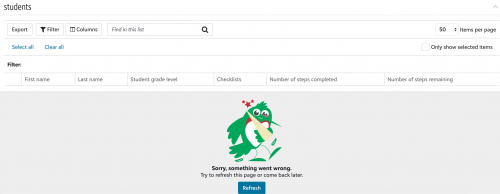
0 -
Hi Geoffrey Goodfellow and Bryan Lorenzo I'll have someone look first thing tomorrow (Monday) morning to see what might be happening.
thanks,
Sarah0 -
Many thanks, Sarah!!!0
-
Geoffrey Goodfellow Bryan Lorenzo we should have a fix going live in the next few hours for the BBID piece. Bryan- we're still working on why you're manage checklists tab is doing that, that appears to be a separate issue.1
-
Hi there -
Anyone having issues with file sizes on uploads? There is a limit of 500 MB and the parents are having a hard time uploading files. We haven't run across this issue for file uploads on Admission Checklist. One file I tested with is only 694 KB. I'm creating a case with support now.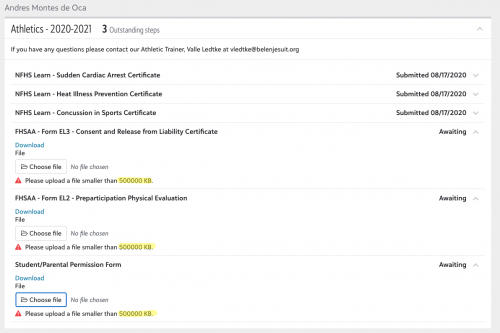
0 -
Sarah Bienvenue, thanks again for your update regarding the student cheklists being fixed. It has really helped to organize the many steps that parents need to complete at back-to-school time.
One thing I've noticed is that steps like "Update your Emergency Contact Information" or "Register for After School Care" or other steps where the parent does something that doesn't result in a form being submitted to us, the step continues to stay "awaiting" until we mark it "complete" for the parent. However, we don't always know if they are complete or not. I have many parents who say, "I updated my emergency contact information on my contact card like you asked, but it still shows 'awaiting'." Likewise for the parent who is not interested in registering for after school care, they looked at the event form and decided it wasn't for them, but the student checklist has no idea that they aren't interested, so the checklist step stays "awaiting" forever until we mark it "completed".
Is there some way for parents to mark a step (that has no "trigger" to be automatically marked completed) "complete"?0 -
Just testing out the Student Checklists on a few stragglers that we have coming in, since we missed using it for this school year (we started Aug. 12th) and had already
rolled out our forms, etc...
So a few questions: #1. I see that you can assign staff to a specific checklist step, but it appears that those are only people that have an Enrollment Management role.
Many of our forms are specific to a division or athletics or nurses' office, and we do not want to add all of those people to Enrollment Mgt.
Does the Student Checklist Manager role, allow you to then assign the steps to a person with that role? If so, when I looked in the tasks for the Student Checklist Manager role, they were all about editing, etc.... I didn't see anywhere, they could just have a role to View the checklist.
Really seems like the Checklist Tab also needs to be in the Academic side as well, since once they are through the admissions process or are a returning student, the staff that work with
the families are not part of the Enrollment Management Role.
Any thoughts or suggestions on the above and/or work around you have taken?
Thanks!!0 -
Hi Josceline, you can assign the checklist to any staff within the school and they will have access to their own version of the process checklist steps list from their faculty view that will only show checklists they have been assigned to. The checklist manager role gives access to all of the student checklist admin pieces within enrollment management and nothing else, so if there is someone who needs to be doing the set up/assigning who is not an admissions manager, they can still access those pieces.
thank you,
Sarah0 -
Hi Sarah,
Thanks for your reply. You can assign the entire checklist to anyone at the school; however, we are unable to assign a step, it only gives us people with the Enrollment Management role.
Which doesn't make sense because say our checklist for New 6th-8th graders has 9 steps with forms and each should be assigned to a different person, so they can see if the student has completed the step, ie: Physical/Medical to Nurse & Athletic Director, After Care form to After Care Director, Handbook to Assistant in Middle School, etc....
See screenshot.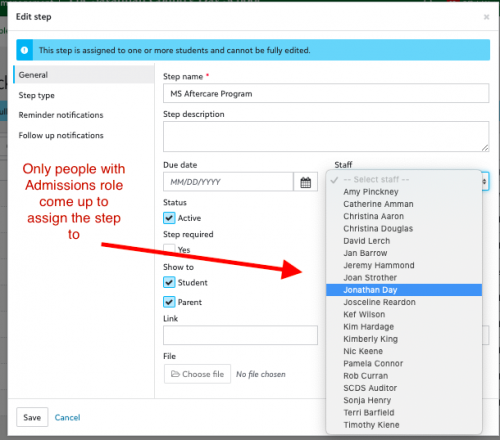
0 -
Hi Josceline Reardon you are correct, you are unable to assign individual steps within the checklist to staff members, you can assign the checklist to more than one staff person. Currently the assignment of admissions staff/managers at the step level does not actually do anything within the system and will be removed as such. In our back and forth with EAP customers, we found that the ability to assign the checklist to more than one staff member was enough for most of our schools, as users could filter on the steps that they needed to see/keep track of. I would encourage you to add the idea within the community.
thank you,
Sarah0 -
Thanks Sarah. That makes sense. I did assign a checklist to a staff member, that has a lot of roles, but seems like it still isn't working correctly.
I can put in a case if you prefer.
#1. In her Faculty persona to the right she has a checklist assigned, but cannot select anything
#2. If she searches a student in Academic >People Finder, there isn't a Check list Tab
#3. When she goes to her Advisory Group and selects the student > 3 dots> view profile, a Checklist Tab appears, but says she does not have access to view.
Many people that would need checklists assigned to them, do not have Class, Advisories or Teams, so how do they view checklists, if not Via Academics >People Finder?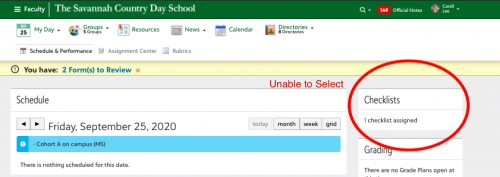
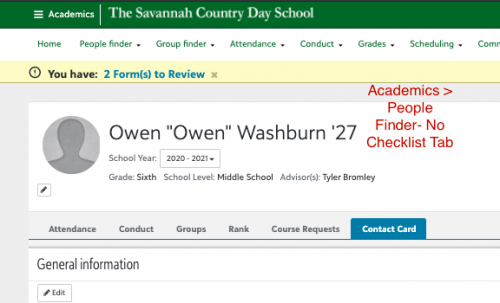
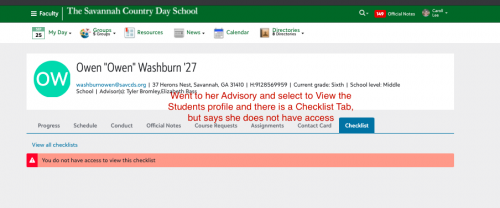
0 -
Hi Josceline Reardon, if she clicks on the "1" she will be brought to the list. The list has the submitted filter applied by default, but if she removes that filter she'll see all of the steps/people. Faculty only have access to the list. They do not have access to the student checklist tab. Let me know if you have any other questions.
thank you,
Sarah1 -
We are new to BB K-12 and haven't gone "live" with admissions yet. I am totally confused about this topic. So, has the checklist that is connected to the application gone away and now i need to set up new checklists? Or is this something totally different?0
-
Kim Hodges this is completely separate from the candidate checklists. This allows checklists to be built and assigned to incoming and current students.
thank you,
Sarah2 -
Sarah Bienvenue oh my, my eyes must be going bad. I didn't even notice the 1 was hyperlinked. Thank You!0





















Categories
- All Categories
- New YourCause Community TEST
- New SKY Community TEST
- New Grantmaking TEST Community
- New Altru Test Community
- New bbcon Community - TEST
- 12 Blackbaud Agents for Good™
- New Raiser's Edge NXT Community
- 7 Blackbaud Community Help
- 218 bbcon®
- 1.4K Blackbaud Altru®
- 409 Blackbaud Award Management™ and Blackbaud Stewardship Management™
- 1.2K Blackbaud CRM™ and Blackbaud Internet Solutions™
- 16 donorCentrics®
- 361 Blackbaud eTapestry®
- 2.7K Blackbaud Financial Edge NXT®
- 680 Blackbaud Grantmaking™
- 598 Blackbaud Education Management Solutions for Higher Education
- 3.3K Blackbaud Education Management Solutions for K-12 Schools
- 952 Blackbaud Luminate Online® and Blackbaud TeamRaiser®
- 85 JustGiving® from Blackbaud®
- 7K Blackbaud Raiser's Edge NXT®
- 3.9K SKY Developer
- 257 ResearchPoint™
- 123 Blackbaud Tuition Management™
- 165 Organizational Best Practices
- 247 Member Lounge (Just for Fun)
- 40 Blackbaud Community Challenges
- 37 PowerUp Challenges
- 3 (Closed) PowerUp Challenge: Grid View Batch
- 3 (Closed) PowerUp Challenge: Chat for Blackbaud AI
- 3 (Closed) PowerUp Challenge: Data Health
- 3 (Closed) Raiser's Edge NXT PowerUp Challenge: Product Update Briefing
- 3 (Closed) Raiser's Edge NXT PowerUp Challenge: Standard Reports+
- 3 (Closed) Raiser's Edge NXT PowerUp Challenge: Email Marketing
- 3 (Closed) Raiser's Edge NXT PowerUp Challenge: Gift Management
- 4 (Closed) Raiser's Edge NXT PowerUp Challenge: Event Management
- 3 (Closed) Raiser's Edge NXT PowerUp Challenge: Home Page
- 4 (Closed) Raiser's Edge NXT PowerUp Challenge: Standard Reports
- 4 (Closed) Raiser's Edge NXT PowerUp Challenge: Query
- 822 Community News
- 3.1K Jobs Board
- 57 Blackbaud SKY® Reporting Announcements
- 47 Blackbaud CRM Higher Ed Product Advisory Group (HE PAG)
- 19 Blackbaud CRM Product Advisory Group (BBCRM PAG)