Pay what you want pre-registered event tickets





Does anyone have any thoughts on how this might be implemented in the current product? Absent a workaround, I'll add an idea to the board.
Thanks,
Mac
Comments
-
Thank you for posting this! We are also interested in doing this and would like to know how this would work.
Thanks,0 -
Us, too.
We have a "Pay what you can" membership structure that was handled using some custom software written for us. We decided this year to use the Event and Membership modules to see if they could be of help (membership is tied to specific events, so it seemed like a natural fit). We set up membership levels as separate "Events", with the price being $0, and the verbiage "Pay what you can" appearing instead of the word "Free." We invited donors to enter the amount they wished to contribute to their memberships in the "Additional Donations" field box.
After a rush of multiple $0 memberships, we shut that down, created specific prices, and included wording in the Event form and the webpage that specified that if a "Pay what you can" membership was desired, one needed to contact the Membership coordinator directly.
Since I'm "in the neighborhood," is there any "off the shelf" software we can use for Memberships that will allow a Pay what you can structure? We'd have to import membership and gift data into RE, but we are willing to do that.1 -
I can think of two ways to do this in Altru, but they're both kind of workarounds:
1) Create a scheduled program and set ticket prices to zero. On the web form, mention the 'pay what you want' option on the shopping and change the text on the additional donation box at check out to match.
2) Use a donation web form that allows for any donation amount. Create a separate scheduled program, enable online sales, but do not link the program anywhere on a website. Only send the link to that program in the outgoing email on the donation web form. Make sure you tell people to donate, then click the link in the email they receive, then schedule a free ticket. You'd have to manage capacity at that point though to make sure you don't accept more donations than you have tickets for.
Jesse4 -
We've only offered "Pay What You Can" shows in person and our work around was making the event $0, registering the person then add a donation of "Pay What You Can". It worked ok, but the staff was handling the transaction, not the patron. I think Jesse's suggestions are your best bet, assuming the patron is able to navigate the webpages/technologically savvy. ?0
-
Jesse Price:
I can think of two ways to do this in Altru, but they're both kind of workarounds:
1) Create a scheduled program and set ticket prices to zero. On the web form, mention the 'pay what you want' option on the shopping and change the text on the additional donation box at check out to match.
2) Use a donation web form that allows for any donation amount. Create a separate scheduled program, enable online sales, but do not link the program anywhere on a website. Only send the link to that program in the outgoing email on the donation web form. Make sure you tell people to donate, then click the link in the email they receive, then schedule a free ticket. You'd have to manage capacity at that point though to make sure you don't accept more donations than you have tickets for.
JesseThis is good advice. I'd say option 1 is probably the way to go about it. Though there's one gotcha with the donation box that shows up on all web forms, it is global, so it would show up on all webforms with the language override. Option 2 would get around that but at the expense of complexity and manual processes for both patron and box office staff.
0 -
I love Jesse's suggestion here! In fact, I just spoke to someone this morning. We fixed up a sample page to look at the options and wanted to share here.
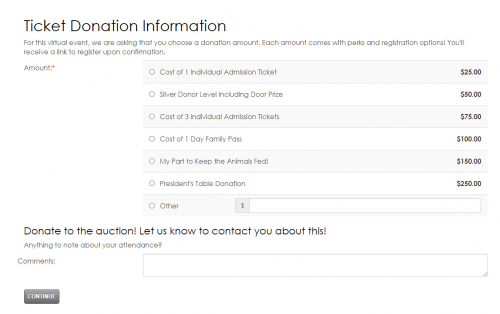
This would be having a link to the $0 registration donation page in the acknowledgement email.
Here's to great virtual events!
0










Categories
- All Categories
- New YourCause Community TEST
- New SKY Community TEST
- New Grantmaking TEST Community
- New Altru Test Community
- New bbcon Community - TEST
- 12 Blackbaud Agents for Good™
- New Raiser's Edge NXT Community
- 7 Blackbaud Community Help
- 218 bbcon®
- 1.4K Blackbaud Altru®
- 409 Blackbaud Award Management™ and Blackbaud Stewardship Management™
- 1.2K Blackbaud CRM™ and Blackbaud Internet Solutions™
- 16 donorCentrics®
- 361 Blackbaud eTapestry®
- 2.7K Blackbaud Financial Edge NXT®
- 680 Blackbaud Grantmaking™
- 598 Blackbaud Education Management Solutions for Higher Education
- 3.3K Blackbaud Education Management Solutions for K-12 Schools
- 952 Blackbaud Luminate Online® and Blackbaud TeamRaiser®
- 85 JustGiving® from Blackbaud®
- 7K Blackbaud Raiser's Edge NXT®
- 3.9K SKY Developer
- 257 ResearchPoint™
- 123 Blackbaud Tuition Management™
- 165 Organizational Best Practices
- 247 Member Lounge (Just for Fun)
- 40 Blackbaud Community Challenges
- 37 PowerUp Challenges
- 3 (Closed) PowerUp Challenge: Grid View Batch
- 3 (Closed) PowerUp Challenge: Chat for Blackbaud AI
- 3 (Closed) PowerUp Challenge: Data Health
- 3 (Closed) Raiser's Edge NXT PowerUp Challenge: Product Update Briefing
- 3 (Closed) Raiser's Edge NXT PowerUp Challenge: Standard Reports+
- 3 (Closed) Raiser's Edge NXT PowerUp Challenge: Email Marketing
- 3 (Closed) Raiser's Edge NXT PowerUp Challenge: Gift Management
- 4 (Closed) Raiser's Edge NXT PowerUp Challenge: Event Management
- 3 (Closed) Raiser's Edge NXT PowerUp Challenge: Home Page
- 4 (Closed) Raiser's Edge NXT PowerUp Challenge: Standard Reports
- 4 (Closed) Raiser's Edge NXT PowerUp Challenge: Query
- 822 Community News
- 3.1K Jobs Board
- 57 Blackbaud SKY® Reporting Announcements
- 47 Blackbaud CRM Higher Ed Product Advisory Group (HE PAG)
- 19 Blackbaud CRM Product Advisory Group (BBCRM PAG)