Giving User RENXT access



Hello,
I have a client who is trying to give my BBID access to their RENXT. Per Bill Connors' recent session at bbcon I instructed them to start in database view with a security group and user and then link the BBID, following this kb article: https://kb.blackbaud.com/articles/Article/121155#NoBBID-HasRE7User
However, when I attempt to log in to RENXT, I get redirected to a page that says "This page requires additional permissions. You do not have rights to access admin." Though I am not attempting to access admin.
I had to the client:
- Create a security group in database view that has read access to constituents
- Create a user in database view that is only in the previously created security group.
- In Web View, create a user with my BBID and link to the previously created user
I received the invitation email and accepted. When I log in, that database is available in my list of organizations. However, when I attempt to switch to that organization, I get the aformentioned error.
Note that in step 6 from that kb article, they did not "Grant access for the product you wish to grant the user Database View access" as I do not need Database View access. Is this the issue?
Also note that, per the Connors talk, I did not have them add any the NXT user to any roles as the Security Group should handle that access.
Since this is a client, I do not have admin access or database view access to their database. Surely there is something simple missing in these steps as this is not an uncommon task. What steps do I need to take to help them get my account access to their NXT?
Thank you in advance.
I have a client who is trying to give my BBID access to their RENXT. Per Bill Connors' recent session at bbcon I instructed them to start in database view with a security group and user and then link the BBID, following this kb article: https://kb.blackbaud.com/articles/Article/121155#NoBBID-HasRE7User
However, when I attempt to log in to RENXT, I get redirected to a page that says "This page requires additional permissions. You do not have rights to access admin." Though I am not attempting to access admin.
I had to the client:
- Create a security group in database view that has read access to constituents
- Create a user in database view that is only in the previously created security group.
- In Web View, create a user with my BBID and link to the previously created user
I received the invitation email and accepted. When I log in, that database is available in my list of organizations. However, when I attempt to switch to that organization, I get the aformentioned error.
Note that in step 6 from that kb article, they did not "Grant access for the product you wish to grant the user Database View access" as I do not need Database View access. Is this the issue?
Also note that, per the Connors talk, I did not have them add any the NXT user to any roles as the Security Group should handle that access.
Since this is a client, I do not have admin access or database view access to their database. Surely there is something simple missing in these steps as this is not an uncommon task. What steps do I need to take to help them get my account access to their NXT?
Thank you in advance.
0
Comments
-
Scott - Pretty sure the step 6 is the issue. You're attempting an end-run around role-based security so it won't work. It seems like you are trying to control security to web view via database view but never login to database view. I don't need to know why you'd go that route, but what will give you access to see the data you've been provisioned to have access to in web view (RE NXT) is for the organization to give your user account access via a role to what you need to see in RE NXT. It sounds like they've already done the setup for database view, but the Role access essentially acts like a web-based gatekeeper to make sure you are allowed to see the same data you've been given permission to in database view on the web.
RE NXT > Control panel > Security > Users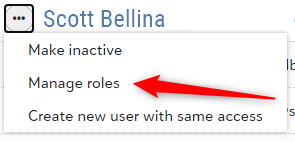
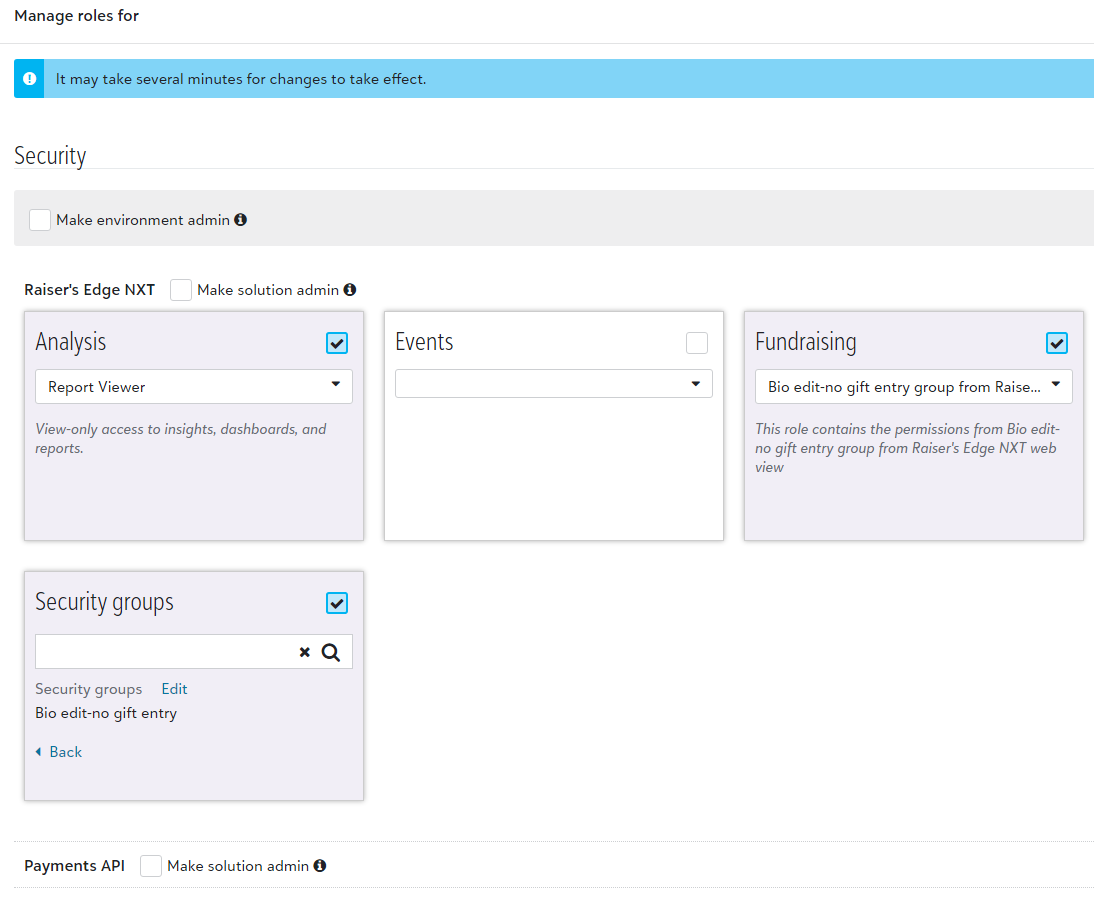
Database view definitely still rules for controlling detailed level access. However, it is no longer enough on its own to control web view. It's possible to have a user able to see more in database view than they can in web view if they don't have the correct roles.
Good luck.
0 -
Graham, thank you for your response. That is very helpful.
I am no expert on NXT security, and the interplay of Roles vs. Security Groups is something I don't have a clear understanding of. All I need is web view access to the constituent data defined by the security group.
Per that session I referenced (from slides at https://billconnors.com/wp-content/uploads/Bill-Connors-bbcon-2020-Presentation-on-Security-in-Raisers-Edge.pdf)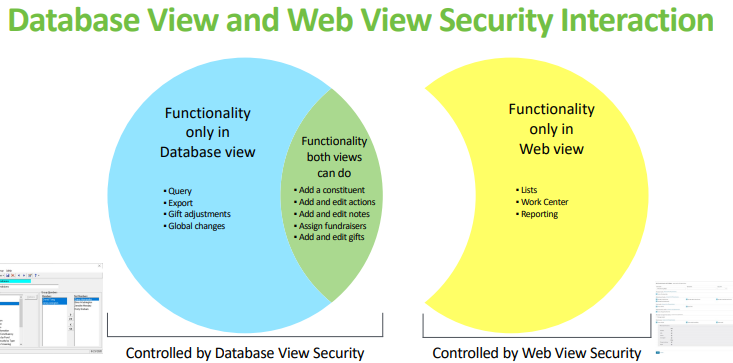
I do not (think I) need access to anything in the yellow graphic. But it sounds like I do not have a full understanding and that is not it.
Is there a recommended built-in role or roles that would get this done? Or do I just need to have them duplicate the security group permissions in a role?
Thanks again for your help.
0 -
Thanks for your help Graham, that did the trick.0





Categories
- All Categories
- New K-12 Community Home (TEST)
- New Higher Education Home Page (Test)
- New Impact Edge Community TEST
- New YourCause Community TEST
- New SKY Community TEST
- New Grantmaking TEST Community
- New Altru Test Community
- New bbcon Community - TEST
- 12 Blackbaud Agents for Good™
- New Raiser's Edge NXT Community
- 8 Blackbaud Community Help
- 222 bbcon®
- 1.4K Blackbaud Altru®
- 411 Blackbaud Award Management™ and Blackbaud Stewardship Management™
- 1.2K Blackbaud CRM™ and Blackbaud Internet Solutions™
- 16 donorCentrics®
- 361 Blackbaud eTapestry®
- 2.7K Blackbaud Financial Edge NXT®
- 688 Blackbaud Grantmaking™
- 604 Blackbaud Education Management Solutions for Higher Education
- 3.3K Blackbaud Education Management Solutions for K-12 Schools
- 954 Blackbaud Luminate Online® and Blackbaud TeamRaiser®
- 85 JustGiving® from Blackbaud®
- 7.1K Blackbaud Raiser's Edge NXT®
- 4K SKY Developer
- 258 ResearchPoint™
- 123 Blackbaud Tuition Management™
- 165 Organizational Best Practices
- 249 Member Lounge (Just for Fun)
- 40 Blackbaud Community Challenges
- 37 PowerUp Challenges
- 3 (Closed) PowerUp Challenge: Grid View Batch
- 3 (Closed) PowerUp Challenge: Chat for Blackbaud AI
- 3 (Closed) PowerUp Challenge: Data Health
- 3 (Closed) Raiser's Edge NXT PowerUp Challenge: Product Update Briefing
- 3 (Closed) Raiser's Edge NXT PowerUp Challenge: Standard Reports+
- 3 (Closed) Raiser's Edge NXT PowerUp Challenge: Email Marketing
- 3 (Closed) Raiser's Edge NXT PowerUp Challenge: Gift Management
- 4 (Closed) Raiser's Edge NXT PowerUp Challenge: Event Management
- 3 (Closed) Raiser's Edge NXT PowerUp Challenge: Home Page
- 4 (Closed) Raiser's Edge NXT PowerUp Challenge: Standard Reports
- 4 (Closed) Raiser's Edge NXT PowerUp Challenge: Query
- 829 Community News
- 3.1K Jobs Board
- 57 Blackbaud SKY® Reporting Announcements
- 47 Blackbaud CRM Higher Ed Product Advisory Group (HE PAG)
- 19 Blackbaud CRM Product Advisory Group (BBCRM PAG)