User Management in the SKY Reporting Dashboard builder release





With the SKY reporting for Education Dashboard release coming, you'll want to make sure any of your users who view dashboards are authenticating via Blackbaud ID. If they are set up before you receive the release, we'll migrate their roles and access to be sure they have continuity for viewing dashboards in the new Education area.
If you've received the Dashboard builder and your dashboard users are not logging in via Blackbaud ID here's how to get caught up:
- Depending on your access, you should see Control Panel > Security within the new Education area. From here you can configure roles for specific dashboard access.
- Some users are already in this list if they access other solutions like RE NXT or FE NXT, or if they are authorized to contact Blackbaud for chat and support. Use Manage roles from the context menu to add their access for Dashboards.
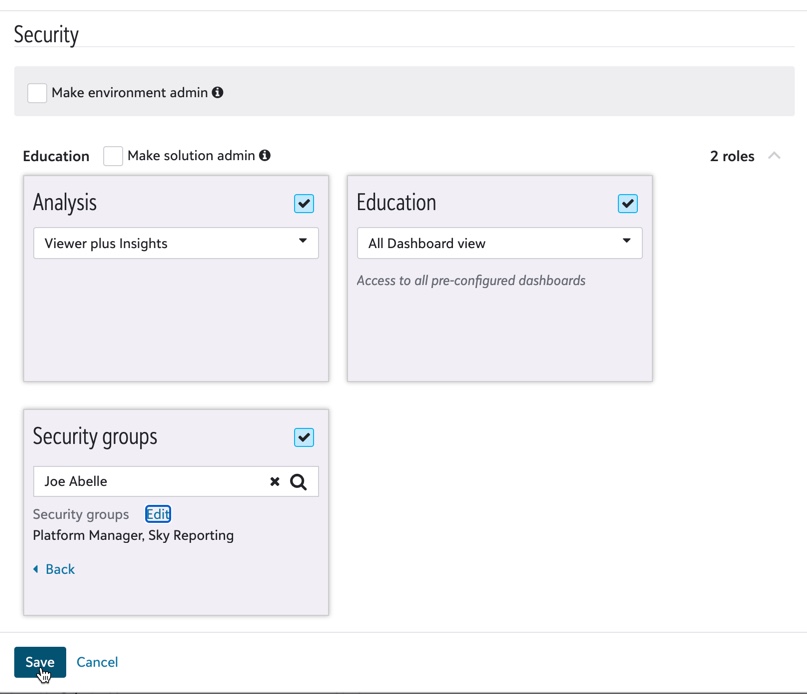
- Some BBID-authenticated users in Core will still need to added to this security list to set their permissions for the new dashboard viewing and building. On the Security Groups tile, be sure to link them to their existing user in Core. If you forget, they will end up with a second user in Core and their experience navigating back and forth to Analysis will not work correctly. The choices you select within the Security Groups tile correspond to the same roles you can assign to their account from within Core. When you click Send Invite from the Control Panel Add user task, an email invitation is sent from Blackbaud authentication services indicating that the user can now connect to your school via Blackbaud ID. When the user accepts this invitation they will show with Authentication status "Registered" in Core instead of "Awaiting response".
- At this writing (dec 2020), there are no plans to add end users such as Parents or Students into the Control Panel > Security area because all of their user access can be managed in Core. Only Application ("manager") roles (including SKY reporting role) are options in the list in the security groups tile.
- Some users are already in this list if they access other solutions like RE NXT or FE NXT, or if they are authorized to contact Blackbaud for chat and support. Use Manage roles from the context menu to add their access for Dashboards.
- Don't see Control Panel > Security in in the new Education area but you have access to manage users in Core? Follow the instructions in this kb article to locate the person at your school that can grant you the right access going forward. In the image above, if you are granted "solution admin" access, you will have automatic access to Education area permissions, and you will use Control Panel > Security to add users with Education access. Environment admins have access to all Blackbaud solutions at your organization and can grant users access other areas such as RE NXT or FE NXT.
- The SKY Reporting Role back in Core is still used to provide access to lists when a user clicks on a dashboard insight to drill into the detail. This should be the only role you need to assign to someone who can only view dashboards and doesn’t otherwise login to Education Management through myschoolapp.
Tagged:
1
Comments
-
Hi Jeanne,
Happy new year! Although the tile name is a little weird, the Education tile options control the preconfigured dashboard options, the Analysis tile has the permission to set view access to any custom dashboards you build. Remember when you build a custom dashboard you can also set the properties to grant access to only selected users, but those users must also have 'view dashboard' permissions in an Analysis role.
So long and short of it is that to give someone view access to both kinds of dashboards - Preconfigured or custom built, you'll need to give them a role in both Education and Analysis respectively.
Janet1
Categories
- All Categories
- New K-12 Community Home (TEST)
- New Higher Education Home Page (Test)
- New Impact Edge Community TEST
- New YourCause Community TEST
- New SKY Community TEST
- New Grantmaking TEST Community
- New Altru Test Community
- New bbcon Community - TEST
- 12 Blackbaud Agents for Good™
- New Raiser's Edge NXT Community
- 8 Blackbaud Community Help
- 222 bbcon®
- 1.4K Blackbaud Altru®
- 410 Blackbaud Award Management™ and Blackbaud Stewardship Management™
- 1.2K Blackbaud CRM™ and Blackbaud Internet Solutions™
- 16 donorCentrics®
- 361 Blackbaud eTapestry®
- 2.7K Blackbaud Financial Edge NXT®
- 687 Blackbaud Grantmaking™
- 604 Blackbaud Education Management Solutions for Higher Education
- 3.3K Blackbaud Education Management Solutions for K-12 Schools
- 954 Blackbaud Luminate Online® and Blackbaud TeamRaiser®
- 85 JustGiving® from Blackbaud®
- 7K Blackbaud Raiser's Edge NXT®
- 4K SKY Developer
- 258 ResearchPoint™
- 123 Blackbaud Tuition Management™
- 165 Organizational Best Practices
- 248 Member Lounge (Just for Fun)
- 40 Blackbaud Community Challenges
- 37 PowerUp Challenges
- 3 (Closed) PowerUp Challenge: Grid View Batch
- 3 (Closed) PowerUp Challenge: Chat for Blackbaud AI
- 3 (Closed) PowerUp Challenge: Data Health
- 3 (Closed) Raiser's Edge NXT PowerUp Challenge: Product Update Briefing
- 3 (Closed) Raiser's Edge NXT PowerUp Challenge: Standard Reports+
- 3 (Closed) Raiser's Edge NXT PowerUp Challenge: Email Marketing
- 3 (Closed) Raiser's Edge NXT PowerUp Challenge: Gift Management
- 4 (Closed) Raiser's Edge NXT PowerUp Challenge: Event Management
- 3 (Closed) Raiser's Edge NXT PowerUp Challenge: Home Page
- 4 (Closed) Raiser's Edge NXT PowerUp Challenge: Standard Reports
- 4 (Closed) Raiser's Edge NXT PowerUp Challenge: Query
- 829 Community News
- 3.1K Jobs Board
- 57 Blackbaud SKY® Reporting Announcements
- 47 Blackbaud CRM Higher Ed Product Advisory Group (HE PAG)
- 19 Blackbaud CRM Product Advisory Group (BBCRM PAG)