Add a section to an existing course




Does anyone know if there's a way to add a section to a course that is already running? The person I spoke to in a chat said that I will have to create a whole new course for the newly added students, even though it's actually the same course. They are looking into whether there is a workaround for this, but I thought you all might already know the answer.
1
Comments
-
Linda -
If you just need another section, you can add one. You do not need to create a new course unless you are changing grade plans.
Academics > Scheduling > Requests and schedules > set the filters as needed > Classes > click the ... button to the left of the course name > Manage Classes > Add Section
Scott0 -
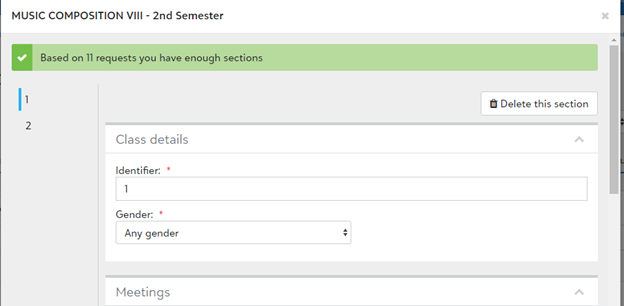
That won't work because the message "With x requests you have enough sections" has replaced the "Add a section" button.0
-
Linda -
On the Requests and schedules Classes screen, I have Class status of Too Many Classes and Enough Classes - I can still add sections via the Manage classes screen.
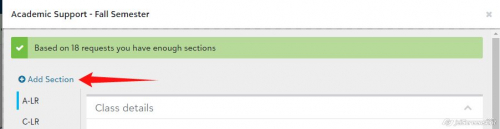
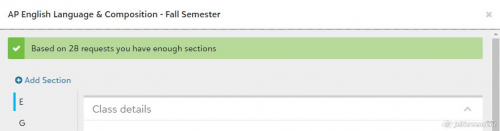
I am unaware of a setting in scheduling that would limit the number of section you can create based on the number of requests. Perhaps changing the parameters on the Scheduling tab of the course might help?
The work around I would use is just enter more requests for that course, create the section, then delete those requests.
I am sorry I could not be of more help.
Scott
0 -
This is what I have -- but I was trying to add the section for second semester. After I looked at your screenshot, I went back and looked at this course for first semester, and I DO have the "Add a section" button in first semester. SO, I guess that even though I don't need the additional section till second semester, I should just add it to first semester and it should carry over into second semester. Thanks for helping me work through this! And I wonder why I can add a section to the semester that's almost over but not to the semester that hasn't begun yet? That's a question for another day. Thanks again!
 0
0 -
Linda -
I just looked at some of our spring term courses and full-year courses via the spring semester view in Classes. For our one-term courses, I am able to add a section. For our full-year or two-term courses, I cannot add a section. So I am assuming that the system is only permitting you to add a section in in the first term the course meets.
One-term Spring Course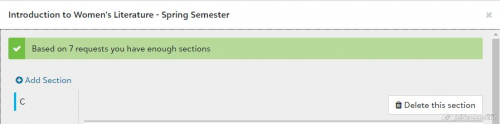
Two-term (full -year) Course viewed in spring semester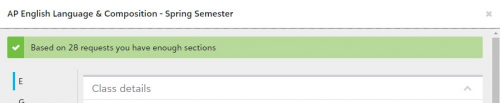
You solved the problem!
Congratulations.
Scott1 -
WE solved the problem!2
-
I was curious about this, so I did some testing...I think that the limitation may be related to course length and which term is selected on the Classes page. We have three terms (Fall, Winter, Spring).
For a course with length 3, I can add sections with the Fall term selected (even though our Fall term has ended), but not with Winter or Spring selected.
For a course with length 2 , I can add a section with Fall or Winter selected, but not with Spring selected (probably because there would not be enough terms left in the year to complete a 2-term course starting in the spring).0 -
You're probably right about not being able to complete the required terms being the reason. But I wish the flexibility were there, to accommodate new admits and students returning from a semester away, as well as resectioning due to staff changes or student program changes. Thanks for your insight!0










Categories
- All Categories
- New YourCause Community TEST
- New SKY Community TEST
- New Grantmaking TEST Community
- New Altru Test Community
- New bbcon Community - TEST
- 12 Blackbaud Agents for Good™
- New Raiser's Edge NXT Community
- 7 Blackbaud Community Help
- 218 bbcon®
- 1.4K Blackbaud Altru®
- 409 Blackbaud Award Management™ and Blackbaud Stewardship Management™
- 1.2K Blackbaud CRM™ and Blackbaud Internet Solutions™
- 16 donorCentrics®
- 361 Blackbaud eTapestry®
- 2.7K Blackbaud Financial Edge NXT®
- 680 Blackbaud Grantmaking™
- 598 Blackbaud Education Management Solutions for Higher Education
- 3.3K Blackbaud Education Management Solutions for K-12 Schools
- 952 Blackbaud Luminate Online® and Blackbaud TeamRaiser®
- 85 JustGiving® from Blackbaud®
- 7K Blackbaud Raiser's Edge NXT®
- 3.9K SKY Developer
- 257 ResearchPoint™
- 123 Blackbaud Tuition Management™
- 165 Organizational Best Practices
- 247 Member Lounge (Just for Fun)
- 40 Blackbaud Community Challenges
- 37 PowerUp Challenges
- 3 (Closed) PowerUp Challenge: Grid View Batch
- 3 (Closed) PowerUp Challenge: Chat for Blackbaud AI
- 3 (Closed) PowerUp Challenge: Data Health
- 3 (Closed) Raiser's Edge NXT PowerUp Challenge: Product Update Briefing
- 3 (Closed) Raiser's Edge NXT PowerUp Challenge: Standard Reports+
- 3 (Closed) Raiser's Edge NXT PowerUp Challenge: Email Marketing
- 3 (Closed) Raiser's Edge NXT PowerUp Challenge: Gift Management
- 4 (Closed) Raiser's Edge NXT PowerUp Challenge: Event Management
- 3 (Closed) Raiser's Edge NXT PowerUp Challenge: Home Page
- 4 (Closed) Raiser's Edge NXT PowerUp Challenge: Standard Reports
- 4 (Closed) Raiser's Edge NXT PowerUp Challenge: Query
- 822 Community News
- 3.1K Jobs Board
- 57 Blackbaud SKY® Reporting Announcements
- 47 Blackbaud CRM Higher Ed Product Advisory Group (HE PAG)
- 19 Blackbaud CRM Product Advisory Group (BBCRM PAG)