Power Automate Add Participant to an event



I am trying to add a participant to an event when someone submits a form. At the beginning of the flow, I search the constituent and if they are in RE then I want to add the event. How do I grab the constituent record from the search? I can successfully add a participant record if I manually add in the constituent record, but I can't seem to grab it from the search.
0
Comments
-
Hi Rachel,
The Search for a constituent connector action returns a list of results (it's an array of objects), and you can reference the ID of the constituent via the Dynamic Content window (you'll see it labeled as "ID" below). Note that this value is the "system record ID" not the user-defined Lookup ID, which is good because that's the value expected by the Create a participant action!.
Since the search returns a list of matches, you'll probably want to express what should happen if no results (or multiple results) are found. In my example below, I'm only taking an action (creating a participant) if a single result was returned by the search action (meaning, the Count property of the response is 1):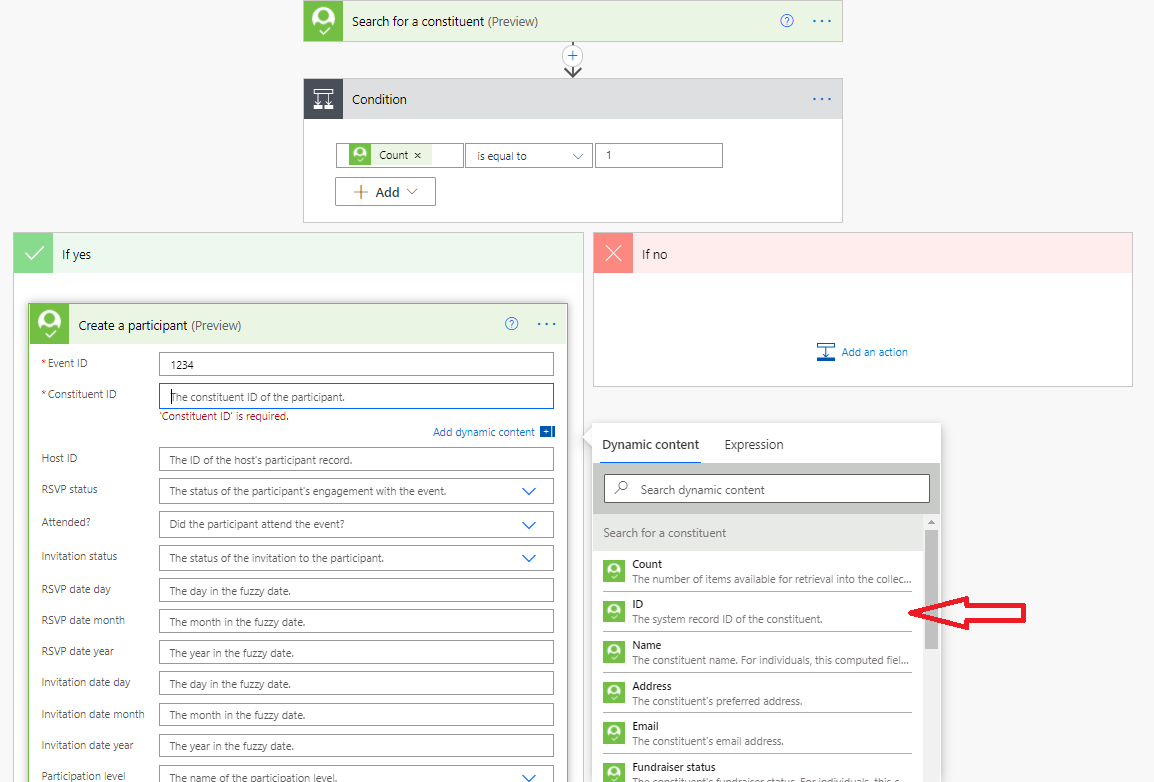
Note that Power Automate will automatically inject an "Apply to Each" block when you reference the ID because it won't know you're only doing this work for a single item: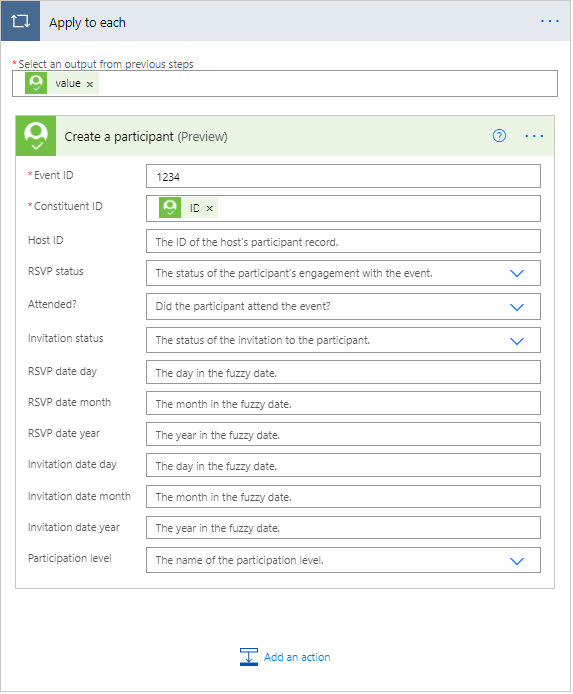 .
.
So it's essentially a loop over a single record, which works fine just makes the flow a bit more awkward to read. If you'd rather not see the Apply to Each block, you can use a Compose action with an expression to grab the ID of the first item in the search results: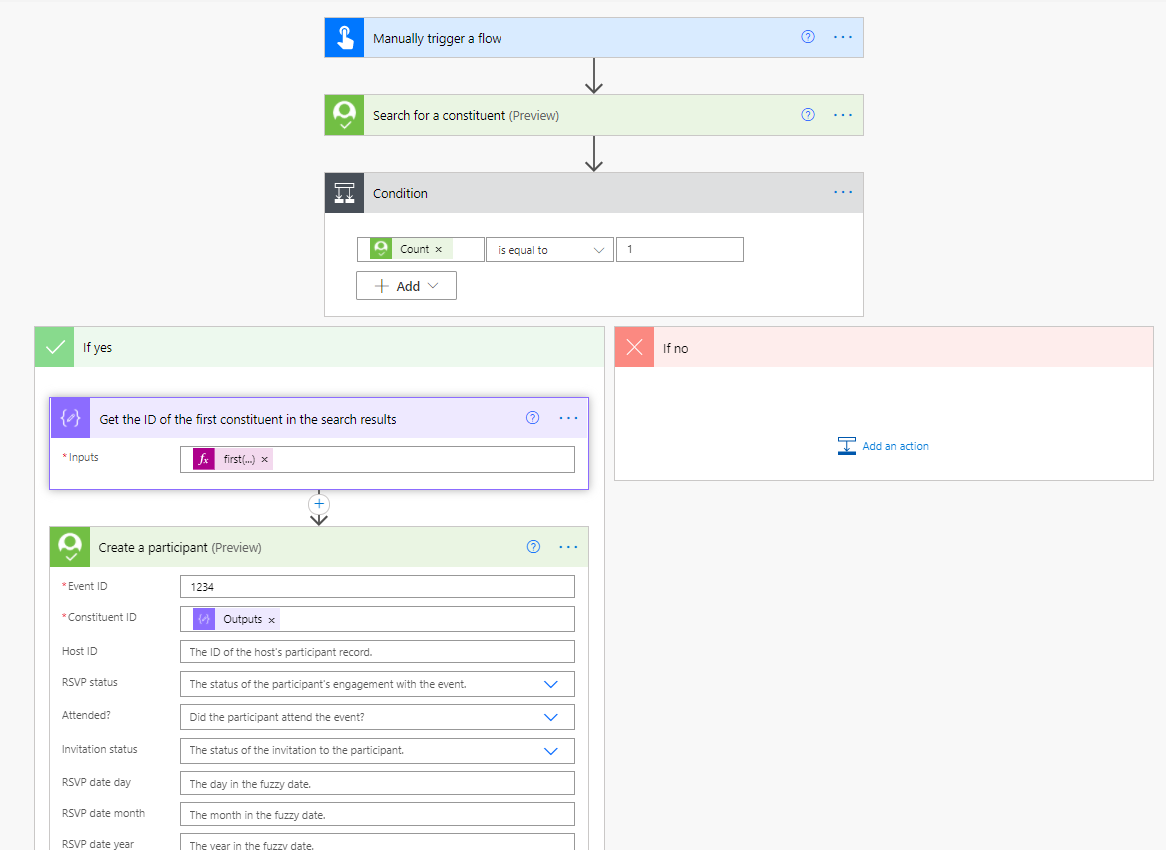
In the above example, the expression I'm using with the Compose action is:
first(outputs('Search_for_a_constituent')?['body/value'])['id']That expression takes the first item of the value property of the search result action, and then returns the id property.
I hope this helps - let us know if you have any questions!0





Categories
- All Categories
- New K-12 Community Home (TEST)
- New Higher Education Home Page (Test)
- New Impact Edge Community TEST
- New YourCause Community TEST
- New SKY Community TEST
- New Grantmaking TEST Community
- New Altru Test Community
- New bbcon Community - TEST
- 12 Blackbaud Agents for Good™
- New Raiser's Edge NXT Community
- 8 Blackbaud Community Help
- 222 bbcon®
- 1.4K Blackbaud Altru®
- 410 Blackbaud Award Management™ and Blackbaud Stewardship Management™
- 1.2K Blackbaud CRM™ and Blackbaud Internet Solutions™
- 16 donorCentrics®
- 361 Blackbaud eTapestry®
- 2.7K Blackbaud Financial Edge NXT®
- 687 Blackbaud Grantmaking™
- 604 Blackbaud Education Management Solutions for Higher Education
- 3.3K Blackbaud Education Management Solutions for K-12 Schools
- 954 Blackbaud Luminate Online® and Blackbaud TeamRaiser®
- 85 JustGiving® from Blackbaud®
- 7K Blackbaud Raiser's Edge NXT®
- 4K SKY Developer
- 258 ResearchPoint™
- 123 Blackbaud Tuition Management™
- 165 Organizational Best Practices
- 248 Member Lounge (Just for Fun)
- 40 Blackbaud Community Challenges
- 37 PowerUp Challenges
- 3 (Closed) PowerUp Challenge: Grid View Batch
- 3 (Closed) PowerUp Challenge: Chat for Blackbaud AI
- 3 (Closed) PowerUp Challenge: Data Health
- 3 (Closed) Raiser's Edge NXT PowerUp Challenge: Product Update Briefing
- 3 (Closed) Raiser's Edge NXT PowerUp Challenge: Standard Reports+
- 3 (Closed) Raiser's Edge NXT PowerUp Challenge: Email Marketing
- 3 (Closed) Raiser's Edge NXT PowerUp Challenge: Gift Management
- 4 (Closed) Raiser's Edge NXT PowerUp Challenge: Event Management
- 3 (Closed) Raiser's Edge NXT PowerUp Challenge: Home Page
- 4 (Closed) Raiser's Edge NXT PowerUp Challenge: Standard Reports
- 4 (Closed) Raiser's Edge NXT PowerUp Challenge: Query
- 829 Community News
- 3.1K Jobs Board
- 57 Blackbaud SKY® Reporting Announcements
- 47 Blackbaud CRM Higher Ed Product Advisory Group (HE PAG)
- 19 Blackbaud CRM Product Advisory Group (BBCRM PAG)