Communication to your Community on when you Switched/Started BlackBaud





[EDITED for Clarity]
We are gearing up on getting ready to start communicating to our parents/guardians of our upcoming switch from Senior Systems to BlackBaud and I was wondering what other institutions had used to communicate to their families of the incoming changes/ what they as our community can expect. I was also wondering what the parent/guardian response was regarding the communication that went out to see if some approaches were better then others. I.e How much information did you give the first time you communicated the change, did you start up by just letting them know a change is coming, or did you go into detail about specifics/ how did you time the information. I do enjoy the material(s) BB provides, but wanted to get input from anyone who has -or has not- implemented those tools.
Thank you everyone

Comments
-
If you are seeking to convince your community that switching to Blackbaud is a great idea, I'm sure Blackbaud's own materials and website can provide verbiage that sell it better than I can, but you can simply let them know that it has millions of users worldwide and is pretty much considered the gold standard among nonprofits, with ever-evolving programs. It's best if they go in to it with an open mind and are willing to go through training, of which there is an abundance available, then other more-experienced users will be helpful in getting them through the rough spots and growing pains. You get out of it what you put in to it.6
-
I'm curious whom you mean with that word "community." If it's your town, for example, why are you feeling the need to tell them you're switching software? Depending on what your answer to my question is, perhaps re-examine if you actually need to communicate this or not.
If you do actually send out something, I second Heather Pauli's answer below for where to get your comments, info, for convincing/sharing information on why the change.1 -
By "community", I assume you meant your fellow co-workers/volunteers/parents and anyone else with whom you work in the educational "community" that will be impacted by the switch to Blackbaud.2
-
I do, I mean our parents/guardians. We are switching from Senior Systems to BlackBaud and I was wondering what other institutions had used to communicate to their families of the incoming changes, what they can expect. I was also wondering what the parent/guardian response was regarding the communication that went out to see if some approaches were better then others. I.e How much information did you give the first time you communicated the change, did you start up by just letting them know a change is coming, or did you go into detail about specifics/ how did you time the information. I do see the material BB provides (Which I love) but wanted to get input from anyone who has -or has not- implemented those tools.2
-
By Community I am referring to the Parents/Guardians of our students. I'm looking for feedback on if other institutions utalized the tools from BlackBaud to inform families, if they did not use the tools, or if they did a combo of the two and what their Parent/Guardian community response was. I guess the verbiage was confusing XD0
-
Hi Amber,
I hate to sound corny, but it depends on how your school is/was using both products.
We used Senior Systems as our database of record with Blackbaud EM as the "face". Parents (and older students) interacted with SS via My Backpack for: billing, report cards, attendance, profile editing (parents only), and school forms. And they did that via an SSO link from Blackbaud - they never logged in directly to MBP...Everything else was done in Blackbaud - calendar, assignments, athletics, etc. So, for us, it wasn't much of a parent experience change.
If your parents are going from 100% MBP to Blackbaud, that is a BIG culture shift. My two cents - I recommend sitting down with someone at your school who is in the communications/marketing side to figure out what the most major changes are for parents for the first communication. I would also establish where you want to store your help documents - like a Resource Board page.
Communication e-mail:
Parents are not going to read a big long e-mail with all the changes, because: 1) they don't read anymore, and 2) it would be overwhelming. For the first communication, I recommend an enthusiastic sales pitch with a handful of bullet points on how their experience will improve rather than a "how to." (highlight things like calendar, resource boards, what they see of their student)(with a couple screen shots if poss.) After that initial communication, you could dish out regularly-timed "how to" communications on one or two topics. This gives you a chance to stay ahead on creating help docs that are school-specific and in line with your configuration/policies.
Resource Board/Ongoing Training:
Highly recommend storing help docs/help videos on a resource board so users can go back to it when they need to.. For parents and students, you could have some training sessions at the start of the new school year. You could offer dedicated office hours where the only focus is help sessions... NB - I am totally leaving faculty/staff training out of this discussion - which will be its own lift.
Good luck! It's a really positive change.
Carolyn Stevens
Information Systems Administrator
Cranbrook Schools4 -
Hi Amber -
We are about to embark on this process. Do you have any tips and tricks from your experience? I am also curious about a timeline you may have followed that worked, or didn't work
Thanks!
0 -
Hi Maya, I'm following up on this
We did a small mention of it in our newsletter to families letting them know that more information will be coming soon about login information. The biggest question families had was if they would still have access to old report cards.
When it went live we made a pop up on our website that went with a notification that was sent out, see below.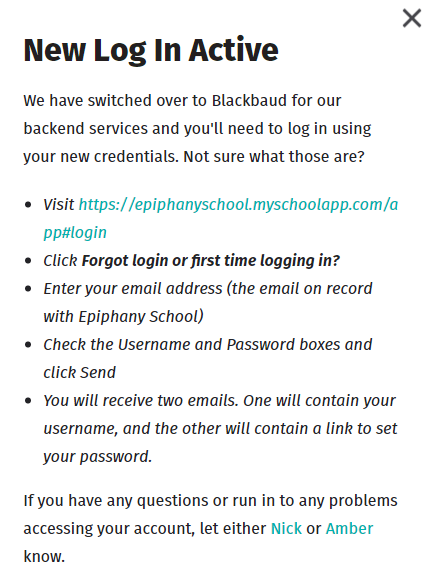
When our Summer forms/Re-Enrollment forms went out, I included some “what is new” information and a “”how to find and fill out" resource on our website.
So far, the only complaints are that
1. Emergency contacts do not synch for siblings, parents have to enter them in individually for each sibling.
2. Checklists are confusing, honestly, next year I'm only going to assign the forms. The checklists are great as a list, but the terminology is really duplex since forms also are listed with the complete or not status. Parents are having a hard time following what has and what has not been completed if a form says completed and a step says submitted or something.
Hopefully this helps!0













Categories
- All Categories
- New YourCause Community TEST
- New SKY Community TEST
- New Grantmaking TEST Community
- New Altru Test Community
- New bbcon Community - TEST
- 12 Blackbaud Agents for Good™
- New Raiser's Edge NXT Community
- 7 Blackbaud Community Help
- 218 bbcon®
- 1.4K Blackbaud Altru®
- 409 Blackbaud Award Management™ and Blackbaud Stewardship Management™
- 1.2K Blackbaud CRM™ and Blackbaud Internet Solutions™
- 16 donorCentrics®
- 361 Blackbaud eTapestry®
- 2.7K Blackbaud Financial Edge NXT®
- 680 Blackbaud Grantmaking™
- 598 Blackbaud Education Management Solutions for Higher Education
- 3.3K Blackbaud Education Management Solutions for K-12 Schools
- 952 Blackbaud Luminate Online® and Blackbaud TeamRaiser®
- 85 JustGiving® from Blackbaud®
- 7K Blackbaud Raiser's Edge NXT®
- 3.9K SKY Developer
- 257 ResearchPoint™
- 123 Blackbaud Tuition Management™
- 165 Organizational Best Practices
- 247 Member Lounge (Just for Fun)
- 40 Blackbaud Community Challenges
- 37 PowerUp Challenges
- 3 (Closed) PowerUp Challenge: Grid View Batch
- 3 (Closed) PowerUp Challenge: Chat for Blackbaud AI
- 3 (Closed) PowerUp Challenge: Data Health
- 3 (Closed) Raiser's Edge NXT PowerUp Challenge: Product Update Briefing
- 3 (Closed) Raiser's Edge NXT PowerUp Challenge: Standard Reports+
- 3 (Closed) Raiser's Edge NXT PowerUp Challenge: Email Marketing
- 3 (Closed) Raiser's Edge NXT PowerUp Challenge: Gift Management
- 4 (Closed) Raiser's Edge NXT PowerUp Challenge: Event Management
- 3 (Closed) Raiser's Edge NXT PowerUp Challenge: Home Page
- 4 (Closed) Raiser's Edge NXT PowerUp Challenge: Standard Reports
- 4 (Closed) Raiser's Edge NXT PowerUp Challenge: Query
- 822 Community News
- 3.1K Jobs Board
- 57 Blackbaud SKY® Reporting Announcements
- 47 Blackbaud CRM Higher Ed Product Advisory Group (HE PAG)
- 19 Blackbaud CRM Product Advisory Group (BBCRM PAG)