How do I see what constituent the relationship record belongs to?





I know you smart Community people can help me with this!
When I search the relationship records in webview, I can find the relationship I'm looking for, let's call it “Coffee For Everyone Foundation.” When I click on it to open it up and view it, where do I see what constituent record it sits on? All I can see is the info for Coffee for Everyone, and not that it's a relationship on “John Smith” constituent record.
I've looked all over the screen and clicked on everything I can click on. I've also searched Knowledgebase. What am I missing?
Comments
-
The relationship might not be reciprocated, and if that is the case, then I think the best way to find all of the relationships for an organization would be through a query.
1 -
I know how to find relationships through query, but thanks for mentioning that!
My actual (fictitious names here though!) example is that John Smith has a record, and Coffee for Everyone Fndtn. only exists as a relationship record to John Smith.
When I search for Coffee for Everyone in webview, I cannot see that it sits on John Smith's record. That's what I'm looking for. I can successfully search and find Coffee for Everyone, but I am unable to tell that I need to go to John Smith's record to add a fundraiser, action, etc.
1 -
Fascinating! How does it look in database view? Might that help explain why it is difficult to see in webview?
Karen
1 -
It feels like Melissa is on to something…is the relationship reciprocated?
1 -
The relationship can't be reciprocated because Coffee is only a relationship record.
0 -
Karen Diener:
Fascinating! How does it look in database view? Might that help explain why it is difficult to see in webview?
Karen
I don't see anything that feels like it answers this, Karen. Coffee is just a relationship record on John's full constituent record. Database view can't find me Coffee's record in the search area, because it's not a spouse or contact, but webview can. That's the only difference I can see. Anyone else have more to add to this point?
0 -
I may be misunderstanding, but if you type Coffee for All in search from web view and nothing returns as a match, you should see a little tiny pulldown option that says search relationship records. If you click on that, you should see the relationship for Coffee for All.
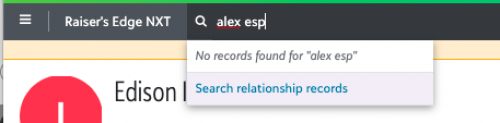
0 -
I don't know of a way to see the constituent record the non-constituent relationship is attached to – at least not within RE NXT.
Usually what I do is then open the DB view and create a new constituent query and query on the relationship name… then go from there. It would be fantastic if there was a way to see what the ‘parent’ record is for the ‘child’ relationship record.2 -
I think you've found a big bug here. I just checked in a sample database.
Hermione Grainger has a non-constituent relationship to Ministry of Magic where she is also the primary contact. I know that being a contact doesn't matter, since the Ministry is a not a constituent record, but this is for testing purposes.
I'm able to find Ministry of Magic when I use “search for relationship records”. I can open the non-constituent “record”, but there is no way to see where this non-constituent relationship actually “lives”.
This is already logged in the idea bank with “voting open”, so I recommend we all go vote it up!
Karen
1 -
Jeannie Goings:
I may be misunderstanding, but if you type Coffee for All in search from web view and nothing returns as a match, you should see a little tiny pulldown option that says search relationship records. If you click on that, you should see the relationship for Coffee for All.Jeannie, that's not quite it, but thanks for making sure I knew about this step! I can search for, and find, quite well, Coffee's relationship record. Once it's open, on my screen, in Webview, I can't see that it's a relationship record on John Smith's record. That's what I'm looking for.
0 -
Cameron Alzubi:
I don't know of a way to see the constituent record the non-constituent relationship is attached to – at least not within RE NXT.
Usually what I do is then open the DB view and create a new constituent query and query on the relationship name… then go from there. It would be fantastic if there was a way to see what the ‘parent’ record is for the ‘child’ relationship record.Right, Cameron, that's a way to do this, but not for the staff person in my shop whose question to me prompted me coming to you all here in the Community. So, I'm looking for a way, ONLY in webview, to find this. If any more ideas come to mind for you, please come back.
0 -
Thanks for sharing this link~ I voted.
1 -
I'm so glad you posted this question! I actually came across the same issue searching for something in our database. With so many hands in it over the years we have had NUMEROUS relationship records created for the same organizations (sometimes employers but also parishes to which a family belongs). The only way I have been able to see what constituent is tied to one of these records is to make that record a constituent, which is not always needed nor the best way to answer a question.
I've wanted to find a better workaround so I can easily identify what constituents have a relationship that needs fixed. I'm definitely going to go vote and watch this thread. Thank you Community!
2



















Categories
- All Categories
- New K-12 Community Home (TEST)
- New Higher Education Home Page (Test)
- New Impact Edge Community TEST
- New YourCause Community TEST
- New SKY Community TEST
- New Grantmaking TEST Community
- New Altru Test Community
- New bbcon Community - TEST
- 12 Blackbaud Agents for Good™
- New Raiser's Edge NXT Community
- 8 Blackbaud Community Help
- 222 bbcon®
- 1.4K Blackbaud Altru®
- 411 Blackbaud Award Management™ and Blackbaud Stewardship Management™
- 1.2K Blackbaud CRM™ and Blackbaud Internet Solutions™
- 16 donorCentrics®
- 361 Blackbaud eTapestry®
- 2.7K Blackbaud Financial Edge NXT®
- 688 Blackbaud Grantmaking™
- 604 Blackbaud Education Management Solutions for Higher Education
- 3.3K Blackbaud Education Management Solutions for K-12 Schools
- 954 Blackbaud Luminate Online® and Blackbaud TeamRaiser®
- 85 JustGiving® from Blackbaud®
- 7.1K Blackbaud Raiser's Edge NXT®
- 4K SKY Developer
- 258 ResearchPoint™
- 123 Blackbaud Tuition Management™
- 165 Organizational Best Practices
- 249 Member Lounge (Just for Fun)
- 40 Blackbaud Community Challenges
- 37 PowerUp Challenges
- 3 (Closed) PowerUp Challenge: Grid View Batch
- 3 (Closed) PowerUp Challenge: Chat for Blackbaud AI
- 3 (Closed) PowerUp Challenge: Data Health
- 3 (Closed) Raiser's Edge NXT PowerUp Challenge: Product Update Briefing
- 3 (Closed) Raiser's Edge NXT PowerUp Challenge: Standard Reports+
- 3 (Closed) Raiser's Edge NXT PowerUp Challenge: Email Marketing
- 3 (Closed) Raiser's Edge NXT PowerUp Challenge: Gift Management
- 4 (Closed) Raiser's Edge NXT PowerUp Challenge: Event Management
- 3 (Closed) Raiser's Edge NXT PowerUp Challenge: Home Page
- 4 (Closed) Raiser's Edge NXT PowerUp Challenge: Standard Reports
- 4 (Closed) Raiser's Edge NXT PowerUp Challenge: Query
- 829 Community News
- 3.1K Jobs Board
- 57 Blackbaud SKY® Reporting Announcements
- 47 Blackbaud CRM Higher Ed Product Advisory Group (HE PAG)
- 19 Blackbaud CRM Product Advisory Group (BBCRM PAG)