Column Width in SKY - making changes and making them stick!




I've been trying to tighten up columns in SKY, but they don't stay! In Classic, if you changed a column width a little padlock appeared to make the change permanent. What to do in Sky?
Comments
-
Okay… according to BBGM there has been a recent update to column width saving.
I go to the dashboard part, press … to Open the Workspace. I adjust my column widths to my desired lengths and choose SAVE column width/YES from the button above the dashboard. Nothing is permanently saved.
1 -
we need a sad / unhelpful emoji for this
0 -
I was excited to hear that this update was made, but I see no difference.
0 -
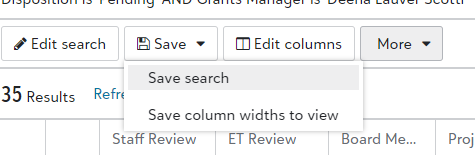
You can save in the upper left-hand side of the Workspace. You can only do one column at a time so it is a little frustrating to have to save each time but at least it works.
1 -
That's right - adjust one column, then save, then adjust the next column and save.
Bear in mind you have to adjust the column by dragging the bar between column headings - if you use the method to double-click to adjust the column width automatically, it doesn't get saved.
I have added an 'Idea' (ref GMK-1-1350) to change this behaviour - if you agree it should be different, please vote on the idea.
0 -
When I adjust the width by dragging the column heading and then saving this method does not work on my end.0












Categories
- All Categories
- New YourCause Community TEST
- New SKY Community TEST
- New Grantmaking TEST Community
- New Altru Test Community
- New bbcon Community - TEST
- 12 Blackbaud Agents for Good™
- New Raiser's Edge NXT Community
- 7 Blackbaud Community Help
- 218 bbcon®
- 1.4K Blackbaud Altru®
- 409 Blackbaud Award Management™ and Blackbaud Stewardship Management™
- 1.2K Blackbaud CRM™ and Blackbaud Internet Solutions™
- 16 donorCentrics®
- 361 Blackbaud eTapestry®
- 2.7K Blackbaud Financial Edge NXT®
- 680 Blackbaud Grantmaking™
- 598 Blackbaud Education Management Solutions for Higher Education
- 3.3K Blackbaud Education Management Solutions for K-12 Schools
- 952 Blackbaud Luminate Online® and Blackbaud TeamRaiser®
- 85 JustGiving® from Blackbaud®
- 7K Blackbaud Raiser's Edge NXT®
- 3.9K SKY Developer
- 257 ResearchPoint™
- 123 Blackbaud Tuition Management™
- 165 Organizational Best Practices
- 247 Member Lounge (Just for Fun)
- 40 Blackbaud Community Challenges
- 37 PowerUp Challenges
- 3 (Closed) PowerUp Challenge: Grid View Batch
- 3 (Closed) PowerUp Challenge: Chat for Blackbaud AI
- 3 (Closed) PowerUp Challenge: Data Health
- 3 (Closed) Raiser's Edge NXT PowerUp Challenge: Product Update Briefing
- 3 (Closed) Raiser's Edge NXT PowerUp Challenge: Standard Reports+
- 3 (Closed) Raiser's Edge NXT PowerUp Challenge: Email Marketing
- 3 (Closed) Raiser's Edge NXT PowerUp Challenge: Gift Management
- 4 (Closed) Raiser's Edge NXT PowerUp Challenge: Event Management
- 3 (Closed) Raiser's Edge NXT PowerUp Challenge: Home Page
- 4 (Closed) Raiser's Edge NXT PowerUp Challenge: Standard Reports
- 4 (Closed) Raiser's Edge NXT PowerUp Challenge: Query
- 822 Community News
- 3.1K Jobs Board
- 57 Blackbaud SKY® Reporting Announcements
- 47 Blackbaud CRM Higher Ed Product Advisory Group (HE PAG)
- 19 Blackbaud CRM Product Advisory Group (BBCRM PAG)