Bug in Authorization Flow Tutorial - NodeJS



Hello Community
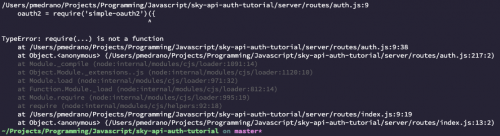
I am trying to get the NodeJS version of the sky-api-auth-tutorial running on my local machine. I am unable to start the app via “npm start” due to an error I am receiving in the auth.js file.
routes is an object in this file, I have attached a photo of the stacktrace for reference.
All of the dependencies have been installed successfully.
Would this be due to a version mismatch in Node?
I do have programming experience but am new to Node and Express. I am hoping it's something simple!
Comments
-
Hi @Daniel Fierro - I'm going to try to reproduce on my end.
Just a couple questions:
- What version of nodejs are you running?
- Did you happen to run “npm install” before running “npm start”? If so, do you see any errors in the console during the “npm install” process?Thanks!
0 -
@Daniel Fierro I'm able to run the application via “npm start” without any errors.
I am using nodejs v14.17.0
0 -
Hey Michael,
I am using node version 15.10.0.
The issue seemed to originate from an incompatibility with the simple-oauth2 package which is at 4.2.0
I got the app running by altering the require statement to conform with their docs
eg
const { ClientCredentials, ResourceOwnerPassword, AuthorizationCode } = require('simple-oauth2');The apps runs now but I am trying to quash another bug occurring when submitting the authorize app form
 0
0 -
Hey @Daniel Fierro ,
The sample app does depend on quite a few very outdated versions of some packages. We can work on getting the sample working with later versions.
But those older versions shouldn't prevent you from running the sample app as is. I see you mentioned that simple-oauth2 v4.2.0 is being used. I wouldn't have expected npm install to have pulled in the latest major version since package.json depends on ^0.2.1. Did you happen to manually update the simple-oauth2 package? That could be the problem.
Maybe you could try to delete the node_modules folder and package-lock.json file, and then try running npm install again?
1 -
Hi Michael!
You're absolutely right. The warning message node produced when installing the dependencies pretty much recommended against using the older version so I did do the npm audit --force initially . I did manage to get the app working with the older version of simple-oauth2 though! My goal is to get both versions working. If I manage to get the app running fully with the newer simple-oauth2 pkg, I can let you know if you'd like?
0 -
Hi @Daniel Fierro , glad you have it working! Sure, if you do get it working with newer packages it would be nice for us to know. We do want to try and get that sample/tutorial code up to date.
Thanks!
0





Categories
- All Categories
- New eTapestry Home Community
- New K-12 Community Home (TEST)
- New Higher Education Home Page (Test)
- New Impact Edge Community TEST
- New YourCause Community TEST
- New SKY Community TEST
- New Grantmaking TEST Community
- New Altru Test Community
- New bbcon Community - TEST
- 12 Blackbaud Agents for Good™
- New Raiser's Edge NXT Community
- 8 Blackbaud Community Help
- 223 bbcon®
- 1.4K Blackbaud Altru®
- 411 Blackbaud Award Management™ and Blackbaud Stewardship Management™
- 1.2K Blackbaud CRM™ and Blackbaud Internet Solutions™
- 16 donorCentrics®
- 361 Blackbaud eTapestry®
- 2.7K Blackbaud Financial Edge NXT®
- 688 Blackbaud Grantmaking™
- 604 Blackbaud Education Management Solutions for Higher Education
- 3.3K Blackbaud Education Management Solutions for K-12 Schools
- 954 Blackbaud Luminate Online® and Blackbaud TeamRaiser®
- 85 JustGiving® from Blackbaud®
- 7.1K Blackbaud Raiser's Edge NXT®
- 4K SKY Developer
- 258 ResearchPoint™
- 124 Blackbaud Tuition Management™
- 165 Organizational Best Practices
- 249 Member Lounge (Just for Fun)
- 40 Blackbaud Community Challenges
- 37 PowerUp Challenges
- 3 (Closed) PowerUp Challenge: Grid View Batch
- 3 (Closed) PowerUp Challenge: Chat for Blackbaud AI
- 3 (Closed) PowerUp Challenge: Data Health
- 3 (Closed) Raiser's Edge NXT PowerUp Challenge: Product Update Briefing
- 3 (Closed) Raiser's Edge NXT PowerUp Challenge: Standard Reports+
- 3 (Closed) Raiser's Edge NXT PowerUp Challenge: Email Marketing
- 3 (Closed) Raiser's Edge NXT PowerUp Challenge: Gift Management
- 4 (Closed) Raiser's Edge NXT PowerUp Challenge: Event Management
- 3 (Closed) Raiser's Edge NXT PowerUp Challenge: Home Page
- 4 (Closed) Raiser's Edge NXT PowerUp Challenge: Standard Reports
- 4 (Closed) Raiser's Edge NXT PowerUp Challenge: Query
- 829 Community News
- 3.1K Jobs Board
- 57 Blackbaud SKY® Reporting Announcements
- 47 Blackbaud CRM Higher Ed Product Advisory Group (HE PAG)
- 19 Blackbaud CRM Product Advisory Group (BBCRM PAG)