Report-Include Project with no activity




We have a project summary report that lists detail for every project returned from a query. One of the projects in the query results has never had activity recorded. We would still like this project to be on the report. Currently, it does not show on the report - I think this is because it had never had an activity recorded.
Does anyone know how to have it show up?
Comments
-
Hi Elizabeth. When you are creating the report, you should have a tab called “Filters”. Here there will be a section labeled “Include” where you can choose to include “Projects with no activity” and/or “Projects with zero beginning balances and no activity”.
2 -
Thank you.
For the report I am running, the "Include" section only has "Inactive accounts" and "Accounts with zero balances". The report type is a Custom Management Report. I do see the include options you described on reports where the report type is "Project financial statements".2 -
@Aubrey Rigby
This is not true. I have the same exact problem as this user. I have a Custom Management Report that is formatted to “Summarize by Project”. Basically it's a listing of Project activity, where each row in the report is a different Project, and the columns are various summary activities for the Project (e.g. Income, Expense, Gifts, Ending Balance). If a given Project has a result of “0.00” for each defined column, the report WILL NOT ever include that Project in it - even if the Project is Active. You say that on the “Filters” tab there will be a section labeled “Projects with no activity” or “Projects with zero beginning balances”, but this is not true. I have done this in BOTH web view and database view, I've analyzed every option there is many times over, and there's no option for this.0 -
@Elizabeth Bjork, Aubrey is right but you will have to run a Project based report to have the options to include the projects with $0 balances. Perhaps a project Activity Report, run in Summary rather than Detail over the Project Financial Statement will be a better option for what you're trying to achieve.
0 -
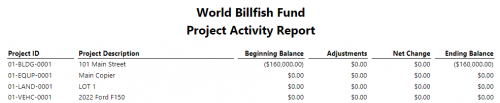
@Casey Richey, if you have those options marked on a Project based report (Project in the title) and your $0 projects do not show, then you should contact support to get a case created because that is not working as designed. I just tried a quick one in my sample database and you can see here that I have multiple projects showing with $0 balances/activity for the period I selected.
0 -
@Nikki Baldwin thank you for this information about Project Activity Reports. However, as stated by Elizabeth and then myself in my reply, we're talking about Custom Management Reports. I use this format because of its versatility - my management needs more than just beginning, changes, ending. We need to see Beginning, Income, Expenses, Transfers, Adjustments, Ending. The CMR allows you to do this and also has additional filtering options by column. So that was our complaint, is that the CMR leaves the user no way to include Projects with no activity. I'm happy to provide additional details or screenshots if that might help.
Perhaps a little off-topic, but another desire I've had with Project reporting is the ability to export other fields as columns in Project based reporting. For example, it would be so helpful for us if we could have columns for the Project Division, Project Location, etc. I have yet to find any Project-based report that will allow you to export BOTH information like that as well as financial activity summary info such as what I describe above (income, expense, beginning balance, ending balance, etc).
1 -
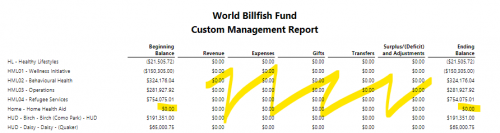
@Casey Richey, definitely understand the Custom Mgt Report not having that option to include the Projects (not accounts) with $0 balances/$0 activity can be frustrating compared to using the Project type reports which come with that natively. However, I did do a little test and created a Project query with no criteria, just an output of Project ID – saved this query and called it “All Projects” because without any criteria, that's what it will include. Then I added a Project filter to the CMR and utilized that query in my filter. My report then came out with both projects that did not have activity and those that didn't have balances. Would this be the results you're looking for on that report?
You could also put a filter on the Project Query to only include active* status or set another filter on the report for the statuses you want to include, paired with the query.
0 -
@Nikki Baldwin Wow! That's quite the trick! Now, as of recently, we're running all our reports out of web view (we're trying to be good Blackbaud clients like that). If I recall, though, the use of Query as a filter will be restricted to database view for now, is that right? I guess we could set it up and go back to database view just for these reports that we need in this format - then wait for Blackbaud to add that feature to web view. Does this sound right?
Also, any insights about my other question relating to outputting Project fields? Has anyone found a trick for getting that info (Project Type, Project Division, etc) into a report that also includes accurate financial outputs? Note, I have learned that you cannot use Query fields as it will reliably export the Net Assets balances as doubled values for some reason.
0 -
@Casey Richey, you're right that Queries are not able to be created/edited just yet in webview but the ability does exist in webview Reporting to select a saved query as a filter. That's actually what I did was create the query in db view and then ran the report with the selected query filter in webview since reports are better in webview IMO. Query is coming very soon to webview though, starting with view-only for your saved queries and then add/edits will come soon after!
I'm sorry I don't have a trick for your other question, though. I know you can show all those types of detail in a Project Profile Report (db view only) and yes, a query will get you that, but since it's a gathering tool and not so much a financial reporting tool, it doesn't pull those summary totals as you'd expect on a financial statement/report (which mock close to get your correct net assets value). And then on all the reports we've discussed, any Project based report and the custom management report, along with most financial statements, you can filter by those project fields but can't have them display on the reports. So essentially with the filter option, you could run a report for each project type and/or division but that doesn't really solve your question at hand to get them to display on the financial report.
I would highly suggest to search/submit this to our IdeaBank so you don't have to continue to export and combine two reports' data or create a separate fin. statement for each filter type (which will show on the criteria page).0 -
@Nikki Baldwin Actually, I just tested this in a few different settings, and it's not working for me as you described. I simply saved a Project Query, then went over to Custom Management Report and added that Query as the ONLY Filter (Project filters). And it still doesn't list the Projects with no activity. I can go back to the Query and hit Run and see the other Projects there that don't show up on the CMR results. I'm not sure how you got this to work.
0 -
@Casey Richey, I will say I did mark the boxes on the filters tab to also include accounts with zero balances and inactive accounts so that may be why you're not seeing them if those boxes aren't marked. If you do have those marked, then I would suggest you reach out to support because it worked with no issues for me to show those $0 balances with the appropriate query and those boxes marked.
0 -
@Nikki Baldwin Yeah those boxes are totally marked. OK, I appreciate that you hung in there for this long with me :-) Thanks for the help. Given that I have a few different critical FE NXT cases open right now, including one hyper-escalated one that's over 2 months old and has completely crushed my entire Finance team's productivity and another where my Bank Rec report lists nearly a million dollars in phantom outstanding transactions that they can't figure out, as well as 4 or 5 "Idea bank" posts on various topics of how bad Reporting still is in web view… I'm gonna pass on reaching out to support for any more reporting issues for now. Thanks again.
0










Categories
- All Categories
- New K-12 Community Home (TEST)
- New Higher Education Home Page (Test)
- New Impact Edge Community TEST
- New YourCause Community TEST
- New SKY Community TEST
- New Grantmaking TEST Community
- New Altru Test Community
- New bbcon Community - TEST
- 12 Blackbaud Agents for Good™
- New Raiser's Edge NXT Community
- 8 Blackbaud Community Help
- 222 bbcon®
- 1.4K Blackbaud Altru®
- 411 Blackbaud Award Management™ and Blackbaud Stewardship Management™
- 1.2K Blackbaud CRM™ and Blackbaud Internet Solutions™
- 16 donorCentrics®
- 361 Blackbaud eTapestry®
- 2.7K Blackbaud Financial Edge NXT®
- 688 Blackbaud Grantmaking™
- 604 Blackbaud Education Management Solutions for Higher Education
- 3.3K Blackbaud Education Management Solutions for K-12 Schools
- 954 Blackbaud Luminate Online® and Blackbaud TeamRaiser®
- 85 JustGiving® from Blackbaud®
- 7.1K Blackbaud Raiser's Edge NXT®
- 4K SKY Developer
- 258 ResearchPoint™
- 123 Blackbaud Tuition Management™
- 165 Organizational Best Practices
- 249 Member Lounge (Just for Fun)
- 40 Blackbaud Community Challenges
- 37 PowerUp Challenges
- 3 (Closed) PowerUp Challenge: Grid View Batch
- 3 (Closed) PowerUp Challenge: Chat for Blackbaud AI
- 3 (Closed) PowerUp Challenge: Data Health
- 3 (Closed) Raiser's Edge NXT PowerUp Challenge: Product Update Briefing
- 3 (Closed) Raiser's Edge NXT PowerUp Challenge: Standard Reports+
- 3 (Closed) Raiser's Edge NXT PowerUp Challenge: Email Marketing
- 3 (Closed) Raiser's Edge NXT PowerUp Challenge: Gift Management
- 4 (Closed) Raiser's Edge NXT PowerUp Challenge: Event Management
- 3 (Closed) Raiser's Edge NXT PowerUp Challenge: Home Page
- 4 (Closed) Raiser's Edge NXT PowerUp Challenge: Standard Reports
- 4 (Closed) Raiser's Edge NXT PowerUp Challenge: Query
- 829 Community News
- 3.1K Jobs Board
- 57 Blackbaud SKY® Reporting Announcements
- 47 Blackbaud CRM Higher Ed Product Advisory Group (HE PAG)
- 19 Blackbaud CRM Product Advisory Group (BBCRM PAG)