Simple Gift Ack - Web request error response





Hi all,
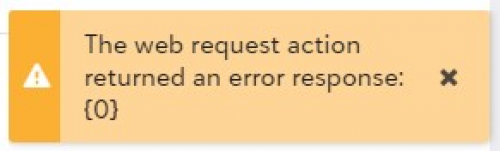
I'm configuring the Simple Gift Acknowledgement flow in Power Automate and I'm falling at the last hurdle. When the user clicks the add-in from the gift record, a little pop-up appears as shown below. Any advice on resolving this? I've verified that I'm using the correct flow URL, encoded using the link in the tutorial, and everything is pointing at the correct application ID.
Comments
-
I just posted the exact same question. Have you found a solution?
0 -
No luck. I stripped the flow down so it was just “when HTTP request is received, store current date, terminate" and it was still erroring, so the issue is either in the request schema, the marketplace application, or RE, I think. Unfortunately it's not exactly a descriptive error!
0 -
Well I'm glad to know it isn't just me experiencing this problem. Hopefully one of the Power Automate gurus can help solve this.
0 -
Hey guys - We have Office Hours tomorrow (Jan 20). Let's look at this together and see if we can figure out the issue. I appreciate the feedback.
1 -
Hey there - we had some time to dig into this today and my apologies (because it's my fault) that the docs had an inaccuracy. Take a look at Step 8 - I inadvertantly had an error in the URL structure that has now been updated.
I'm very sorry for the frustration this caused. Thank you for the feedback; that way we can fix these things.
See if this fixes things for you and let me know!
Add-in URL – For the first part of the URL, enter https://app.blackbaud.com/addin-webrequest-action?url=. After the "url=" paste in an encoded version of the URL you copied from Power Automate. Then, after the Power Automate URL you pasted in, enter &title=Create%20Simple%20Acknowedgment.
1 -
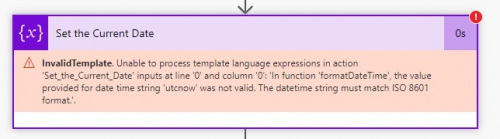
EDIT: Resolved this by replacing the existing function with utcNow().
Almost there!
The flow now returns Error 502. The flow run history is showing an error with the datetime formatting in the “Set the Current Date” step:
 0
0 -
Alright - now we're erroring on the template file, I'm using the one directly from the tutorial.
 0
0





Categories
- All Categories
- New YourCause Community TEST
- New SKY Community TEST
- New Grantmaking TEST Community
- New Altru Test Community
- New bbcon Community - TEST
- 12 Blackbaud Agents for Good™
- New Raiser's Edge NXT Community
- 7 Blackbaud Community Help
- 219 bbcon®
- 1.4K Blackbaud Altru®
- 409 Blackbaud Award Management™ and Blackbaud Stewardship Management™
- 1.2K Blackbaud CRM™ and Blackbaud Internet Solutions™
- 16 donorCentrics®
- 361 Blackbaud eTapestry®
- 2.7K Blackbaud Financial Edge NXT®
- 682 Blackbaud Grantmaking™
- 599 Blackbaud Education Management Solutions for Higher Education
- 3.3K Blackbaud Education Management Solutions for K-12 Schools
- 952 Blackbaud Luminate Online® and Blackbaud TeamRaiser®
- 85 JustGiving® from Blackbaud®
- 7K Blackbaud Raiser's Edge NXT®
- 3.9K SKY Developer
- 257 ResearchPoint™
- 123 Blackbaud Tuition Management™
- 165 Organizational Best Practices
- 247 Member Lounge (Just for Fun)
- 40 Blackbaud Community Challenges
- 37 PowerUp Challenges
- 3 (Closed) PowerUp Challenge: Grid View Batch
- 3 (Closed) PowerUp Challenge: Chat for Blackbaud AI
- 3 (Closed) PowerUp Challenge: Data Health
- 3 (Closed) Raiser's Edge NXT PowerUp Challenge: Product Update Briefing
- 3 (Closed) Raiser's Edge NXT PowerUp Challenge: Standard Reports+
- 3 (Closed) Raiser's Edge NXT PowerUp Challenge: Email Marketing
- 3 (Closed) Raiser's Edge NXT PowerUp Challenge: Gift Management
- 4 (Closed) Raiser's Edge NXT PowerUp Challenge: Event Management
- 3 (Closed) Raiser's Edge NXT PowerUp Challenge: Home Page
- 4 (Closed) Raiser's Edge NXT PowerUp Challenge: Standard Reports
- 4 (Closed) Raiser's Edge NXT PowerUp Challenge: Query
- 822 Community News
- 3.1K Jobs Board
- 57 Blackbaud SKY® Reporting Announcements
- 47 Blackbaud CRM Higher Ed Product Advisory Group (HE PAG)
- 19 Blackbaud CRM Product Advisory Group (BBCRM PAG)