Adding a 10% midterm grade to gradebook with using points





Some of our teachers were unaware that they were required to have a midterm exam/project that is worth 10% of the final semester grade. Those that use %'s seem to be fine as they can alter the categories. But those with total points are struggling to find a way to do this. They have said that if they use total points with %'s it does not work out mathematically. (they figured some of the averages out by hand). Any suggestions? We don't have a column on the report card for this and have been asked to calculate this in our gradebooks within the semester grade.
Comments
-
There a couple of different ways this can be accomplished, but it will depend on how your grade plan is already set up. Can you tell us how the fall semester grade is currently calculated in your setup?
Scott
0 -
We have similar issues every semester. Our high school teachers are supposed to have their Cumulative Assessment (what we call their “final”) be between 15-20% of the semester grade. Previously, we would have grading set up so that we had a grade column for their gradebook grade and a column for their Cumulative Assessment and they could choose how to weight the two but for a myriad of other reasons, we've just resorted to all grades going in the gradebook, including their Cumulative Assessment.
As you said, if the teacher uses weights or percentages, it's not an issue. They use the assignment type “Cumulative Assessment” and set the appropriate percentage. However, most of our teachers do “Total Points”. Here is what we've been having them do:
- Figure out the number of points that have been assigned. The easiest way we have found to do this is to run the “Averages - By Assignment Type” report. Next to the student's name, they see their points recieved out of total possible points. (Note that if a few students have a different number of points possible, it means they were excused from assignments or received extra credit points. Also, keep in mind that this total points doesn't include the Cumulative Assessment yet so they will have to add those points in later.)
- Figure out what 15% or 20% of the total points would be. Add this number of points to your points assigned to get your Total Points Possible.
- Again figure out what 15% or 20% of the Total Points Possible is and adjust the number of points the Cumulative Assessment is supposed to be out of.
Teachers have to do some manipulating to get their Cumulative Assessment to be worth the percentage they want. It's not easy. It's super annoying. (I'm speaking as a teacher who uses Total Points and goes through this process every semester.)
Here are the formulas I give teachers and I usually meet with at least a handful of them every semester to help:

I hope that all made sense….. I'd love to find a better way of doing it so would love to hear other people's solutions!
0 -
We have one semester grade, there is not an exam category.
0 -
thank you. This is useful.
0 -
Sara -
So when the faculty click the calculate button for their fall semester grades, to bring them over from their gradebooks into the “grade report” they are seeing something that resembles this without the quarters:
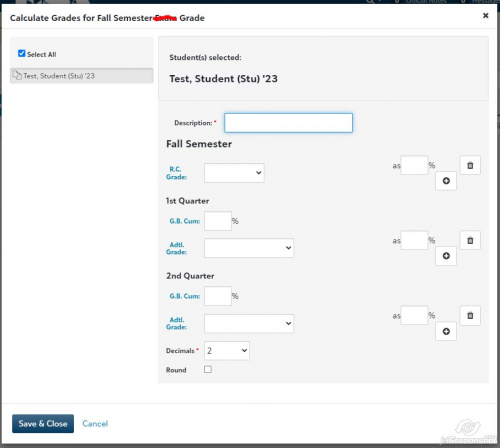
From what you are saying, I believe it would say Fall Semester
G.B. Cum ___%
Adtl. Grade <dropdown menu> as ___%
Scott
0 -
Yes, there is only one space for the semester grade. That is how the admin wanted the grading plan set up.
0 -
I apologize, I was called out to a meeting.
If that is what they are seeing, I would recommend the following to calculate your fall semester grades.
Have the teachers enter the fall exam/project grade in their grade book with a very clear name such as FALL EXAM. For this assignment, the “Add to cumulative grade” box SHOULD NOT be checked. The teacher will add the student grade for the exam/project in this column.
When they click the calculate button for the fall semester, they should enter the following:
Description: Fall Semester Grade
G.B Cum: 90%
Adtl Grade: from dropdown select FALL EXAM as 10%
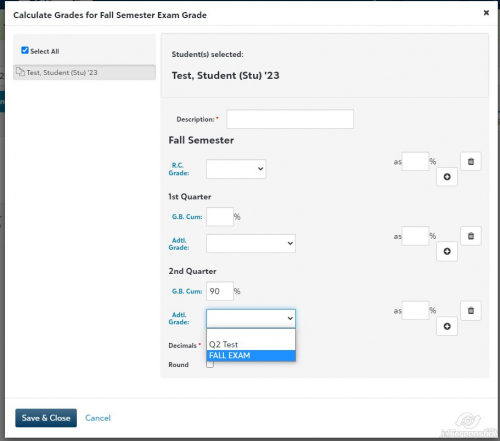
Click Save & Close and the Fall Semester should be calculated as desired.
Hope that helps.
All the best,
Scott
1







Categories
- All Categories
- New YourCause Community TEST
- New SKY Community TEST
- New Grantmaking TEST Community
- New Altru Test Community
- New bbcon Community - TEST
- 12 Blackbaud Agents for Good™
- New Raiser's Edge NXT Community
- 7 Blackbaud Community Help
- 218 bbcon®
- 1.4K Blackbaud Altru®
- 409 Blackbaud Award Management™ and Blackbaud Stewardship Management™
- 1.2K Blackbaud CRM™ and Blackbaud Internet Solutions™
- 16 donorCentrics®
- 361 Blackbaud eTapestry®
- 2.7K Blackbaud Financial Edge NXT®
- 681 Blackbaud Grantmaking™
- 599 Blackbaud Education Management Solutions for Higher Education
- 3.3K Blackbaud Education Management Solutions for K-12 Schools
- 952 Blackbaud Luminate Online® and Blackbaud TeamRaiser®
- 85 JustGiving® from Blackbaud®
- 7K Blackbaud Raiser's Edge NXT®
- 3.9K SKY Developer
- 257 ResearchPoint™
- 123 Blackbaud Tuition Management™
- 165 Organizational Best Practices
- 247 Member Lounge (Just for Fun)
- 40 Blackbaud Community Challenges
- 37 PowerUp Challenges
- 3 (Closed) PowerUp Challenge: Grid View Batch
- 3 (Closed) PowerUp Challenge: Chat for Blackbaud AI
- 3 (Closed) PowerUp Challenge: Data Health
- 3 (Closed) Raiser's Edge NXT PowerUp Challenge: Product Update Briefing
- 3 (Closed) Raiser's Edge NXT PowerUp Challenge: Standard Reports+
- 3 (Closed) Raiser's Edge NXT PowerUp Challenge: Email Marketing
- 3 (Closed) Raiser's Edge NXT PowerUp Challenge: Gift Management
- 4 (Closed) Raiser's Edge NXT PowerUp Challenge: Event Management
- 3 (Closed) Raiser's Edge NXT PowerUp Challenge: Home Page
- 4 (Closed) Raiser's Edge NXT PowerUp Challenge: Standard Reports
- 4 (Closed) Raiser's Edge NXT PowerUp Challenge: Query
- 822 Community News
- 3.1K Jobs Board
- 57 Blackbaud SKY® Reporting Announcements
- 47 Blackbaud CRM Higher Ed Product Advisory Group (HE PAG)
- 19 Blackbaud CRM Product Advisory Group (BBCRM PAG)