suggestions for help with navigating Local Disk?




I've put in a request for help with my org's IT department, but in the meantime: does anyone have suggestions or advice or tips with navigating Local Disk generally? I haven't used a non-fully cloud-based system in 7+ years and I've never otherwise needed to navigate the Local Disk before (who does, except for IT people normally?) If I try to save something in what seems to be a sensible location in the Local Disk, I then cannot find it again because opening my computer's Local Disk after saving shows me totally different folders than what appeared during the saving phase(?). If I export to application and then the file immediately opens (such as today when I tried this with a batch validation report), the PDF opened in some kind of older version of Adobe and I wasn't able to save-as it in a non-Local Disk location to be certain I could find it later again. I went around in circles for hours today with this and that does not bode well for my sanity. FYI when you have a fully cloud-based system, downloads just go to your plain old downloads folder and I never realized that that was something I'd been taking for granted all these years ???
Comments
-
For starters, in RE Database, you can choose a basic path where you want things saved. (If you would save files to the same place all the time.) Click tools, user options, then in the pop-up choose file locations. You can see I have my exports set to a shared drive, in a folder titled Blackbaud. If you click the 3 dots, it will open a window to choose where you want to save the files. You could choose a specific folder, ex. your name, on the local drive or where ever is best for you-or if others need access (this is my case.) I have other folders within the Blackbaud folder-Receipts, Letters, and Financial Reports ( I export pdf, csv, and xls report files.)
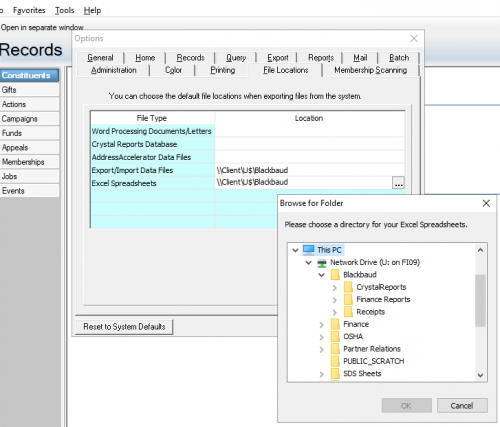
When you export queries, reports, etc, you can choose the same 3 dots to choose the location. The drop down arrow, as you likely know, you can choose the file type. (I have to save monthly reports as pdf, csv, and xls for another finance lady to recreate the necessary reports as we've done for many years.)
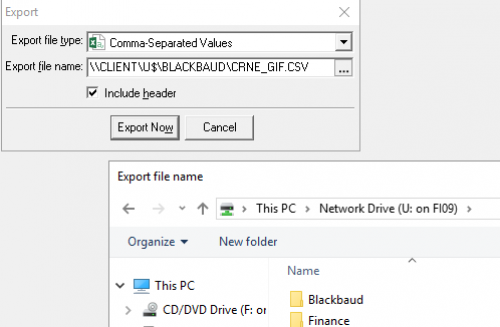
Generally, RE saves to the cloud which is fine for queries but some files need to be found easier, and by others. You could make a file on the C drive with your name on the folder and save all files there. Then it would be easy to find. I've done this as well for all things Word and Excel.
Gabi, if I've misunderstood your question, please correct me!
1 -
It sounds a little bit like you're saving to the hosted files area initially and that's why it looks different during the saving phase to how you would expect.
Definitely picking a basic path where I want to save things, like Dana mentioned, was really helpful for me.
2 -
thank you all who responded!
I couldn't wait for my IT dept to help me and I took a chance going back on chat and then got on a call with someone who could share my screen and see what I was seeing. I'm not going to be able to explain what he said correctly, but his suspicion is that our org is not set up to be able to save AND access things that we save in whatever you call the folder that is named for your org's 5-digit account ID. I can save things all I want, but I can't get to them via my own computer's file explorer navigation.
From there, the phone rep directed me to the “Files” screen next to where you launch database view as well as how to log in there and that's how I could access all the millions of preexisting files I could find under our 5-digit account ID, including what I'm now saving there to download and use and send out. I never would have gotten there on my own (and as it turns out, IT wouldn't have been able to help me figure this out) so I'm relieved I followed my instinct to go back to chat and eventually got onto phone support from there.0








Categories
- All Categories
- New YourCause Community TEST
- New SKY Community TEST
- New Grantmaking TEST Community
- New Altru Test Community
- New bbcon Community - TEST
- 12 Blackbaud Agents for Good™
- New Raiser's Edge NXT Community
- 7 Blackbaud Community Help
- 218 bbcon®
- 1.4K Blackbaud Altru®
- 409 Blackbaud Award Management™ and Blackbaud Stewardship Management™
- 1.2K Blackbaud CRM™ and Blackbaud Internet Solutions™
- 16 donorCentrics®
- 361 Blackbaud eTapestry®
- 2.7K Blackbaud Financial Edge NXT®
- 681 Blackbaud Grantmaking™
- 599 Blackbaud Education Management Solutions for Higher Education
- 3.3K Blackbaud Education Management Solutions for K-12 Schools
- 952 Blackbaud Luminate Online® and Blackbaud TeamRaiser®
- 85 JustGiving® from Blackbaud®
- 7K Blackbaud Raiser's Edge NXT®
- 3.9K SKY Developer
- 257 ResearchPoint™
- 123 Blackbaud Tuition Management™
- 165 Organizational Best Practices
- 247 Member Lounge (Just for Fun)
- 40 Blackbaud Community Challenges
- 37 PowerUp Challenges
- 3 (Closed) PowerUp Challenge: Grid View Batch
- 3 (Closed) PowerUp Challenge: Chat for Blackbaud AI
- 3 (Closed) PowerUp Challenge: Data Health
- 3 (Closed) Raiser's Edge NXT PowerUp Challenge: Product Update Briefing
- 3 (Closed) Raiser's Edge NXT PowerUp Challenge: Standard Reports+
- 3 (Closed) Raiser's Edge NXT PowerUp Challenge: Email Marketing
- 3 (Closed) Raiser's Edge NXT PowerUp Challenge: Gift Management
- 4 (Closed) Raiser's Edge NXT PowerUp Challenge: Event Management
- 3 (Closed) Raiser's Edge NXT PowerUp Challenge: Home Page
- 4 (Closed) Raiser's Edge NXT PowerUp Challenge: Standard Reports
- 4 (Closed) Raiser's Edge NXT PowerUp Challenge: Query
- 822 Community News
- 3.1K Jobs Board
- 57 Blackbaud SKY® Reporting Announcements
- 47 Blackbaud CRM Higher Ed Product Advisory Group (HE PAG)
- 19 Blackbaud CRM Product Advisory Group (BBCRM PAG)